Managing Seasonal and Promotional SKUs Without Cluttering Your Live Catalog
Seasonal SKU management keeps holiday and promo items out of search and feeds. Use lifecycle attributes and workflows to retire each SKU on schedule.

Table of Contents
Key Terms to Know
Holiday products are easy to launch and easy to forget. Seasonal SKU management gives every holiday, seasonal, and promotional product a planned end date, a clear status, and an owner, so it leaves your live catalog when the campaign ends. A few lifecycle fields, a workflow-driven status, and your existing completeness tools cover most of it.
Holiday Candles in March
Picture a home and gift retailer in March. A shopper searches for “candle” and gets a page of holiday scents. Some are sold out. The in-stock spring range sits further down. The same items still sit in its supplier and marketplace feeds.
No one chose to keep them live. In many catalogs, launching a new SKU is a defined process. Retiring one is not. The record says what the item is but not how long to sell it. Ownership is split across merchandising, eCommerce, and channel teams. Cleanup means touching the storefront, feeds, and marketplace listings one at a time. And deleting feels risky when products may return next year, still have open orders, or come back as returns. What teams need is a safe way to take products out of view while keeping the records.
Where Stale SKUs Hurt
Adobe reported that consumers spent a record $257.8 billion online with U.S. retailers from November 1 to December 31, 2025, up 6.8% year over year. Online sales of holiday decor rose 285% compared with October.
Search is often where old seasonal products are most visible. In Baymard’s testing, roughly half of participants preferred search for finding products, and participants often assumed poor or limited results were a site’s full selection. Baymard also notes that shoppers search by seasonal conditions, such as “spring jacket,” so a holiday item still tagged “winter” in March keeps matching the wrong searches.
Old products also travel through every product feed your catalog sends to Google Merchant Center, marketplaces, and distributors, and each channel has to be fixed separately. A single product database that feeds every sales channel removes that repeated work.
Adobe measured a 693.4% year-over-year increase in traffic to U.S. retail sites from generative AI tools during the 2025 holiday season. If those tools draw on your feed data, a stale record travels further, so keeping structured product data that Google and Amazon recognize accurate matters more.
Different Products Need Different Exits
| Product type | Best end state |
|---|---|
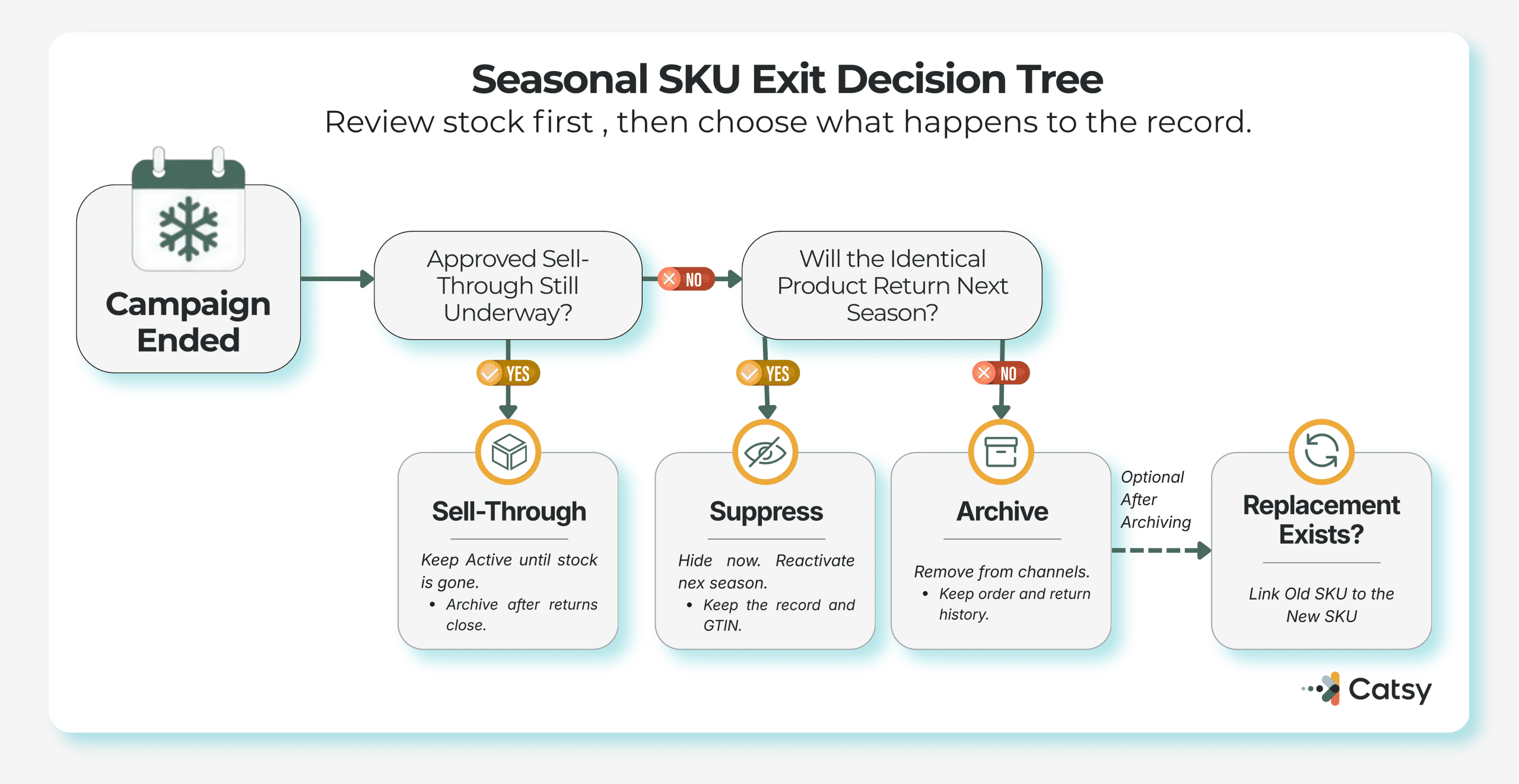
| Returning seasonal (same specs each year) | Hide from search and feeds, keep the record, reactivate next season |
| One-time promotional | Remove from channels, archive for orders, returns, and history |
| Limited edition | Archive once stock sells through and returns close |
| Discontinued | Archive and link to its replacement |
Identifier rules support this split. Under GS1 rules, a GTIN cannot be reassigned to a different product, but a withdrawn product can return under its original GTIN if it is unchanged. That is a good reason to keep returning seasonal SKUs intact. GS1’s rule for time-critical or promotional products calls for a new GTIN at the case and pallet levels when a product is changed for a specific event or date, such as holiday packaging, though not at the consumer unit level.
For discontinued items, a “replaces” link from the old SKU to the new one helps shoppers find the successor. Catsy’s product relationship data model guide covers these links.
Put the End Date in the Product Record
SKU lifecycle management works best when the exit is decided at launch. Start with a custom attribute group. Catsy’s PIM for retailers supports unlimited attributes, so these fields fit your existing data model.
Campaign codes often sit at the product family level, where inheritance rules for seasonal collections can pass them down to every variant. Sell dates may still differ by SKU.
Catsy’s guide to parent vs. SKU attributes explains where each field belongs.
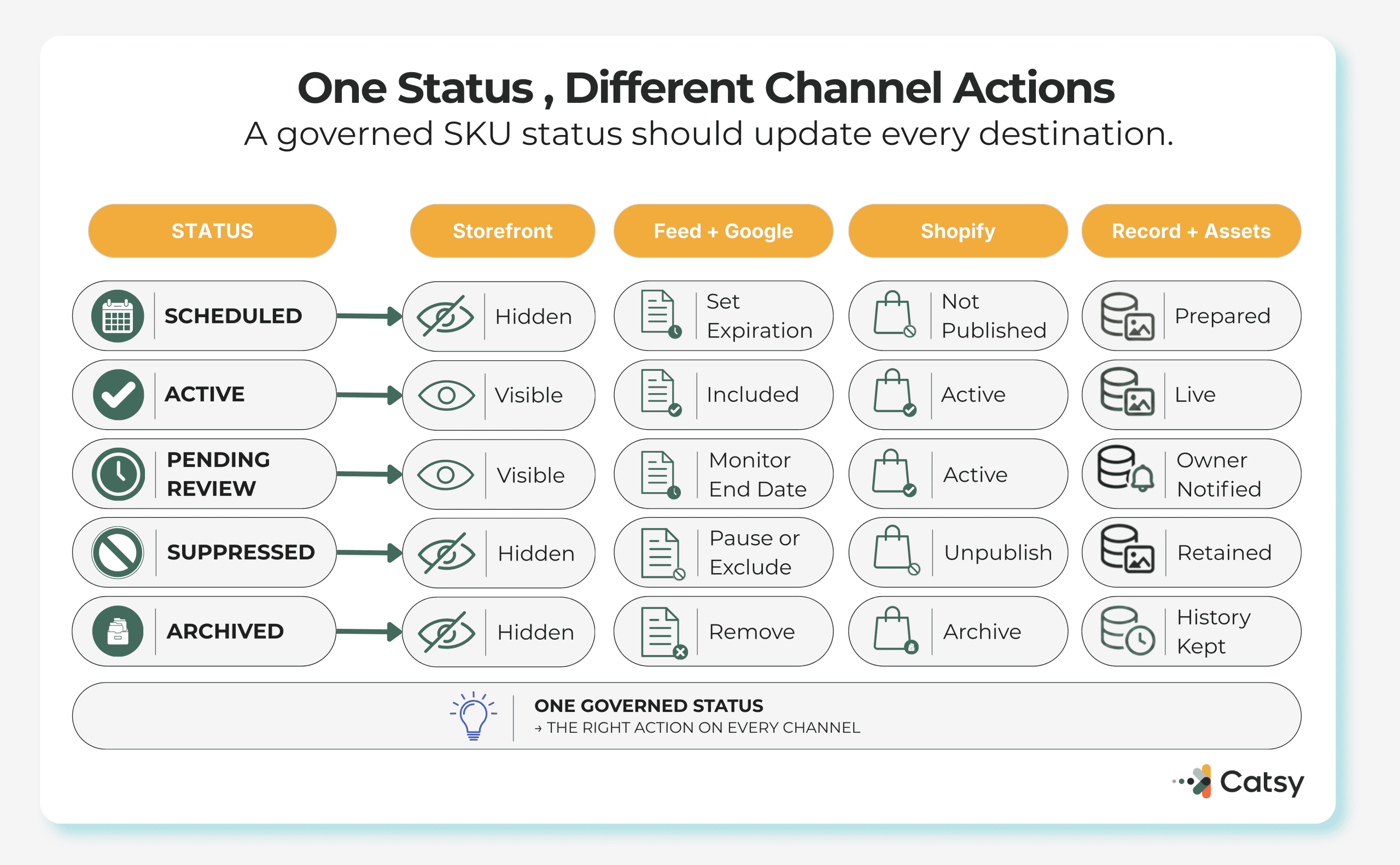
Next, add a lifecycle status that changes only through approved workflow steps, a basic product data governance control.
| Status | Visible to shoppers? |
|---|---|
| Draft or Scheduled | No |
| Active | Yes |
| Pending review (end date near or passed) | Yes, until someone decides |
| Suppressed (hidden, kept for next season) | No |
| Archived (retired, kept for orders and returns) | No |
“Pending review” is the human checkpoint.
Finally, make end dates required. If your PIM scores completeness against required fields, a seasonal product should not count as complete until it has an end date and an owner. Catsy’s automated completeness scoring highlights gaps as soon as data is imported.
An end date is also a timeliness check, so it belongs in your product data quality standards.
A Working Schedule
Each Channel Retires Products Differently
Google Merchant Center’s pause attribute hides a product for up to 14 days. Longer absences call for the excluded destination attribute. Products expire on their expiration date or 30 days after the last refresh, whichever comes first. For products you no longer sell, Google’s availability guidance says to remove them rather than mark them out of stock, while warning against deleting items that are only temporarily unavailable.
Shopify’s archived product status keeps product lists free of clutter without losing product information. And because GS1 does not allow a GTIN to be reassigned, apply the same discipline to internal SKU codes.
Catsy’s multichannel publishing then pushes updates to every relevant channel at once.

Do You Need a PIM for This?
Not always. A small single-store catalog can manage with a spreadsheet and reminders. Once retirements must be repeated by hand across many channels, the work belongs in your ecommerce catalog management system. A product information management system keeps lifecycle data inside each product record.
Digital asset management keeps holiday images linked to the right SKUs.
Catsy’s holiday readiness guide recommends seasonal image variants alongside core photography, and those variants should retire with the campaign.
Key Takeaways
See How Catsy Handles Seasonal Catalogs
Catsy combines PIM and DAM with custom attributes, completeness scoring, and workflow tools, including end-of-life templates.
Request a Demo