Distributor Syndication · Product Data

Why Your Team Keeps Reformatting the Same Product Data for Every Distributor

Buyers switch suppliers over inconsistent information. See how distributor spec templates turn one product record into every partner-ready file.
Ceejay S Teku • September 28, 2026
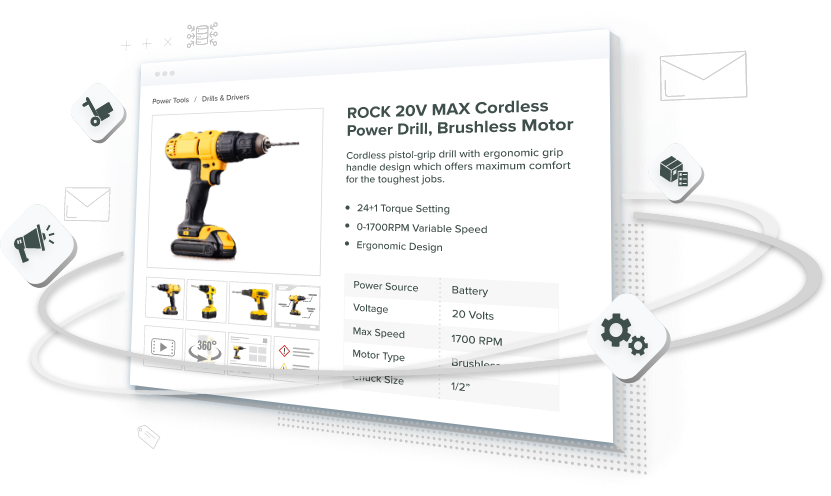
Catsy PIM centralizing one master product record to produce distributor-ready files for every partner

Key Terms to Know

View Key Terms

API (Application Programming Interface): A direct connection that lets two software systems exchange data automatically.

Completeness Score: A measure of how many required fields a product record has filled in for a given channel.

Digital Asset Management (DAM): Software that stores and organizes product images, videos, manuals, and other files.

Distributor Spec Template: A saved set of rules that converts a master product record into one distributor’s required format.

Enterprise Resource Planning (ERP): The business system that runs orders, inventory, and pricing, and often feeds a PIM.

Global Trade Item Number (GTIN): The GS1 product identifier behind a barcode, which GS1 recommends storing as 14 digits.

Master Product Record: The single, governed version of a product’s data that every channel output is built from.

Product Content Syndication: Sending product data from one source to the websites, marketplaces, and distributors that sell the product.

Product Information Management (PIM): Software that centralizes, enriches, validates, and publishes product data.

Stock Keeping Unit (SKU): A code that identifies one specific sellable product or product version.

Take a hypothetical manufacturer with 200 SKUs and five distributors. Every week, someone rebuilds the same product export five times, renaming columns, converting units, and swapping material codes. It takes about six hours a week, roughly 312 hours a year. And each of this rebuilds risks a new typo on a distributor’s site.

The pattern is familiar to manufacturers that sell through distributor networks, which often send the same product data to many partners. Each distributor wants its own layout, and a spreadsheet holds only one layout at a time. A Distributor spec template fixes this. They save each partner’s format as a reusable mapping, so one master product record produces every distributor file.
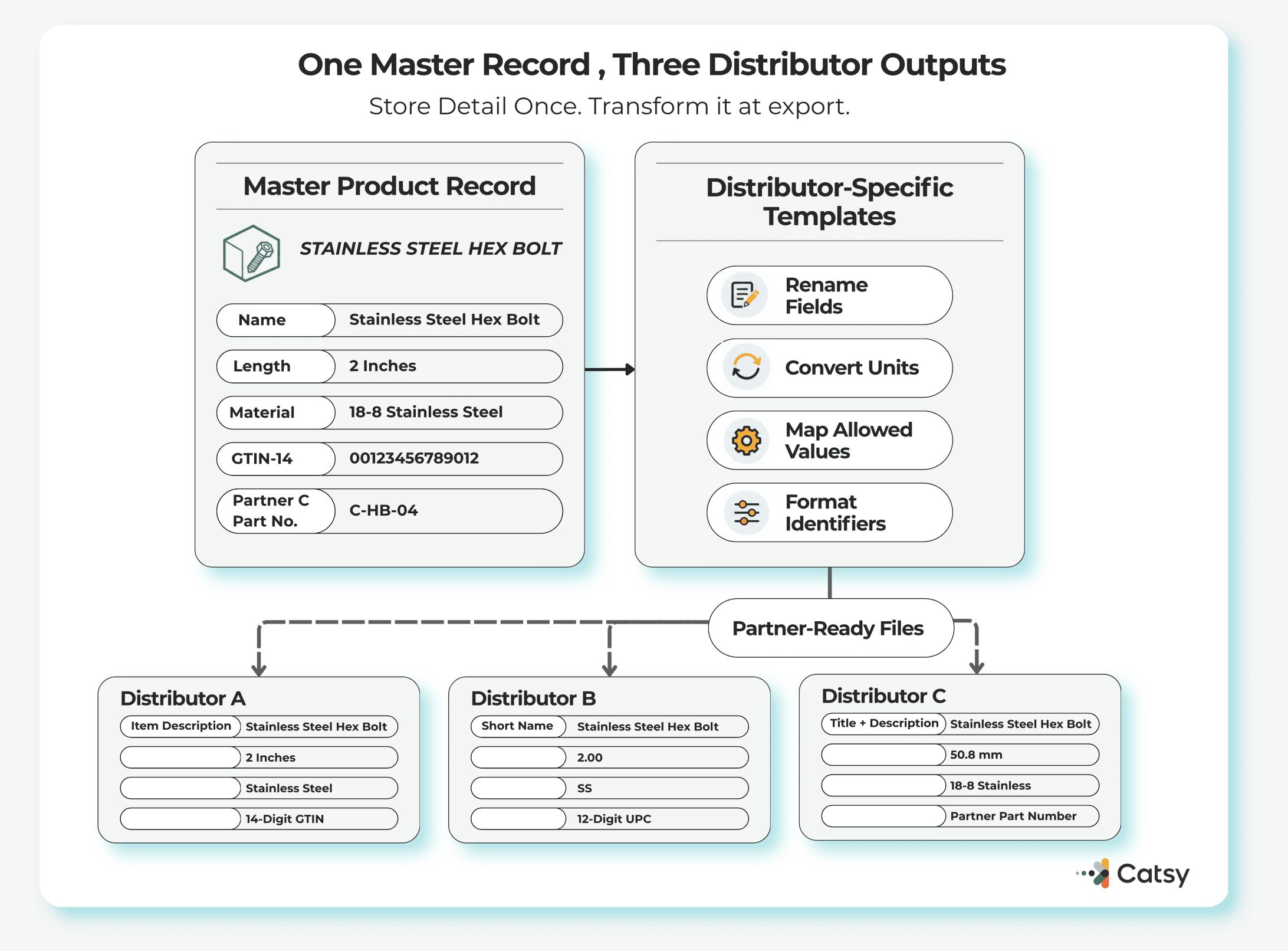
Diagram of one master product record feeding distributor-specific templates that rename fields, convert units, map allowed values, and format identifiers to produce partner-ready files for Distributor A, B, and C
One master record and a set of distributor-specific templates, not five separate rebuilds, is what produces every partner file.

The Same Bolt But in Three Different Ways

Distributors manage product data across ERP systems, vendor catalogs, and channel portals, each built around their own categories and filters. So partners ask for the same fact in different ways.

Here is an example for one stainless steel bolt.

AttributeDistributor ADistributor BDistributor C
Name field“Item Description,” 80 characters max“Short Name,” 40 characters max“Product Title” plus “Long Description”
Length2 in2.0050.8 mm
MaterialStainless SteelSS18-8 Stainless
Identifier14-digit GTIN12-digit UPCDistributor’s own part number

Standards narrow the gap without closing it. ETIM International maintains a classification model that gives technical products a uniform structure, and in May 2024 ETIM classification became part of the GS1 Global Data Synchronisation Network (GDSN). Many distributors still add their own fields and files on top.

Even one identifier can take two shapes. GS1 recommends storing the GTIN as a 14-digit number, padded with leading zeros. GS1 XML messages need all 14 digits, while GS1’s EANCOM format drops the leading zeros.

Where the Six Hours Go

Six hours a week adds up to nearly eight 40-hour work weeks a year. The larger cost is 1,000 hand-made product rows each week, all of which must match the source. That manual product data formatting causes predictable problems:
✓A spec change means editing five spreadsheets. Miss one and a distributor sells old data.
✓New SKUs wait until someone has time to reformat them.
✓Formatting rules live in one person’s head or macro file, so exports stall when that person is out.
✓Rejected files send the team back to the start.
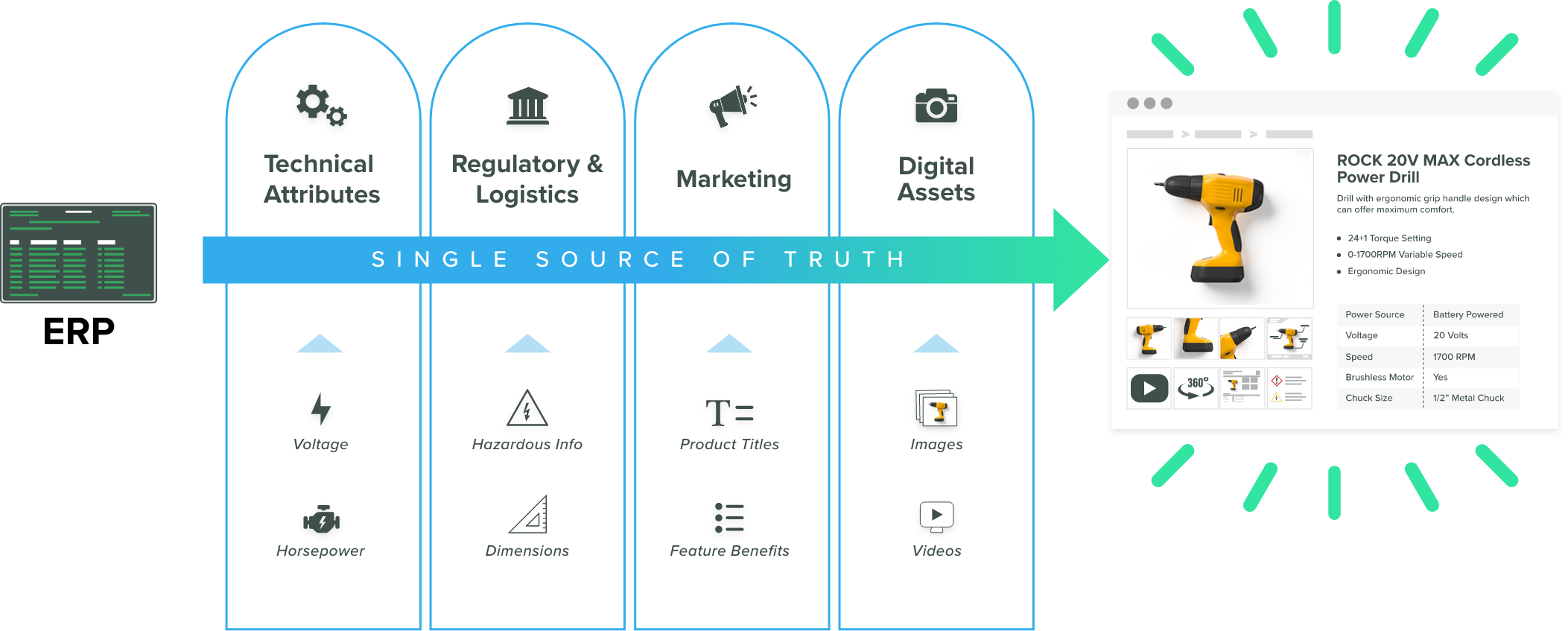
Diagram of an ERP feeding a single source of truth across technical attributes, regulatory and logistics data, marketing copy, and digital assets, which then populates a complete product listing page
A single governed record, not five separate copies, is what feeds technical, regulatory, marketing, and digital asset data into a complete listing.

McKinsey’s 2026 Global B2B Pulse survey of nearly 4,000 decision-makers in 13 countries found that B2B buyers now use an average of ten channels during a purchase. Teams ready to leave spreadsheets can start with Catsy’s guide to migrating from Excel to PIM software.

Spreadsheets Add Errors of Their Own

Many conversion errors come from the tools. By default, Excel removes leading zeros and converts large numbers to scientific notation, such as 1.23E+15, and keeps only 15 significant digits. Excel for Microsoft 365 and Excel 2024 let users turn some of this off. Still, a GTIN that loses a leading zero may no longer match the distributor’s records.

Value lists drift too. One partner wants “Stainless Steel,” another accepts only “SS,” and hand-typed variants like “S.S.” get rejected or filed under the wrong search filter. Controlled value lists and entry checks, both core parts of product data governance, stop these variants early. Unit conversions, shifted columns, and stale files add more quiet errors.

BUYERS NOTICE
A Gartner survey released in June 2025 of 632 B2B buyers, conducted in August and September 2024, found that 69% reported inconsistencies between a supplier’s website and what its sellers told them.

The scary part for businesses: Buyers notice. In McKinsey’s 2026 B2B Pulse report, buyers named inconsistent information across teams as the top reason they switch suppliers.

What a Distributor Spec Template Does

A distributor spec template is a saved set of rules that turns your master record into one distributor’s format. It covers field mapping, product data transformation (such as inches to millimeters), formatting and validation rules, and the output file.

Templates and APIs are the two main methods of product content syndication. Many distributors offer no API and accept data only through their own spreadsheets or portals, as Catsy’s guide to APIs vs. templates for product data syndication explains.

In a product information management (PIM) system, each SKU has one governed record, often synced from the ERP. The system checks that record against each distributor’s required fields, and distributor spec templates produce each partner’s file. A fix made once reaches every distributor on the next export. For the 200-SKU team, the weekly job becomes reviewing exceptions, not retyping data.

How to Set Up Templates

Audit what you receive. List each distributor’s required fields, allowed values, limits, and submission method. The overlap is often large.
Store the most detailed version of every fact. Keep length as a number plus a unit, and keep the full 14-digit GTIN, as GS1 recommends for databases. Shortening data is easy. Recovering missing details is not. This clear attribute ownership at the parent and SKU level will keep the shared values consistent across variants.
Map each distributor once. Careful product data mapping prevents many rejections. So it’s best to store classification codes such as UNSPSC or ETIM as governed attributes, as Catsy’s guide to product classification for manufacturers explains.
Check readiness per distributor. A SKU can be ready for three partners and not the other two. Having a written product data quality standards make those checks testable.
Give every template an owner. When a distributor changes its requirements, one person updates one mapping and logs the change, the same discipline behind product spec change management.

Then track export hours, rejected files, and days to distributor listing.
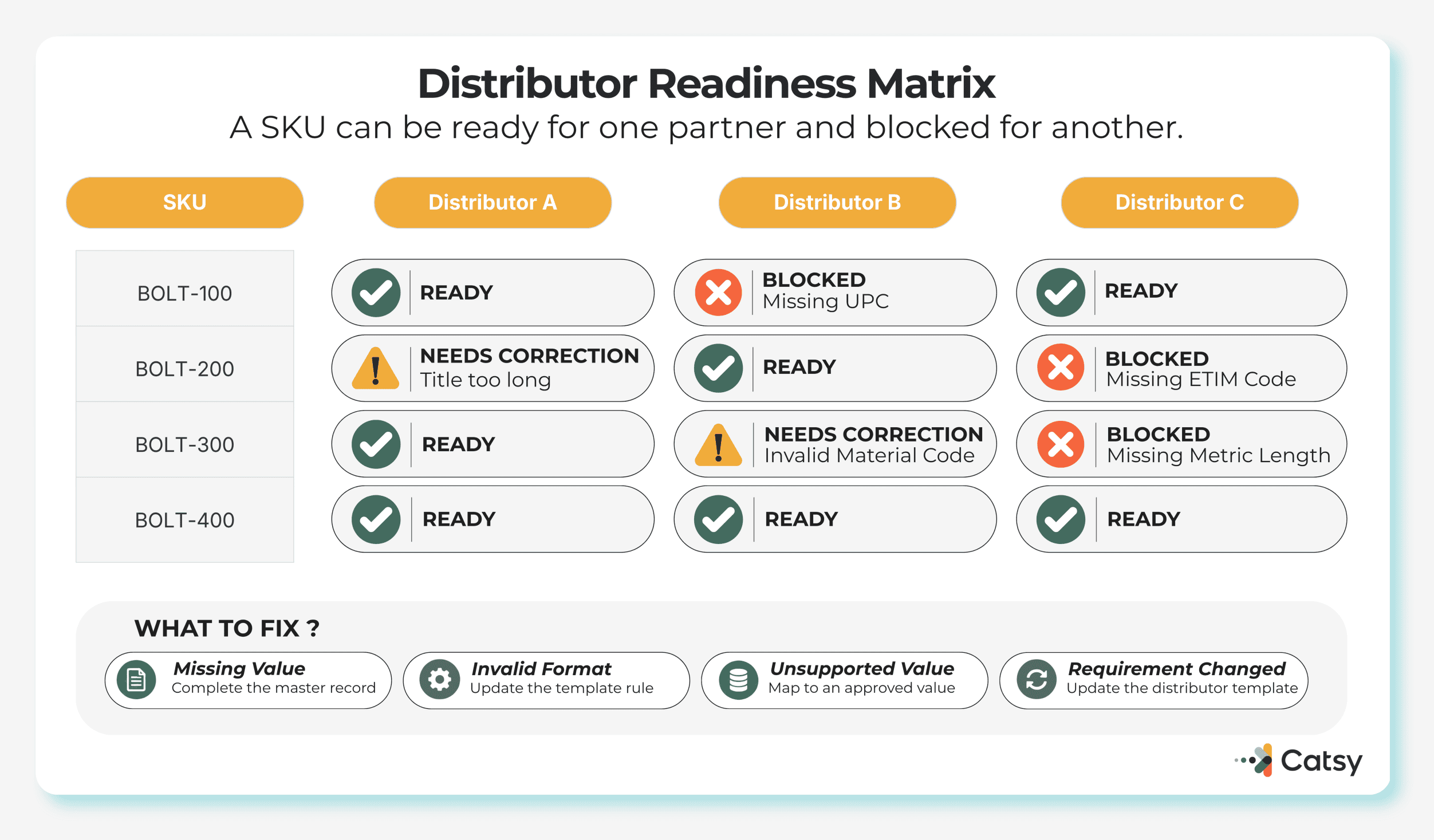
Distributor readiness matrix showing four SKUs checked against three distributors, with status flags for ready, blocked (missing UPC, missing ETIM code, missing metric length), and needs correction (title too long, invalid material code)
A SKU can be ready for one distributor and blocked for another, so readiness gets checked and fixed per partner, not assumed catalog-wide.

What Changes for Each Team

Operations stops acting as a formatting desk. eCommerce teams launch SKUs to every partner from one product database that feeds every sales channel. Sales reps can look up the same item specs that distributors show.

This matters more as buyers research alone. A Gartner survey released in March 2026 of 646 B2B buyers found that 67% prefer a rep-free experience and 45% used AI during a recent purchase. With no rep involved, nobody explains why two listings disagree.

Where Catsy Fits

Catsy is an integrated PIM and DAM platform for manufacturers, B2B brands, and wholesale distributors. Its published feature pages show that teams can:

✓Prepare products with distributor spec templates organized to each channel’s specs
✓Export InDesign, Excel, and CSV files in custom distributor specs with channel-ready export tools
✓Flag content gaps with completeness scoring and readiness reports
✓Produce channel-sized images through digital asset management and asset transformation
✓Share products through a secure brand portal, with scheduled ERP syncs and SFTP delivery

For distributors that also receive supplier data, Catsy normalizes incoming files into one schema before publishing. Templates still need upkeep when partners change requirements, but that work happens once, in one place.
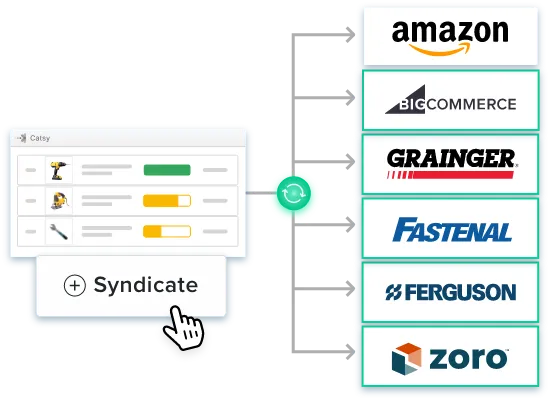
Catsy product list with a Syndicate button pushing updates out to Amazon, BigCommerce, Grainger, Fastenal, Ferguson, and Zoro
One syndicate action pushes the same governed record out to every connected marketplace and distributor at once.

Key Takeaways

01.Distributor formats differ because each partner runs its own systems, so the fix has to happen on your side.
02.Every manual conversion creates a copy of your data that can drift away from the source.
03.Excel’s default handling of leading zeros can quietly break product identifiers, even for a careful team.
04.A distributor spec template turns a weekly rebuild into a one-time setup plus upkeep, as long as the master record stores each fact at its most detailed level.
05.Buyers name inconsistent information as a top reason to switch suppliers, so consistent distributor data protects revenue as well as staff time.
DISTRIBUTOR DATA

See It With Your Own Files

A faster spreadsheet will not fix weekly reformatting. One governed record with distributor spec templates for each partner will.

Book a Catsy Demo

FAQs

Saved mappings that convert a master product record into a specific distributor’s format, reusable for every export to that partner.

Each distributor runs its own systems. Standards such as ETIM and GS1 help, but many distributors still add their own fields and files.

Not reliably. Macros still depend on spreadsheet copies and can break when columns change. Microsoft notes that reformatting does not restore leading zeros Excel already removed.

An API connects systems directly but only works where the receiving platform offers one. A template produces a file or upload in the partner’s layout.

When several distributor formats come from one export, specs change often, files keep getting rejected, or only one person knows the formatting rules.

SHARE