Cloud PDM vs On-Premise: Which Deployment Model Fits Your Business?
Cloud PDM often goes live in weeks; on-premise can take months but gives full control. Compare costs, CAD performance, CMMC/ITAR rules and scaling.

Table of Contents
Key Terms to Know
Archive-server replication: Copying files from a main PDM server to a local server at a remote office so engineers there can open files faster.
Bill of materials (BOM): A structured list of every part, component and material needed to build a product.
CAD (computer-aided design): Software used to create 3D models and technical drawings of products.
CMMC (Cybersecurity Maturity Model Certification): The U.S. Department of Defense program that sets cybersecurity requirements for defense contractors.
Egress fee: A charge a cloud provider applies when you move data out of its platform.
Hybrid PDM: A setup that keeps some data or functions on your own servers and runs others in the cloud.
Local cache: A folder on a workstation that stores copies of files you have opened, so they load faster and can be used offline.
Product data management (PDM): A central system that stores and controls engineering data such as CAD files, BOMs and specifications.
Product lifecycle management (PLM): A broader system that manages a product from first idea through design, production, service and retirement.
Total cost of ownership (TCO): Everything a system costs over its full life, including licenses, hardware, staff, upgrades and support.
Every team that adopts product data management (PDM) has to decide where it will run. Cloud PDM is hosted by a vendor and paid for by subscription. On-premise PDM runs on your own servers, managed by your IT staff.
Cloud is usually faster to set up; on-premise gives more control over configuration, data location and integration. The choice usually comes down to three things: the rules your data must follow, how large your CAD files are and how many sites use them, and what the system will cost over five to seven years.
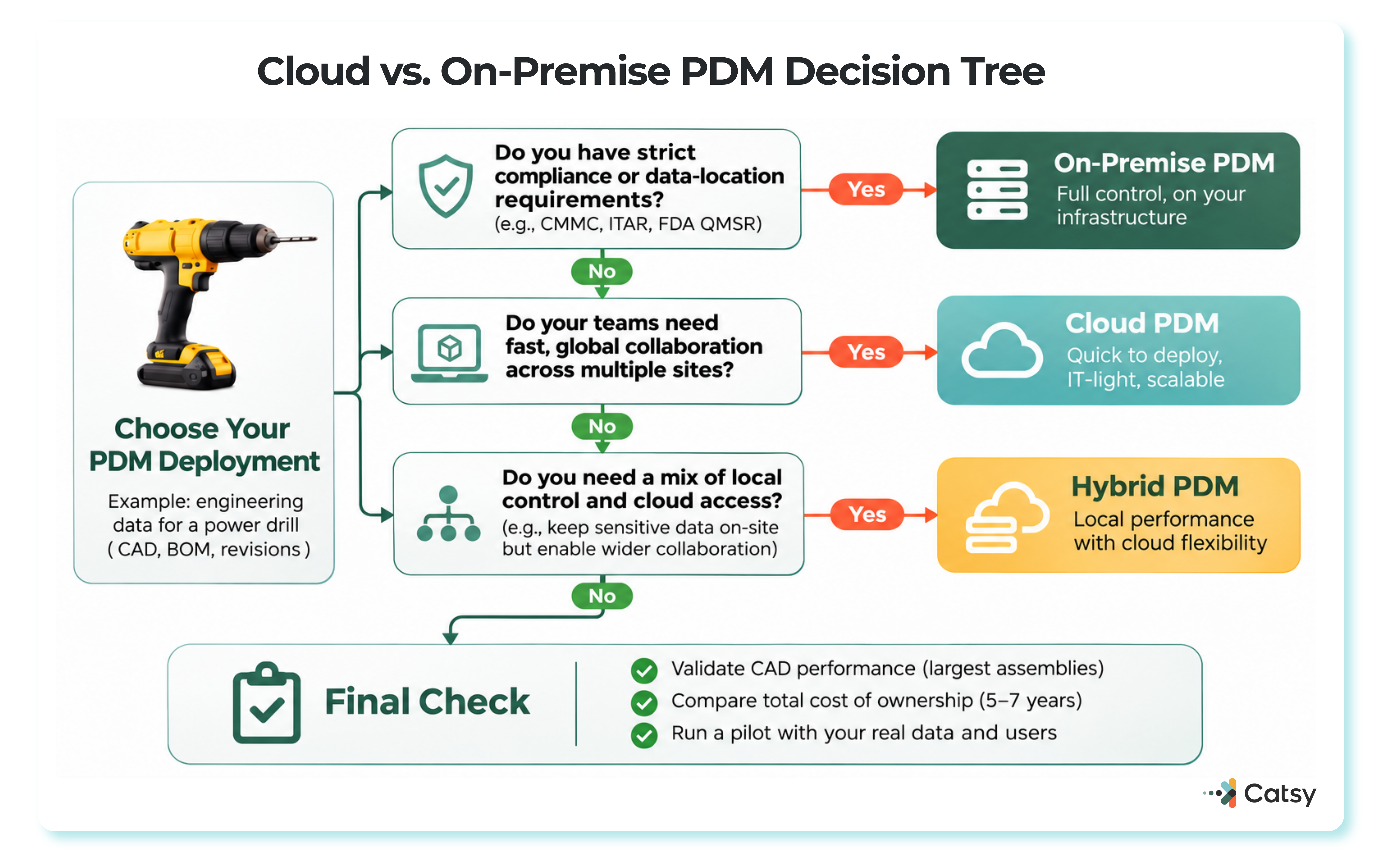
Gartner projected that public cloud services would grow 21.3% in 2026 (Gartner), yet Flexera’s 2026 State of the Cloud Report found that 73% of organizations run a hybrid setup. McKinsey’s 2022 analysis found that organizations that adopt cloud tech can lower IT maintenance and infrastructure costs and speed up product development.
Cloud, On-Premise and Hybrid PDM Side by Side
| Cloud PDM | On-Premise PDM | Hybrid PDM |
|---|---|---|
| Who runs it: the vendor or a cloud provider such as Microsoft Azure | Who runs it: your IT team, on your servers | Who runs it: your team on-site, with cloud for collaboration or backup |
| Typical time to basic use: 2 to 4 weeks | Typical time to basic use: 3 to 6 months | Typical time to basic use: done in phases |
| How you pay: subscription | How you pay: upfront licenses and hardware | How you pay: a mix of both |
| Large CAD files: local cache plus syncing of changes | Large CAD files: local network speed, replicated servers for remote offices | Large CAD files: heavy files stay on the local vault |
| Usually fits: distributed teams, small IT staff | Usually fits: strict data control, deep legacy integration | Usually fits: phased moves, mixed sensitivity |
PDM in Plain Terms
PDM is a central system for engineering data: CAD files, bills of materials (BOMs) and specifications. Its main job is making sure everyone from design to manufacturing works from the latest approved version.
A modern PDM system often manages much more than drawings, so list every type of data before you decide where it should live. PDM also connects to PLM, ERP and MES systems; if the difference between them is unclear, start with PLM vs PDM.
Hosting PDM in the cloud gives engineers at every site the same record, which reduces version control issues during frequent spec updates. A modern PDM system also has to handle engineering data quality, not just storage; see engineering data quality management.
Who Runs the Servers
With on-premise PDM, your team installs, patches and backs up the system, which usually means at least one dedicated administrator. In exchange, you control workflows, data location and access, and you can integrate over your internal network.
With cloud PDM, the provider runs the infrastructure, keeps backups in more than one location and applies updates automatically. Digital transformation initiatives keep pushing companies this way; Gartner ties its 2026 forecast partly to ongoing migration and modernization.
The trade-off is dependence on a reliable internet connection, and teams moving large files may need more bandwidth.
Large CAD Files and Slow Connections
Most CAD-connected systems do not download a whole assembly every time. They keep a local cache on each workstation and sync only what changed, so file size and site count matter more than raw internet speed.
Local cache: files you open are copied to a folder on your workstation, so they reopen faster and stay available if the connection drops.
Offline mode: many cloud and on-premise tools let you keep working from cached files and sync changes when you reconnect. Only files already in the cache are available.
Archive-server replication copies files to a local server at each remote office. The gain has limits, because metadata such as BOMs and search results still comes from the central database.
Hybrid Setups
Hybrid setups keep sensitive designs on an on-site vault while using the cloud for collaboration, backup or a phased move. If you plan a phased move, use a PDM migration checklist.
Where the Money Goes
Cloud spreads cost across a subscription; on-premise puts most of it up front. Compare total cost of ownership over five to seven years using a PDM cost-benefit analysis.
Cloud subscriptions are commonly cited at $50 to $300 per user per month; confirm current quotes. Add storage, bandwidth upgrades, and integration with in-house systems such as your ERP (see our guide to ERP integration). Predictable does not mean efficient: Flexera’s 2026 report estimated that 29% of cloud spend is wasted, and 85% of organizations named managing cloud spend a top challenge (Flexera via GlobeNewswire).
On-premise perpetual licenses are commonly cited at $5,000 to $15,000 per user, plus servers and backup equipment. Implementation services often cost 150 to 300 percent of license fees. For large, stable user bases, on-premise can still be cheaper over time.
Costs that rarely appear in the first quote:
| Cloud PDM | On-Premise PDM |
|---|---|
| Data migration | Staff to run the system |
| Customization limits | Hardware upgrades |
| Compliance work in the cloud | Security and disaster recovery upkeep |
| Vendor lock-in (the EU Data Act caps switching fees at cost and bans them from January 12, 2027) | Server refreshes, since older operating systems and databases often need upgrading before a new PDM release will install |
Few teams find this easy: in Flexera’s 2026 report, 43% of respondents named comparing on-premise and cloud costs as a migration challenge.
Security and Compliance Often Decide It
Large cloud providers usually invest more in security than one company can, with constant monitoring and automatic patches. They hold certifications such as SOC 2 and ISO 27001. Those cover the provider’s side; you still decide how data is classified and who can access it.
On-premise appeals when you need maximum control: every permission, the exact data location, even full isolation from the internet. That protection takes real expertise to maintain.
List the rules that apply before comparing vendors: data residency laws, regulator audit access, industry standards such as FDA or aerospace requirements, and export controls. For how PDM supports audit trails, see PDM’s role in regulatory compliance and quality assurance.
Four recent rules change what to confirm before signing:
| Rule | Key Dates | What It Means for PDM |
|---|---|---|
| CMMC | Phase 1: November 10, 2025; Phase 2: November 10, 2026 | Phase 2 requires Level 2 certification by a C3PAO (an approved independent assessor) before certain contracts are awarded (Cooley via JD Supra). A vault holding CUI (controlled unclassified information) is in scope, cloud or on-premise. |
| ITAR §120.54 | In force since 2020 | Cloud storage of unclassified technical data is not an export if it is end-to-end encrypted to FIPS 140-2 (or AES-128) strength, no third party holds the keys, and it is not stored in a §126.1 country (22 CFR §120.54). |
| FDA QMSR | Effective February 2, 2026 | Device quality rules now build in ISO 13485:2016 (FDA), so document control and audit trails must support it. |
| EU Data Act | Applied September 12, 2025; fee ban January 12, 2027 | Covered providers must help customers switch; switching and egress fees are capped at cost, then banned (Mishcon de Reya). |
Ask any cloud vendor who holds the encryption keys, where backups are stored, and how you would leave. Backups matter in either model. Servers in one building are exposed to fire, floods and hardware failure, while cloud PDM adds automatic backups and disaster recovery. On-premise teams can close the gap with off-site backups and a written recovery plan. Test a full restore at least once a year.
Performance as You Grow
Cloud PDM makes it easy to add capacity and new offices, and it lets an engineer in Pennsylvania and a colleague in Portugal review the same CAD model. On-premise offers dedicated resources and fast internal integrations.
Test both in a pilot with your own data: file transfer times, response under heavy use, search speed, and how long your largest assembly takes to open from your slowest site.
Rolling It Out
Cloud PDM can often deliver basic functionality in two to four weeks; on-premise infrastructure typically takes three to six months but allows deeper customization. A fast launch can outrun training. SOLIDWORKS PDM and SOLIDWORKS PDM Professional are common on-premise examples.
Plan training, recruit internal champions, and keep support going after launch. Our guide to overcoming PDM implementation challenges covers roles and pacing. Measure success by adoption, fewer errors and cost against budget.
After PDM: Getting Product Data to Customers
Approved specs, dimensions and certifications feed catalogs, spec sheets, distributor feeds and online listings. When that handoff runs through spreadsheets, errors creep back in.
A product information management (PIM) system picks up where PDM ends, turning released engineering attributes into a single source of truth for sales content across sales channels.

Data governance tools such as validation, completeness scoring and workflows keep specs accurate, and role-based access protects data as it leaves engineering (see these PIM security strategies).
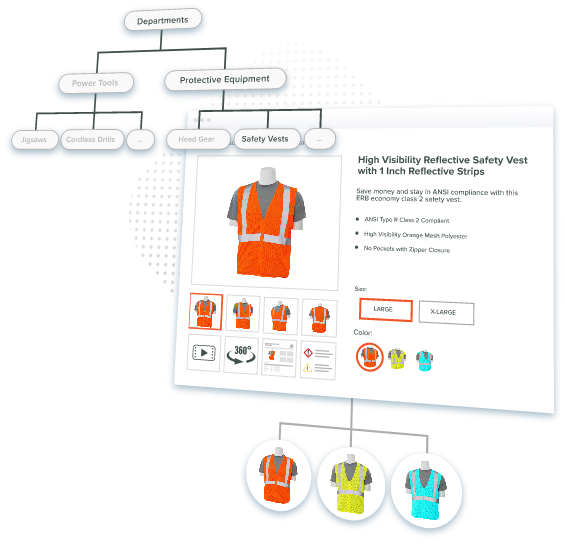
Catsy pairs PIM with digital asset management (DAM), which links images, PDFs and manuals to the right product, using a DAM-PIM workflow. See how it works on our PIM for manufacturers page, or book a demo. Catsy also supports InDesign-based spec sheets through its PIM InDesign integration.
See How Catsy Supports PDM and PIM Together
Once a spec is released in PDM, Catsy’s product information management system keeps it accurate everywhere it’s used. Book a demo, or see Catsy’s PIM for manufacturers page.
Key Takeaways
See How Catsy Supports PDM and PIM Together
Once a spec is released, keep it accurate everywhere it’s used. Book a demo, or see Catsy’s PIM for manufacturers page.