Why Industrial Product Pages Take Forever to Update (And How to Fix It)
Industrial product pages are slow to update because information is scattered across engineering files, ERP records, spreadsheets, and emails. See how a PIM brings it together so updates take hours, not weeks.
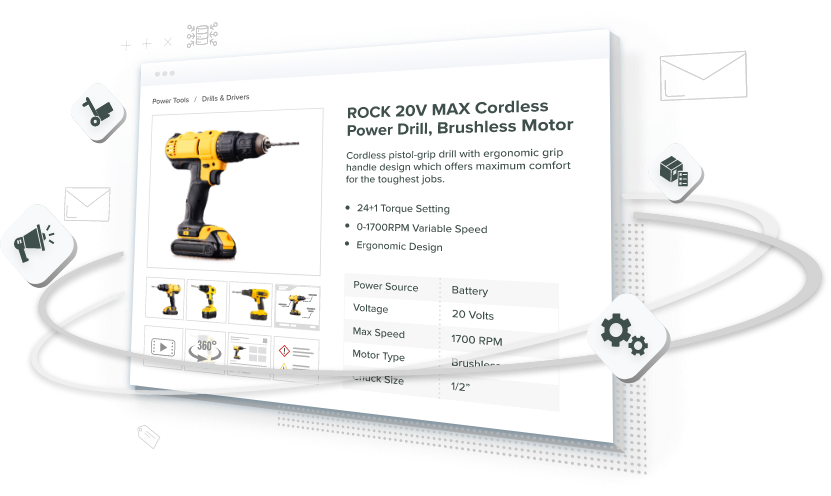
Table of Contents
| Stage | Without PIM | With PIM | Result |
|---|---|---|---|
| Data handoff | Teams email spreadsheets and spec sheets | Connected systems share and map data | Fewer lost files and version errors |
| Approval | Each team waits for the previous team | Teams review their sections at the same time | Faster approvals |
| Publishing | Staff enter the same data on every website and portal | One approved update goes to every connected channel | Consistent information everywhere |
Key Terms to Know
View Key Terms
Why Does a Simple Product Update Take Weeks?
A simple product update takes weeks because one industrial product page depends on data held by five different teams. Each team hands its work to the next in sequence. Nothing moves in parallel, so every handoff adds waiting time.
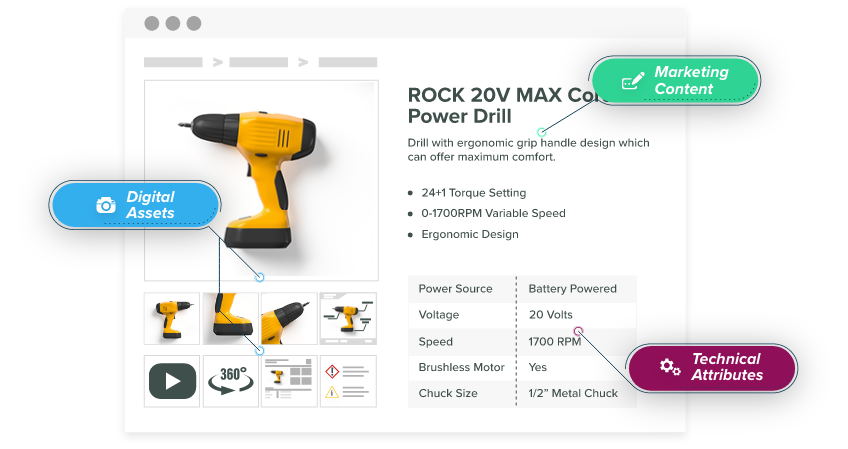
Industrial products come with a lot of information. Even a single product page may need dimensions, materials, prices, certifications, manuals, CAD files, images, and compatibility details. The problem is that this information usually lives in several places.
Let’s say your company launches a new hydraulic pump. Engineering exports the specifications from its design software. Someone copies them into a spreadsheet and sends them to marketing. Marketing then writes the product description. Compliance checks the documents. Pricing reviews the numbers. Finally, the web team enters everything into the website and distributor portals. This one product has passed through five teams before it reaches a buyer.
Every handoff creates another chance for:
- A delayed reply
- A missing file
- An outdated specification
- A copy-and-paste error
- Confusion about which version is final

Meanwhile, buyers are already searching online. If your page is incomplete, they may choose a competitor whose product information is ready.
How do you find the delays in your own process?
Start with these four simple checks:
- Map every step from product approval to website publication.
- Review your last ten launches and calculate the average publishing time.
- Ask sales which product details buyers often request because they are missing online.
- Count how many systems, spreadsheets, and folders contain product information.
This will show you where updates are getting stuck so you can start fixing them.
Which System Owns Which Product Data: PIM, DAM, PLM, ERP, or CMS?
Each system owns a different slice of the product record, and the slices do not overlap. Product Information Management prepares the customer-facing content. Digital Asset Management holds the files. Product Lifecycle Management holds the design. Enterprise Resource Planning holds the commercial facts. A content management system publishes the page. Treating any two of these as interchangeable is the most common reason product data projects stall.
The table below is the short version. Agree on it before you buy anything. The answer to “where does this field live?” shapes every workflow you build afterwards.
| System | What It Owns | Typical Fields | Who Works in It |
|---|---|---|---|
| PLM (Product Lifecycle Management) | The engineering record, from design through revision | CAD files, design changes, bills of materials, tolerances | Engineering, R&D |
| ERP (Enterprise Resource Planning) | The business record needed to sell and fulfill | SKU numbers, inventory, base prices, order data | Finance, operations, supply chain |
| PIM (Product Information Management) | The buyer-facing product record, before it is published | Descriptions, specifications, compliance documents, channel-specific attributes | Marketing, product, compliance, e-commerce |
| DAM (Digital Asset Management) | The files themselves and their versions | Product images, videos, manuals, technical drawings | Marketing, creative, technical writing |
| CMS (Content Management System) | The web page as a page | Page layout, templates, editorial content, navigation | Web team |

A CMS can display a specification. It is not built to validate one, version it, or push it to a distributor portal. That distinction matters most for industrial product pages, because the page is only the last stop. For a fuller map of how these systems hand off to each other, see our complete product data management guide for manufacturers.
What Do Slow Product Updates Actually Cost?
Slow product updates cost you revenue, staff hours, and buyers. Delayed product information affects revenue, productivity, and customer trust. All three are measurable. Most manufacturers track none of them.
You lose part of your launch window
Suppose you are introducing a new precision valve. You expect a six-month advantage before competitors offer something similar. A four-week delay in publishing the product page uses up four of those roughly twenty-four weeks. That is about 17% of the advantage, gone. The numbers here are an illustration, not a study. Swap in your own launch window and your own average publishing time. The shape of the answer stays the same.
The product may be ready, but buyers cannot research or purchase it because the information is not online.
Skilled employees get trapped in manual work
Marketing teams should be creating campaigns, not copying technical data between systems. Technical writers should be explaining products, not searching through emails for the latest specification sheet. Web teams should be improving the site, not correcting the same product detail across several pages.
Gartner has put a number on the wider problem. Its 2020 Magic Quadrant for Data Quality Solutions asked 154 reference customers of data quality vendors one question. What does poor data quality cost your organization? The average answer was $12.9 million a year.
Two caveats belong with that figure. It is a self-estimate, not a measurement. And the respondents were large enterprises that already bought data quality software. So not every company will lose that exact amount. The direction is what holds up: inaccurate and scattered data are expensive.
Buyers leave when information is missing
Buyers often research products before contacting sales. If a page contains incomplete or outdated product information, they may simply leave.
Gartner surveyed 646 B2B buyers between August and September 2025 and published the results in March 2026. It found that 67% of B2B buyers prefer a rep-free experience, and 45% had used AI during a recent purchase.
The same body of research adds a limit worth keeping in view. In a May 2026 release, Gartner reported that 69% of buyers turn to sales reps to validate AI-generated insights. Buyers are not abandoning reps. They are doing the early work alone, then checking their conclusions with a human.
Newer research points at the same page. McKinsey published its 2026 Global B2B Pulse Survey in May 2026, drawing on nearly 4,000 decision-makers across 13 countries. It found that inconsistent information across teams is now the top reason buyers switch suppliers. Buyers use an average of ten channels during a purchase. They notice when those channels disagree.
Your product pages now do much of the early selling. They need to answer buyers’ questions without help from a salesperson.
When you calculate the cost of delay, track these:
| What You Lose | How to Measure It | Where the Number Comes From |
|---|---|---|
| Revenue during the gap | Sales of products that were finished but not yet online | Launch dates versus publish dates |
| Staff hours | Time spent entering, checking, and correcting data | Time tracking or a two-week sample |
| Lead quality | Leads from complete pages versus incomplete pages | Analytics, split by attribute completeness |
| Lost opportunities | Deals where buyers could not find enough information | Sales notes and closed-lost reasons |
How Does a PIM System Remove the Bottlenecks?
A Product Information Management system removes the bottlenecks by giving every team one shared product record. There is no chain of files. Nobody waits for an email. Nobody retypes a price.
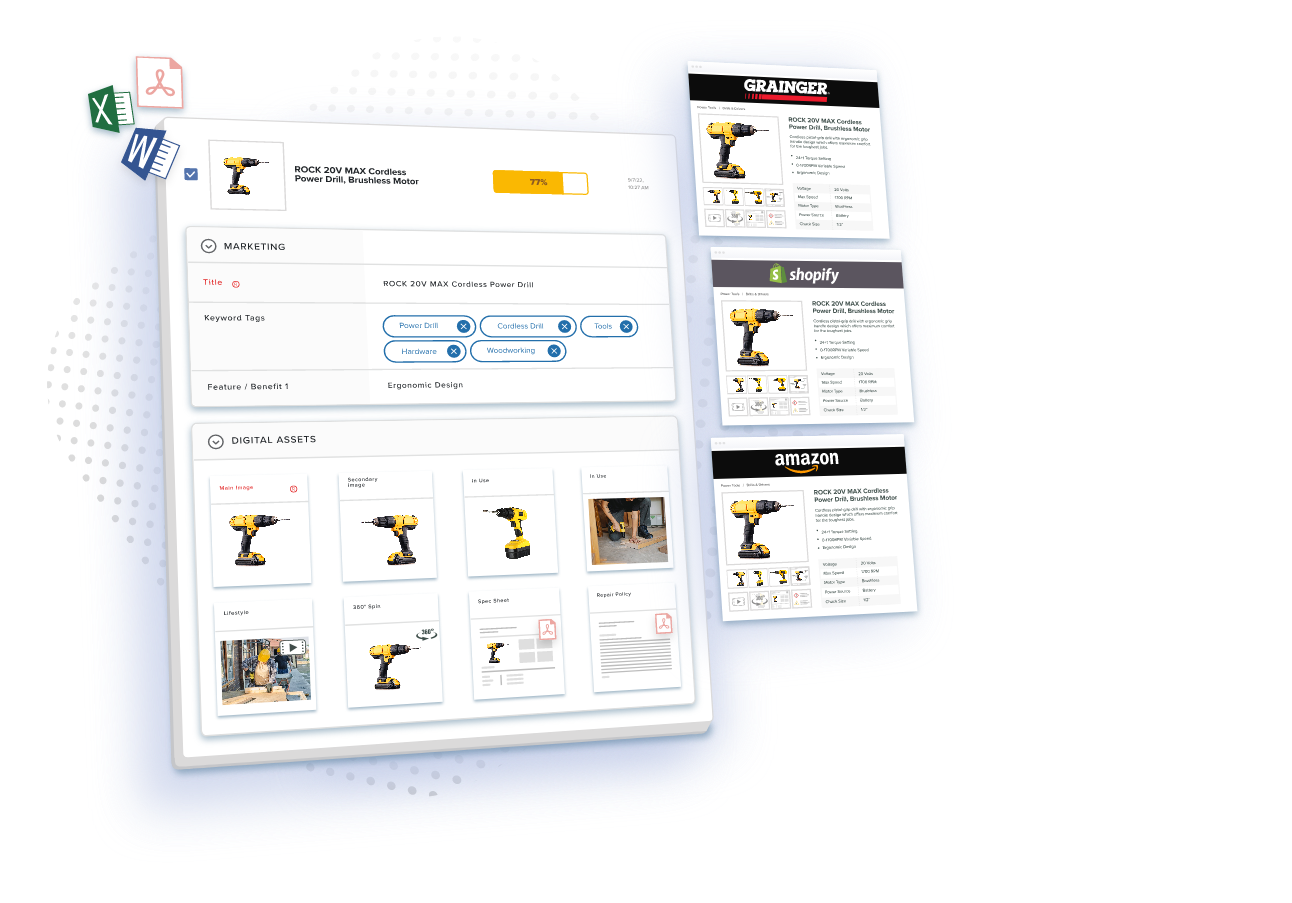
Instead of emailing files back and forth, engineering, marketing, compliance, and e-commerce teams work from the same product record. Once an update is approved, the PIM can send it to your website, print catalog, marketplace, and distributor portals.
It can also connect with the systems you already use, including:
- PLM (Product Lifecycle Management): Holds engineering information such as CAD files, design changes, and bills of materials.
- ERP (Enterprise Resource Planning): Holds business information such as SKU numbers, inventory, and base prices. A SKU is the unique code used to identify a product or product variation.
- PIM (Product Information Management): Adds descriptions, specifications, compliance documents, images, and channel-specific details before publishing them.
PLM and PIM support different stages of a product’s life. ERP manages the information needed to sell and fulfill orders. These systems should be connected, but they should not be treated as interchangeable.
Clear data governance rules also define which system owns each type of information and who may edit it.
A simple example
When a product’s base price changes in the ERP, the new value flows into the PIM. Marketing can add channel-specific content, compliance can confirm the required documents, and the system can publish the approved update everywhere.
No one needs to retype the same price on five different websites.
What steps improve the workflow?
- List every system that stores product information.
- Decide which system owns each field.
- Map the required review and approval steps.
- Automate routine checks and notifications.
- Set a safe schedule for syncing approved information.
For changes that may affect several records or channels, use this product specification change management guide.
How Does Automation Let Teams Work at the Same Time?
Automation lets teams work at the same time by replacing the sequential handoff with two things: a shared record, and a rule that blocks publishing until every required part is done. An automated PIM and DAM workflow allows teams to work on different parts of the same record at the same time. DAM stands for Digital Asset Management, a system used to organize files such as product images, videos, and manuals.
Engineering can confirm specifications while marketing writes the description and compliance reviews the documents. The product is published only when every required part is complete.
Useful automation includes:
| Automation | What It Replaces | What It Prevents |
|---|---|---|
| Start the approval process when new product data arrives | Someone remembering to send an email | A launch sitting untouched in an inbox |
| Alert the right team when its review is needed | Chasing people for status | Reviews that stall without anyone noticing |
| Block publication when a required field, image, price, or document is missing | A final manual eyeball check | Incomplete pages going live |
| Give each team permission to edit only the fields it owns | Shared spreadsheets anyone can change | Overwritten specifications and unclear versions |
| Schedule publication to match a launch campaign | Manual go-live on the day | Pages that appear early or late |
| Send an approved update to every connected sales channel | Re-entering the same data per channel | Channels that disagree with each other |
Human review still matters. Automation removes repetitive tasks and waiting time, but it does not remove engineering or compliance control.
How Do You Build a Product Data Setup That Can Grow?
You build a product data setup that can grow by designing three things to absorb new products: the attribute structure, the approval rules, and the channel connections. A good product data structure should support new products, markets, and sales channels without forcing you to rebuild everything.
Use flexible product categories
Different products need different information. A hydraulic component may need pressure and flow-rate fields, while an electronic control may need voltage and connectivity fields.
A flexible PIM lets you create the right set of attributes for each product category while managing everything in one system.

Keep regional content connected
When you enter a new country, some information stays the same, while other information changes.
Technical specifications may remain global, while language, currency, marketing copy, and regulatory documents vary by region. When you manage these differences in one connected system, you prevent each country from creating its own separate and inconsistent database.
Manage product classifications centrally
Industrial catalogs often use standard classification systems. ETIM organizes technical product information and is widely used by manufacturers and distributors. UNSPSC classifies products and services for purchasing and e-procurement systems.
Managing these classifications in the PIM gives each product category one clean mapping. Your team does not have to fix the same classifications separately for every distributor.
Prepare for new technology
Choose a PIM that can connect with new sales channels and tools. APIs allow different software systems to exchange data. Newer connection methods may also help AI tools interact with product information. This guide explains when to use PIM MCP or an API.
Structured, machine-readable data is also becoming more important. AI shopping and sourcing tools do not read a catalog exactly like a person. They rely on consistent product fields and clear labels.
If your information is scattered across PDFs, images, or inconsistent descriptions, AI tools may overlook your products. Learn more in Why Unstructured Product Data Makes Your B2B Catalog Invisible to AI Shopping Agents.
Plan for growth
| What Changes as You Grow | What to Design for Now | What Breaks if You Skip It |
|---|---|---|
| New product categories | An attribute structure that accepts new field sets | A rebuild every time a product line is added |
| More teams and locations | Approval rules based on roles, not named people | Approvals that stop when one person leaves |
| New sales channels | Connections your system can add without custom work | A separate manual process per channel |
| New regions | One data-quality standard applied across products and regions | Each country building its own inconsistent catalog |
Key Takeaways
Ready to Publish a Product Update in Hours Instead of Weeks?
See how Catsy’s PIM for industrial manufacturers runs engineering, marketing, and compliance reviews in parallel, then syndicates one approved record to every channel. Book a Catsy demo, or read our guide to manufacturing product data management.