Top Advanced Product Options Shopify: Enhance Your Store’s Flexibility
Shopify now allows 2,048 variants but still only 3 options. Learn how to add advanced product options across multiple markets and stores with a PIM.
Table of Contents
Key Terms to Know
If you run Shopify stores in several countries, you have probably felt the squeeze. Each store needs its own languages, currencies, and units, and Shopify’s product setup was not built to hold all of that on one product page.
According to Shopify’s own data, about 30% of the visitors to an online store come from international markets. During the record $14.6 billion Black Friday Cyber Monday weekend in 2025, cross-border orders made up 16% of all orders.
Most people searching for advanced product options want more than three options, more variants than their theme shows, or custom inputs such as engraving text and file uploads. Shopify and its apps now cover more of this but neither keeps option names, prices, and translations the same across several stores. That is the gap we will cover in this guide.
Shopify’s Product Limits, Then and Now
An option is a choice a shopper makes, such as size or color. A variant is one combination of those choices, like a small blue shirt, with its own price, stock count, and SKU.
For years, Shopify allowed 100 variants and 3 options per product. On October 15, 2025, Shopify raised the variant limit to 2,048 for all merchants. The option limit did not move.
| Limit | Before Oct 2025 | Now |
|---|---|---|
| Variants per product | 100 | 2,048 |
| Options per product | 3 | 3 |
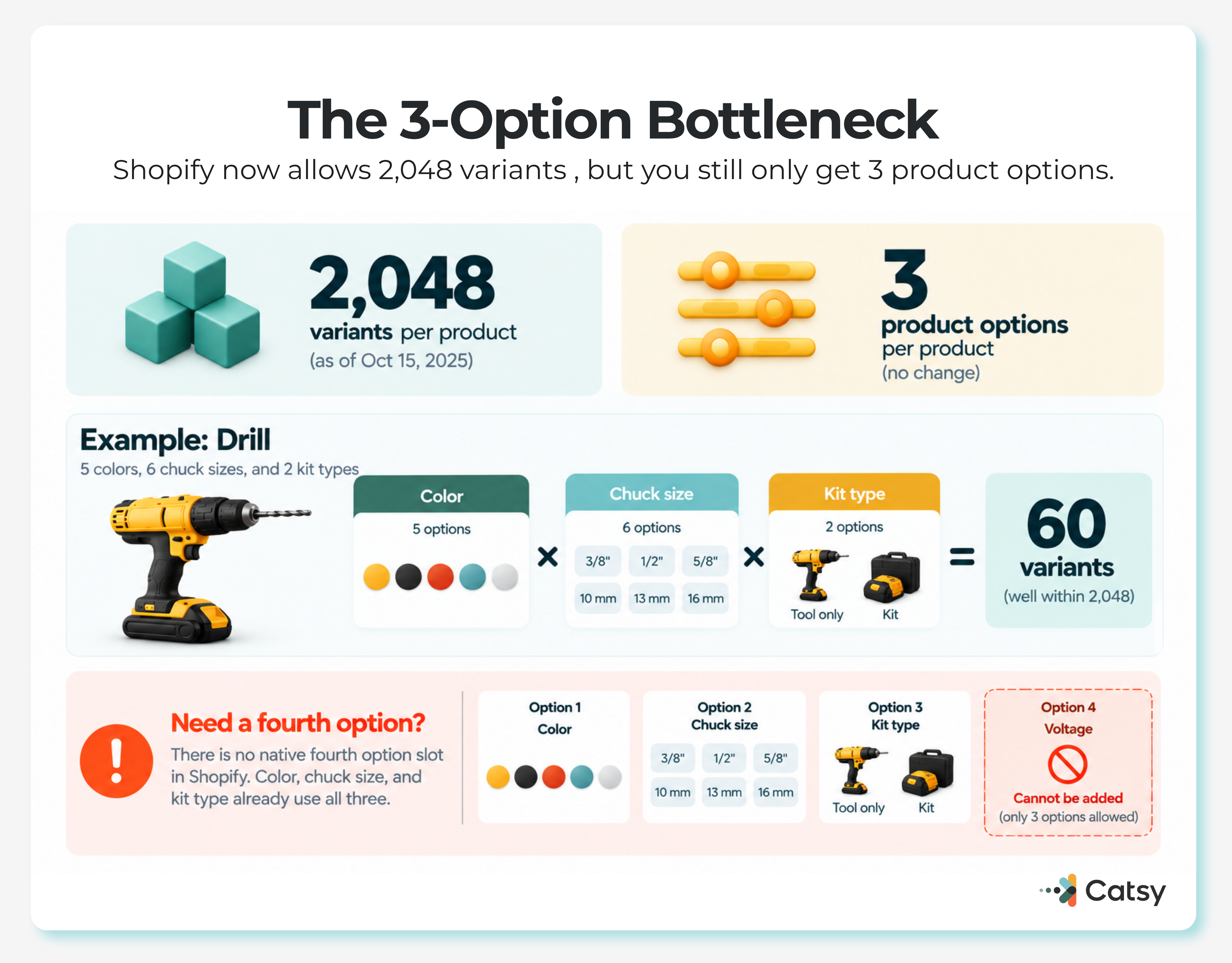
Each product can also hold up to 250 media items, per the Shopify Help Center. The bigger limit has fine print:
Some third-party themes cannot show more than 100 variants, and Liquid, the language Shopify themes are built with, returns at most 250 variants unless the theme loads them page by page.
Older apps built on Shopify’s REST product API may break above 100 variants, and Shopify’s own Stocky and legacy Order Printer apps do not support more than 100.
For more than three options, Shopify points merchants to apps or line item properties. On Plus and enterprise plans, the Combined Listings app shows up to 60 products as one listing, with up to 2,048 variants and 3 extra options.
One T-Shirt, Three Markets
A t-shirt in 5 colors, 6 sizes, and 2 styles has 60 variants. Now sell it in regions that size clothes differently:
Sell it in just three of these markets, and you reach 180 or more variants. Under the old cap, that was 80 percent over the limit. Under the new cap, 180 variants fit, yet the setup still breaks. Color, size, and style already take all three option slots, so “sizing system” has nowhere to go.
Where Options Apps Fall Short
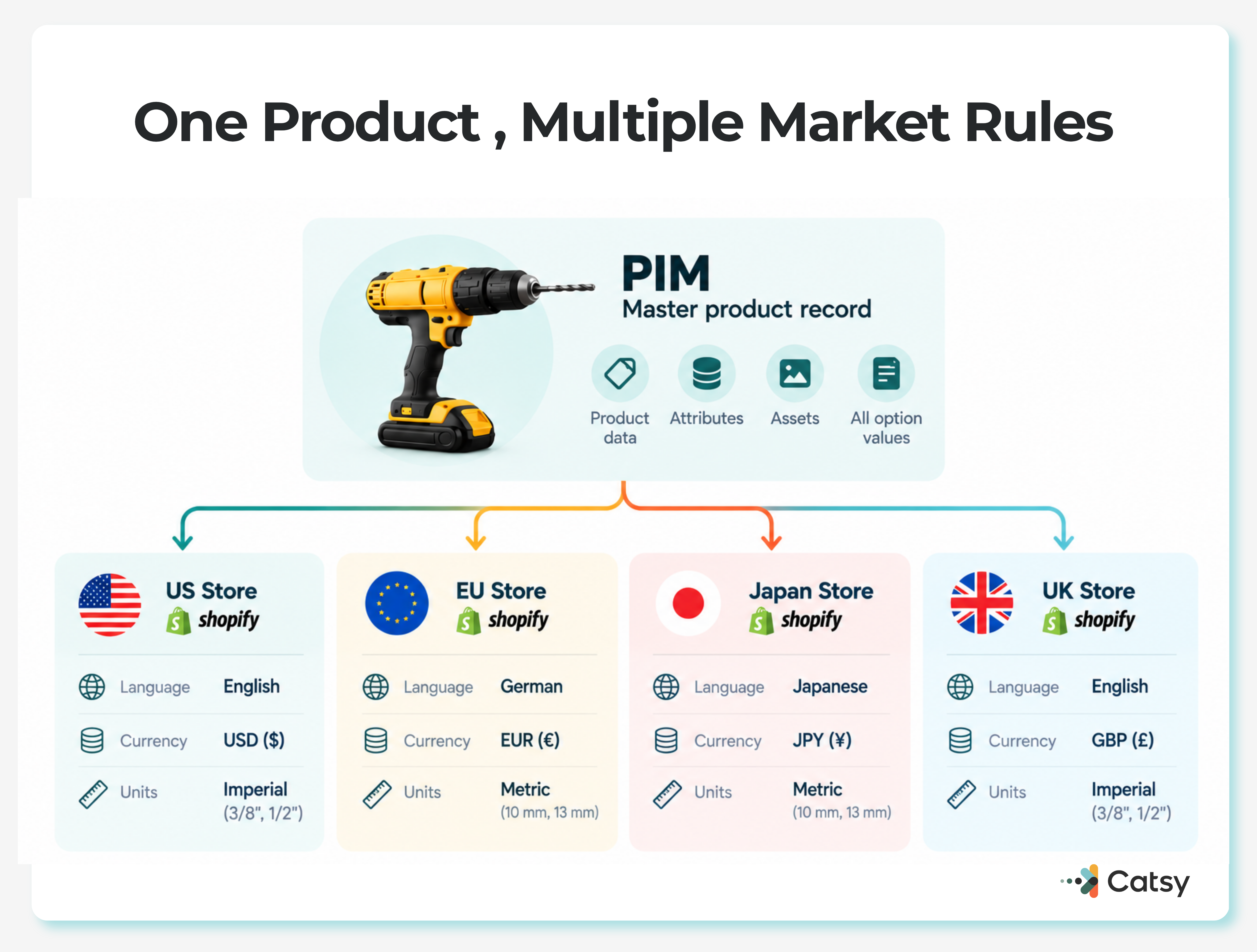
Some apps add unlimited custom options, which may be enough for one store. Across countries, stock tracking breaks between currencies, data splits by region, translations get fixed by hand, and price changes do not carry over between storefronts. A multi-country catalog needs one system that feeds every store.
What Selling Across Borders Adds to a Product Page
An international product may need prices in EUR, USD, GBP, JPY, and other currencies. It may also need metric and imperial units, local tax built into prices, region-specific specifications, and translated option names. Shoppers also expect conditional logic, color swatches, file uploads, date pickers, and engraving fields.
Shopify covers part of this. Connecting variant options to category metafields turns colors into swatches, and renaming a color once updates every product that uses it.
The Cost of Doing It by Hand
Picture one team maintaining 47 variants for a US store, 52 for EU compliance, and 38 for APAC, each with its own translations, prices, and rule checks. One pricing mistake copied across 15 markets can cost thousands in lost sales or penalties. Data governance rules, which check data before it goes live, catch that kind of mistake early.
Shoppers feel the problem too. Confusing options push people off the page, and unclear pricing leads to abandoned carts.
Mobile raises the stakes. In Shopify’s own data, 71% of Black Friday Cyber Monday sales in 2021 were made on mobile devices. Adobe found that 56.4% of online transactions in the 2025 holiday season happened on a smartphone across the US retail sites it tracks, up from 54.5% a year earlier.
Moving Product Options into a PIM
Product information management (PIM) software stores product data in one place and sends it to every channel. A PIM system becomes the single source of truth, including for options Shopify cannot hold.
An options app fixes one product page. A PIM built for Shopify fixes the whole chain. It keeps every combination in one master record, then publishes each store’s set within Shopify’s limits. Translations, currency rules, and unit conversions are set once. Shopify metafields carry the attributes that do not fit into three options.

Pairing PIM with digital asset management (DAM) keeps every variant photo attached to the right SKU, and asset transformation resizes images for each channel.
How PIM Fits with Shopify’s Own Tools
| What You Need | What Shopify Does | What the PIM Does |
|---|---|---|
| Up to 2,048 variants | Built in on all plans | Decides which variants each store gets |
| More than 3 options | Apps or line item properties | Maps the 3 that matter per market, sends the rest as metafields |
| Prices and products by country | Market catalogs in one store | Feeds the same base data to every catalog |
| One product across separate stores | Managed store by store | Publishes one record to many stores |
| Syncing from another system | productSet, designed for syncs from ERP and PIM sources | Acts as that source |
Brands that run separate regional stores, or sell on marketplaces and other channels, still need one governed record behind them. Set baselines before you start. Catsy’s guide to KPIs for a Shopify PIM rollout covers completeness, time to market, and error rates.
Rolling It Out in Four Phases
AI Shopping Agents Read Your Options Too
Shopify’s Agentic Storefronts place products inside ChatGPT, Gemini, Copilot, and other AI chats, using Shopify Catalog to structure product data. Adobe measured a 693.4% increase in traffic from generative AI tools to US retail sites in the 2025 holiday season.
An AI agent will not guess that “AS” means Asian small. Clear option names and complete variant data decide whether a product gets picked. Catsy’s guide to what AI agents see in a Shopify catalog walks through the checks.
Where to Go from Here
Run the Phase 1 inventory on your ten best-selling products to see whether the 3-option limit is your real constraint. For background, read what PIM is, how PIM and DAM differ, or Catsy’s list of the best PIM software.
Catsy’s PIM keeps unlimited variants, unlimited attributes, regional pricing, and localization rules in one record, then sends them to every connected Shopify store.
Book a demo to see Catsy’s PIM with your own catalog.
Key Takeaways