Top 10 Shopify Issues and How to Overcome Them
The 10 most common Shopify issues, from overselling and messy product data to slow pages and checkout friction, and how to fix each one in 2026.
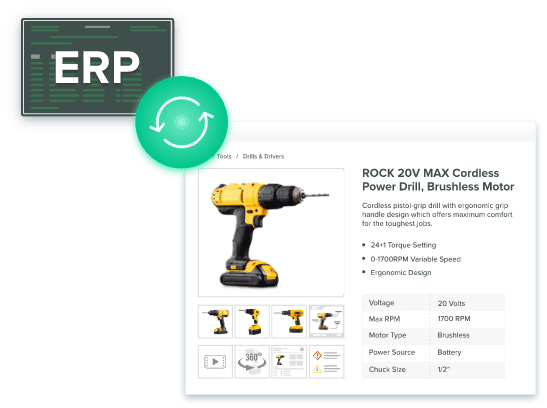
Table of Contents
Key Terms to Know
Expand the glossary for this article
Agentic Storefronts: A Shopify feature that sends eligible products through Shopify Catalog to AI shopping tools such as ChatGPT and Microsoft Copilot.
Content Delivery Network (CDN): A network of servers around the world that stores copies of your files so pages and images load faster.
Core Web Vitals: Google’s page experience scores for loading speed, responsiveness, and visual stability.
Digital Asset Management (DAM): Software that stores images, videos, and documents in one place and links each file to the right product.
Interaction to Next Paint (INP): The Core Web Vitals metric that measures how quickly a page responds when a shopper taps or clicks.
Metafield: An extra field in Shopify for a specific product detail, such as material or sleeve length.
Product Information Management (PIM): Software that keeps all product data in one place, checks it for errors, and publishes it to every sales channel.
Redirect (301): A permanent forward from an old URL to a new one, so visitors and search engines do not hit a dead page.
Shopify Functions: Shopify’s current way to add custom discount, shipping, and payment logic at checkout. It replaced Shopify Scripts.
Structured Data: Code that labels each fact on a page, such as price or return window, so search engines and AI tools can read it.
Shopify makes it easy to open a store but running one at scale is harder. Many store owners hit the same problems as their business grows, and most share one cause. Product information sits in too many places and gets updated by hand.
Shopify merchants sold a record $14.6 billion over Black Friday Cyber Monday 2025, up 27% from 2024. Shopify also now sends eligible products to AI tools such as ChatGPT, Perplexity, and Microsoft Copilot. Here is how to fix the ten most common issues at the source.
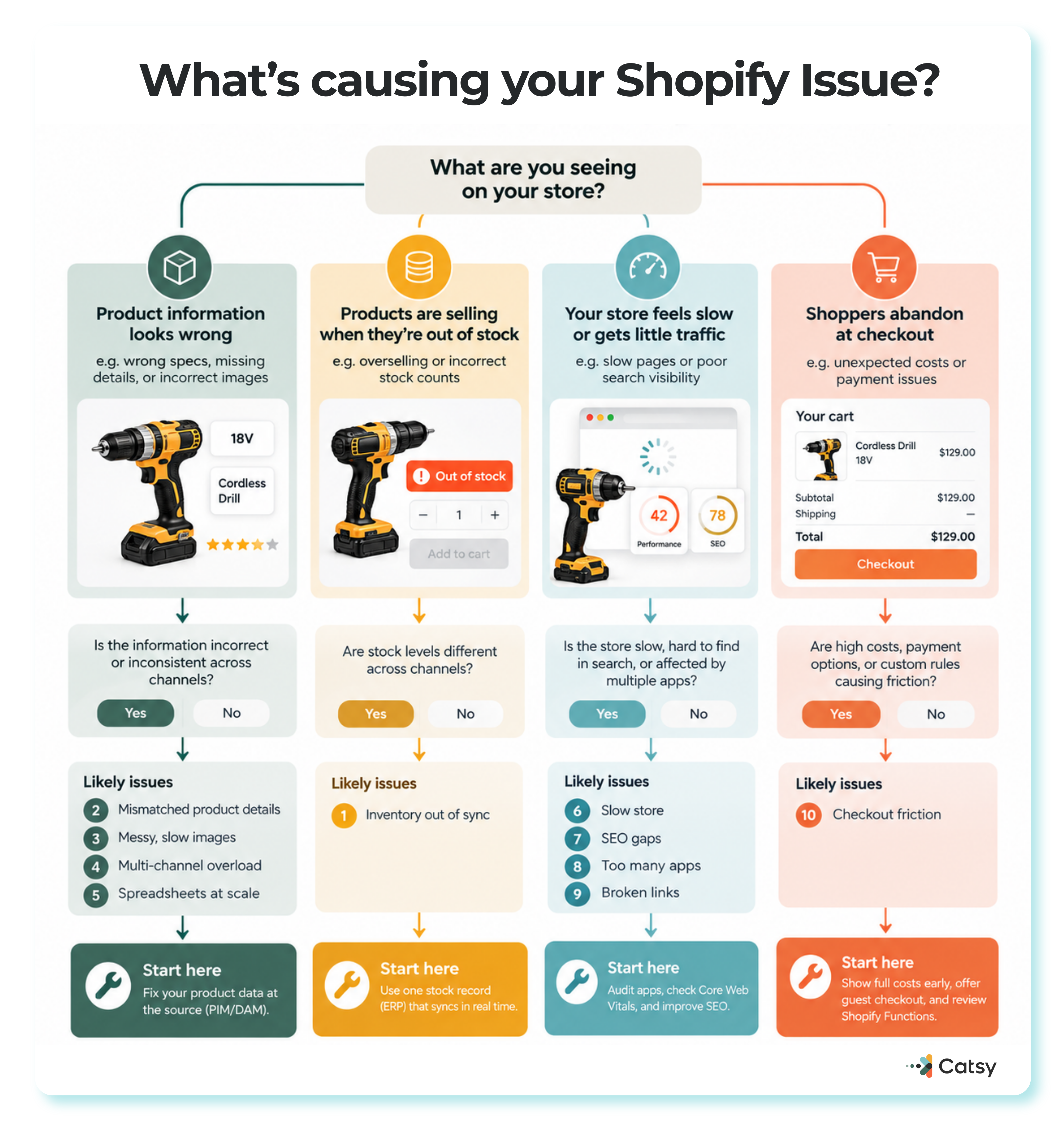
Four starting points for self-diagnosis — product data, out-of-stock selling, a slow store, or checkout abandonment — each routing to the exact issues and fixes that match it.
The Ten Issues at a Glance
| Issue | Fix at the source |
|---|---|
| Inventory out of sync | One stock record that syncs automatically |
| Mismatched product details | One source of truth |
| Messy, slow images | DAM plus Shopify image filters |
| Multi-channel overload | Manage once, syndicate everywhere |
| Spreadsheets at scale | PIM with validation |
| Slow store | App audits, Core Web Vitals tracking |
| SEO gaps | Better meta plus structured data |
| Too many apps | Regular audits |
| Broken links | Planned 301 redirects |
| Checkout friction | Clear costs, Shopify Functions |
1. Inventory That Falls Out of Sync
Overselling usually starts small. An item sells on one channel, the count does not update on another, and a shopper buys something that is already gone. Manual updates across channels fall behind fast.
IHL Group’s 2026 Inventory Distortion Study puts the yearly worldwide cost of out-of-stocks and overstocks at $1.7 trillion, or 6.2% of global retail sales.
The fix to an inventory that falls out of sync is to use one system of record for stock, usually your ERP (enterprise resource planning) software, that syncs to every channel when stock changes, not nightly. Count returns right away so they do not turn into phantom stock. A Shopify PIM connected to ERP data also keeps SKUs (stock keeping units) matched from the warehouse to the storefront.
2. Product Details That Do Not Match
One person edits titles in the Shopify admin. Another updates specs in a spreadsheet. A third rewrites a landing page. Details sometimes drift and customers notice these mismatched specs that makes rankings suffer.
Manage your product data once and publish it everywhere. Shopify supports this through its Standard Product Taxonomy, which has category metafields such as clothing size, neckline, or sleeve length type. Shopify says these fields make products easier to find on your site, on marketplaces, and in search.
Define each field once, with a fixed list of allowed values, or your product taxonomy breaks down as your catalog grows. Give every attribute an owner, as Catsy’s guide to product data quality standards recommends. Product data governance rules then catch blank or badly formatted values before they go live.
3. Images That Are Hard to Find and Slow to Load
Shoppers want clear, consistent photos from several angles. Files named “final_v3_really_final” end up on the wrong product, and oversized images slow pages down, especially on phones.
When a theme uses Shopify’s image filters, the Shopify CDN automatically serves WebP or AVIF to browsers that support them, which Shopify says cuts file size by 25 to 35 percent. [TO FILL: this 25-to-35-percent file-size-savings figure could not be independently confirmed against a primary Shopify source during this pass — Shopify’s own WebP changelog post cites “over 30%” savings and its AVIF changelog post gives no quantified figure at all.]
The CDN can only optimize what you upload, though. Keep one high-resolution master of each image in a digital asset management system, linked to the correct product and variant. From that master, Catsy’s asset transformation tools create files in the exact dimensions each marketplace requires.
4. Selling on More Channels Without Doing the Work Twice
Every marketplace and social channel has its own rules for titles, descriptions, and images. Updating each by hand causes drifting prices and conflicting copy. A central system can push accurate data to each of your channels in the right format instead.
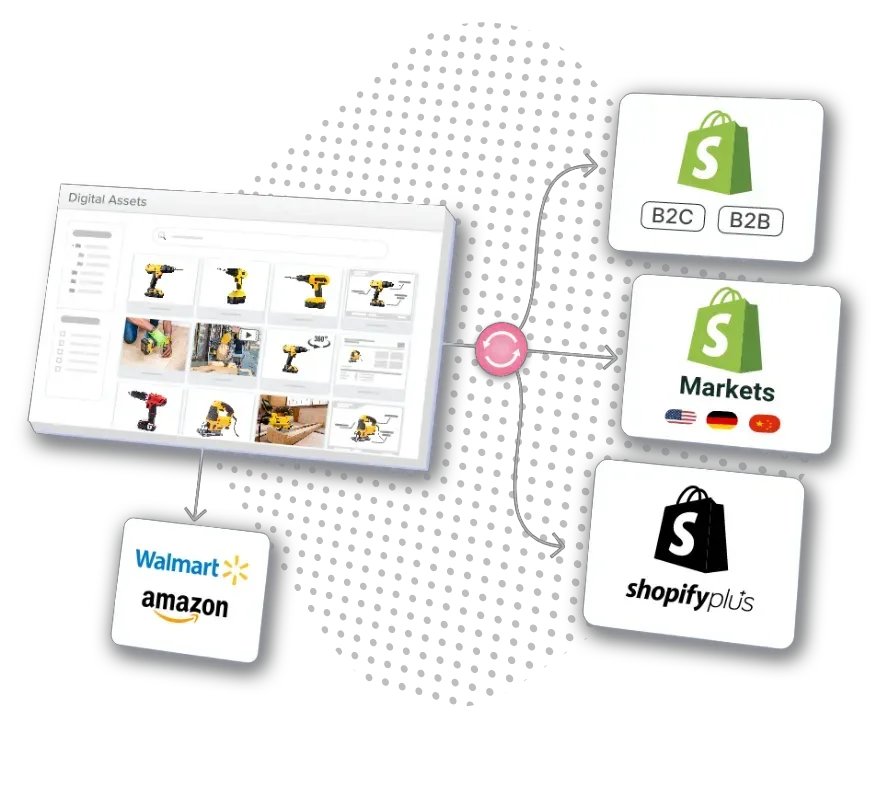
One PIM, every channel: Shopify B2C and B2B stores, Shopify Plus, Shopify Markets, and marketplaces like Walmart and Amazon, all synced from the same record.
The channel list now includes AI. Shopify launched Agentic Storefronts in its Winter ’26 Edition, and its Spring ’26 Edition put eligible merchants in Shopify Catalog and the Universal Commerce Protocol, an open standard built with Google, by default.
On Shopify’s Q4 2025 earnings call, President Harley Finkelstein said orders from AI search were up 15 times since January 2025, from a small base. Catsy’s PIM for omnichannel is built for this manage-once approach.
5. When Spreadsheets Stop Keeping Up
Spreadsheets work with 20 products and break at 200. People overwrite each other and work from old copies. Shopify also raised the product variant limit from 100 to 2,048 per product in October 2025.
More variants mean far more combinations to keep accurate and make clear rules for parent vs. SKU attributes essential. A product information management system handles this with bulk editing, validation rules, readiness checks, and a change history that makes mistakes easy to undo.
Catsy’s PIM and DAM workflow templates add repeatable steps for launches, updates, and end-of-life phase-outs.
See how Catsy keeps thousands of variants accurate.
These Data Problems Now Affect AI Shoppers
AI agents can now search Shopify catalogs, compare products, and build carts for buyers. They read structured fields, not page design, and they cannot guess what a blank field means. A stale stock count, a missing size, or a photo on the wrong variant can drop a product from consideration.
Catsy’s guide to what AI agents see through Shopify MCP includes an eight-point readiness audit.
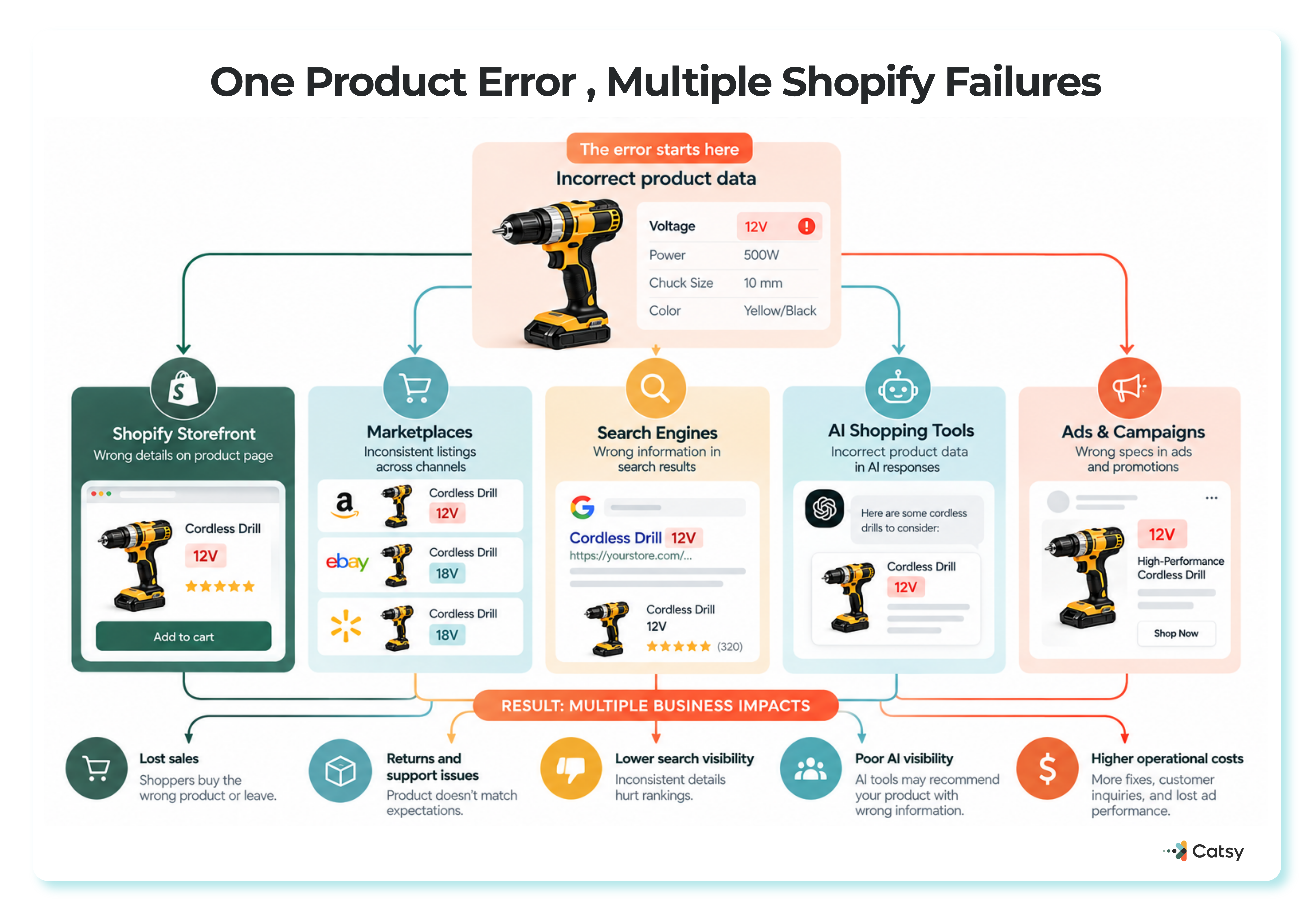
One wrong spec at the source ripples out to the storefront, marketplaces, search, AI shopping tools, and ads — costing sales, returns, and visibility all at once.
B2B catalogs are especially exposed because key specs often sit in PDFs. Understand why unstructured product data leaves B2B catalogs invisible to AI shopping agents. The next five issues are technical, but they cost sales just as quietly.
6. A Slow Store
Too many apps and missing browser caching commonly slow a store. Caching, a CDN, and fewer apps help, especially for mobile shoppers.
Google now measures responsiveness with Interaction to Next Paint (INP), which replaced First Input Delay on March 12, 2024. Heavy app scripts can hurt INP even after a page looks loaded.
Shopify recommends a Lighthouse audit to find render-blocking app scripts, then removing, delaying, or replacing them with built-in features.
7. SEO Gaps That Start With Product Data
Weak meta titles, missing meta descriptions, and no keyword focus cause many basic Shopify SEO issues. Write a unique, keyword-focused title and description for each product, and track results in Google Analytics 4, which replaced Universal Analytics in July 2023.
Google’s merchant listing structured data applies to pages where shoppers can buy, and it supports details such as shipping and return policies. Those facts must exist as clean fields first.
Specs buried in descriptions also hide products from filters, as Catsy’s guide to faceted search and product data shows, but having effective SEO tools can help manage product keywords and image metadata in one place.
8. Too Many Apps (and Too Many Pop-Ups)
Every app adds code, and too many pop-ups wear down trust. Shopify requires that an App Store app not lower storefront Lighthouse scores by more than 10 points. It tests each app on its own, though, so several passing apps can still slow a store.
Audit your apps regularly. Remove apps that are unused, overlap with others, or duplicate a native Shopify feature. Delay apps needed only on some pages, and keep the business-critical ones.
9. Broken Links After Products Change
Broken links frustrate shoppers and signal poor maintenance to search engines. Common causes include deleted products, changed URL handles, and replatforming. The fix is a 301 redirect.
Shopify notes that redirects only work from URLs that return a 404 error. Stores can create up to 100,000 of them (20,000,000 on Shopify Plus) and import them in bulk with a CSV file.
Plan redirects before products disappear, and review them quarterly. Catsy’s guide to managing seasonal and discontinued SKUs shows how lifecycle fields keep retired products out of search and feeds.
10. Checkout Friction
Baymard Institute puts the average documented cart abandonment rate at 70.22% across 50 studies. Among US shoppers who left for reasons other than just browsing, the most common were:
| Reason for leaving | Share |
|---|---|
| Extra costs (shipping, tax, fees) too high | 40% |
| Did not trust the site with card details | 19% |
| Had to create an account | 18% |
| Checkout too long or complicated | 17% |
| Site errors or crashes | 17% |
Clear costs, guest checkout, and familiar wallets like Apple Pay address several of these. Shopify reported a 39% year-over-year rise in Shop Pay sales over Black Friday Cyber Monday 2025.
Citing a study it arranged with an unnamed consulting firm, Shopify also says Shop Pay can lift conversion by up to 50% compared with guest checkout. Treat that as a vendor claim.
Shopify Scripts stopped running on June 30, 2026, after editing ended on April 15. Confirm that any Scripts-based rules were rebuilt as Shopify Functions.
Habits That Keep a Store Healthy
Healthy stores review their data regularly, use built-in Shopify features before adding apps, and automate repetitive work. Catsy’s Shopify PIM best practices support a simple routine:
- Monthly: check Core Web Vitals.
- Quarterly: audit apps and redirects.
- Before each launch: score products for completeness.
- After platform changes: retest checkout.
- Ongoing: review your AI channels in the Agentic Storefronts settings.
See your Shopify catalog the way shoppers and AI agents see it. Catsy’s Shopify PIM syncs product data, metafields, and assets to Shopify from one source of truth.

A Catsy customer tagging their cordless drill catalog by category and type, so every channel works from the same structured data.
Fix these issues at the source
Catsy’s Shopify PIM keeps inventory, product details, images, and metafields in one place, synced to every channel your shoppers and AI agents use. Book a free demo.