7 Optimization Tips to Increase Conversions on Google Shopping
Boost Google Shopping conversions with 7 feed optimization tips for titles, GTINs, images, custom labels, and the 2026 Merchant Center changes.
Table of Contents
Key Terms to Know
Expand the glossary for this article
Click-through rate (CTR): The share of people who see your ad and click it.
Custom labels: Tags you add to products in your feed to group them in campaigns. Shoppers never see them.
Digital asset management (DAM): Software that stores product images, videos, and files and keeps them with the right products.
Google Merchant Center: The Google tool where you upload, check, and manage the product data behind Shopping ads and free listings.
Google product category (GPC): Google’s own list of product categories. Google assigns one to each product automatically.
GTIN: Global Trade Item Number, the number behind a product’s barcode, such as a UPC.
Merchant API: Google’s current way for software to send product data to Merchant Center. It replaced the Content API for Shopping.
Performance Max: A Google Ads campaign type that runs ads across Google’s channels from one campaign.
Product information management (PIM): Software that stores product data in one place and sends it to every sales channel.
Supplemental data source: A second data source that adds or updates details for products already in your main feed.
Google’s Shopping Graph held more than 50 billion product listings, and a Google shopping executive said people shop across Google more than a billion times a day [TO FILL: this specific “a billion times a day” attribution could not be independently confirmed against the cited source during this pass]. In a 2017 Survata (now Upwave) survey of 2,000 U.S. consumers, 49 percent began product searches on Amazon and 36 percent on a search engine, putting about 85 percent of U.S. shoppers on Amazon or a search engine like Google at the start of their search.
With rising ad costs, being listed is not enough. The quality of your product feed decides which products win the click.
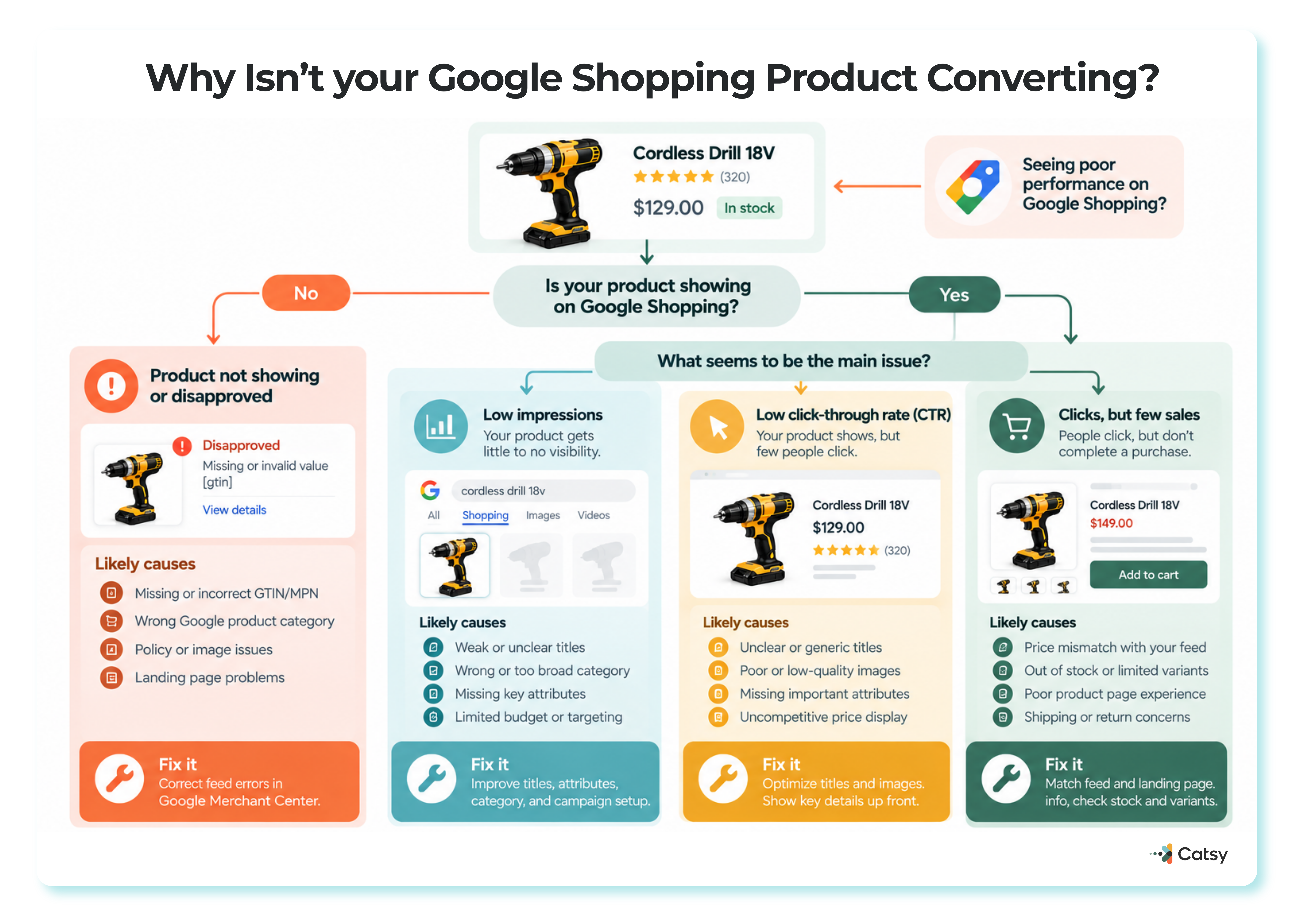
Start with one question — is it showing at all? — then branch to the real cause: a disapproved feed, low impressions, weak CTR, or a landing page that loses the sale.
Your Feed Decides When Your Ads Appear
Google Shopping ads do not use keyword bidding. Google reads your product feed and decides which searches each product matches. Strong data brings a higher CTR, better carousel placement, a lower cost per click (CPC), and a better return on ad spend (ROAS). So vague data leaves revenue on the table.
| Feed element | Details that matter most | What it affects |
|---|---|---|
| Titles | Brand, gender, material, size, color, MPN | CTR, relevance, impressions |
| Descriptions | Features, compatibility, materials, warranty | Ad quality, conversion rate |
| Identifiers and category | GTIN, brand, MPN, Google product category | Feed health, ad approval |
| Images | High resolution, plain background, one image per variant | CTR, conversion rate |
| Custom labels | Margin, season, clearance, top sellers | ROAS, CPC, budget split |
| Landing pages | Price, availability, variant options | Conversion rate, approval |
1. Write Titles That Match How People Search
❌ “Running Shoes – Men’s”
✅ “Nike Men’s Air Zoom Pegasus 39 Running Shoes – Black, Size 10”
The first could describe thousands of products. The second names the brand, model, audience, color, and size. Lead with brand and product type, add key attributes, and keep one order per category. Google’s Keyword Planner shows which terms shoppers use.
Google accepts titles of up to 150 characters but shows only up to 70 on Shopping ads and free listings, so put the important words first. Titles drafted with generative AI belong in the structured_title attribute, and a person should still review AI-drafted product content before it publishes.
Apparel: [Brand] + [Gender/Age Group] + [Product Type] + [Color] + [Size] + [Material]
Electronics: [Brand] + [Model/Series] + [Product Type] + [Key Spec] + [Color]
Home Goods: [Brand] + [Product Line] + [Dimensions] + [Material] + [Color]
Industrial: [Brand] + [Product Type] + [Key Spec] + [Material] + [MPN]
For apparel, a PIM built for fashion catalogs supports bulk edits across variants, which keeps titles consistent.
2. Give Descriptions Real Substance
Descriptions count for less than titles, but they help a shopper decide. Lead with benefits and the features that set the product apart, and include details people search for, such as size, compatibility, materials, and warranty. Match your landing page and cut the fluff.
Google recommends about 500 to 1,000 characters, with key details in the first 160 to 500. In May 2026, it also encouraged retailers to use conversational attributes that reflect how people now search. Catsy’s SEO tools keep product keywords and metadata in one place.
Make Catsy DAM and PIM software an extension of your team.
3. Clean Up Your Data in Google Merchant Center
Start with these checks:
- Valid GTINs and MPNs (manufacturer part numbers)
- The correct Google product category
- Titles and descriptions that agree
- Regular reviews of feed diagnostics
- A supported format, such as XML, Google Sheets, or an API connection
Google assigns a product category automatically, so set one only when Google gets it wrong. If your categories differ from Google’s, map them instead of rebuilding them, as Catsy’s article on why product taxonomies break down as catalogs grow explains.
Google says each color or size variant needs its own unique identifier. If you lack a GTIN, leave it blank rather than entering an internal SKU. Check this guide to parent vs. SKU attributes shows where variant fields belong. For small fixes, a supplemental data source can update details such as price without touching the main feed.
Google sunset the Content API for Shopping on August 18, 2026, and since September 1, 2026, it has been intermittently rejecting requests from projects without an approved extension. Custom scripts and older plugins must move to the Merchant API. Catsy compares API and template-based feed delivery if you are choosing a method.
Where a PIM helps. Spreadsheets break down once a catalog reaches thousands of SKUs. A PIM such as Catsy applies customizable validation rules through its product data governance tools and flags errors before anything publishes.
Approval workflows send changes to the right reviewers. A completeness scoring and readiness reporting will show which products still have gaps, and nightly or custom daily syncs keep channels current. A PIM will not invent a missing GTIN, but it shows you the gap before Google does.
4. Treat Images as Your First Impression
Shoppers see the image first. Use 800 x 800 pixels or larger on a clean white background, show several angles, and skip watermarks and promotional text, which Google may reject. Keep lifestyle shots for your product page, and give each variant its own image.
The current minimum is 100 x 100 pixels, or 250 x 250 for apparel [TO FILL: this specific current-minimum figure could not be independently confirmed against Google’s own image specification page during this pass — that page states only the upcoming 2027 requirement]. Under the 2026 product data specification update, every image must be at least 500 x 500 pixels from January 31, 2027, with warnings since April 14, 2026. The same update added an optional video_link attribute.
Google recommends about 1500 x 1500 pixels, with the product filling 75 to 90 percent of the frame, and AI-generated images must carry metadata saying so. An 800 x 800 image clears the 2027 minimum but not that recommendation, so upgrade best sellers first. Catsy’s asset transformation tools generate channel-sized images, and digital asset management keeps each image with its product record.
5. Use Custom Labels to Spend Where It Pays
Not every SKU deserves the same budget. Group products by margin, season (Winter 2026, Clearance), or performance (Top Sellers), or split-test titles and pricing.
Google allows five custom labels per product, with up to 1,000 values each, in Performance Max, Shopping, and Demand Gen campaigns. Give each label one job.
Seasonal labels must also be retired on time, as Catsy’s guide to managing seasonal and promotional SKUs explains.
6. Does Your Landing Page Match the Ad?
Before spending more, check:
- Does the title match the ad?
- Is the price the same and easy to find?
- Do the variants match the feed?
- Is it in stock?
Make the buy button easy to spot, test on phone and desktop, and add reviews and specs. If your page price differs from your feed, Google may disapprove the product.
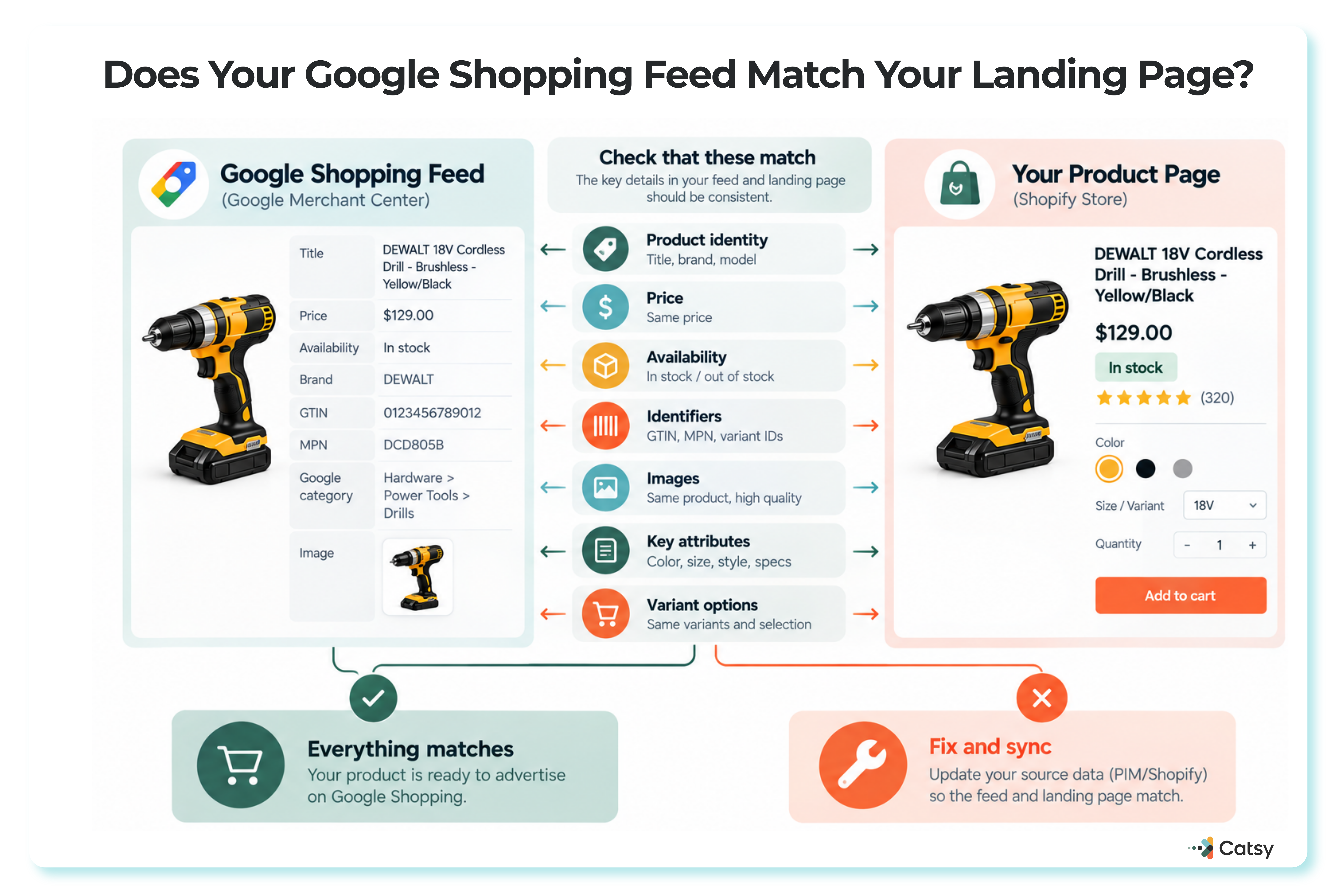
Line up the feed against the live page field by field — title, price, stock, identifiers, images, variants — before spending another dollar on the ad.
A PIM for omnichannel selling pushes price, stock, and content changes to every channel at once. The same attributes also power the filters on your site, as Catsy explains in what faceted search needs from your product data.
7. Review Performance and Keep Adjusting
A feed is never finished. Track impressions, CTR, conversion rate, CPC, search impression share, top queries, and ROAS by product group. Pause weak products, adjust bids, fix low-CTR titles and images, and shift budget to segments that convert.
Performance Max with smart bidding works best with clean product data. In January 2025, Google began rolling out campaign-level negative keywords to all advertisers and added more search terms reporting. Block wasteful queries and reuse winning terms in titles.
Tools and Recent Google Changes
Catsy PIM centralizes and enriches product data and lets you syndicate clean product data to Google Merchant Center through its channel connections. Merchant Center diagnostics catch feed errors, search terms reports show real queries, and GA4 tracks conversions.
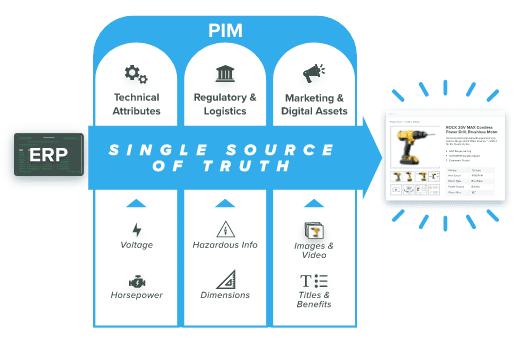
ERP data becomes one finished listing once a PIM sorts it into technical specs, regulatory details, and marketing assets — the same record that feeds Google Shopping.
The feed also reaches beyond ads, since Google’s AI Mode shopping experience draws on the Shopping Graph. Through the Universal Commerce Protocol, Google is expanding checkout directly on Google, and the retailer stays the merchant of record. Google also announced AI performance insights in May 2026, a Merchant Center report on how products appear in AI Mode, AI Overviews, and Gemini. Google says it will roll out in the U.S., Canada, Australia, India, and New Zealand in the coming months.
What this looked like for one electronics brand. [TO FILL: this example is presented in the source as an anonymized illustration, not a named, independently verifiable Catsy case study — the company is not identified and the figures below could not be confirmed against a public source during this pass]
A mid-size, direct-to-consumer electronics company with high CPCs and low ROAS ran a full feed audit through a PIM. It rewrote titles with brand, model, and specs, added high-resolution images for every variant, improved descriptions, labeled top sellers, and corrected GTINs and categories. ROAS rose 42 percent, CPC fell 18 percent, and the conversion rate climbed from 2.1 to 3.7 percent.
Better data beats bigger budgets. Google Shopping success depends more on data quality than on spend. A messy feed cannot compete with brands that keep refining their data. A strong PIM, a clean Merchant Center feed, and smart segmentation can help you convert more while spending less.
For more tips, watch our videos on YouTube, follow us on LinkedIn, or join us on X.
Ready to optimize your Google Shopping feed?
Catsy’s PIM + DAM platform helps e-commerce brands deliver enriched, channel-ready product content everywhere, including Google Shopping. Book a personalized demo.