Best PIM for Shopify Plus: Complete Guide for Multi-Store Merchants
Shopify Plus covers up to 10 stores, but each holds its own product data. See how a PIM syncs content, specs and assets across every storefront in 2026.
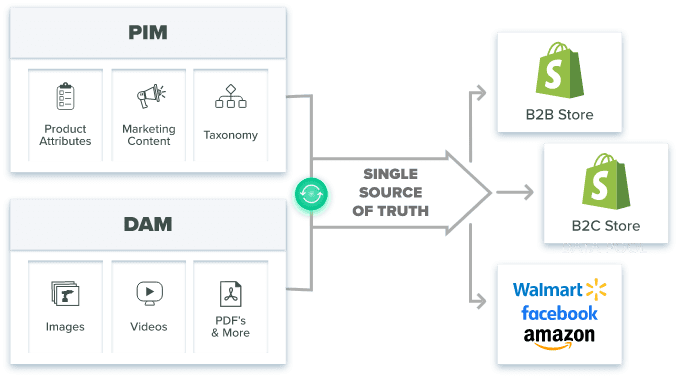
Table of Contents
Key Terms to Know
Expand the glossary for this article
Agentic Storefronts: A Shopify feature, introduced in December 2025, that lets merchants sell inside AI chat platforms such as ChatGPT and Microsoft Copilot.
API (application programming interface): The official connection that lets software such as a PIM read and write data in Shopify.
Digital asset management (DAM): A central library for product images, videos, and documents, with version control and channel-ready file sizes.
Enterprise resource planning (ERP): Back-office software that stores SKUs, costs, and inventory, and often feeds basic product data into a PIM.
Expansion store: An additional storefront on a Shopify Plus account; a Plus contract includes one main store and nine expansion stores.
Metafield: A custom field in Shopify for product details the standard form does not cover, such as fabric weight or wattage.
Product information management (PIM): Software that stores, checks, and enriches product data in one place and sends it to every sales channel.
Shopify Catalog: The Shopify service that structures and sends merchant product data to AI shopping platforms.
Shopify Markets: Shopify’s tool for adjusting currency, language, pricing, domains, taxes, and product availability by region.
Variant: One version of a product, such as a shirt in a specific size and color; Shopify allows up to 2,048 variants per product.
One Shopify store is a design and marketing job. Ten stores in different countries is a data job.
Shopify Plus gives you the stores but not one place to manage what they say about your products. That gap is what product information management (PIM) software fills.
Shopify Plus includes a main store plus nine expansion stores, but each store keeps its own product records. Shopify Markets and its duties settings handle checkout currency, rounding and duties. A PIM handles everything before that: localized descriptions, specs, metafields, digital assets and ERP data, written once and sent to every storefront.
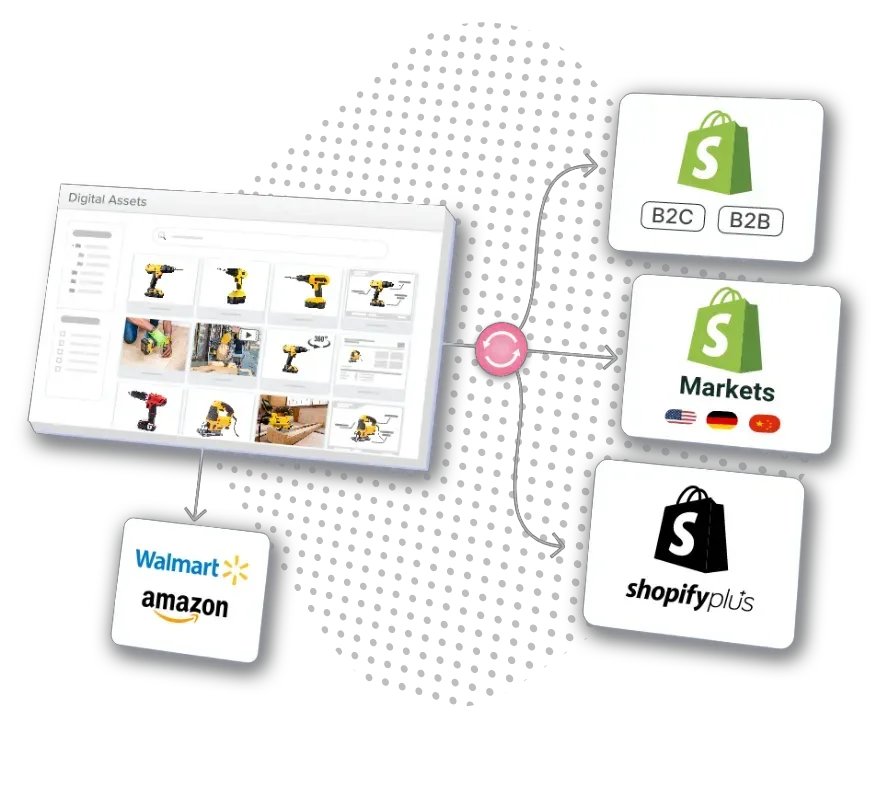
One PIM, every channel: Shopify B2C and B2B stores, Shopify Markets, and marketplaces like Walmart and Amazon, all synced from the same record.
Ten Stores Means Ten Copies of Every Product
Counts of Shopify Plus stores vary by method. DemandSage reports 85,334 live Plus stores using BuiltWith data. StoreLeads, which counts more strictly, tracked 55,964 Shopify Plus domains in February 2026, owned by roughly 37,300 merchants, so many brands run more than one storefront.
Each storefront is its own product database, with its own translations, local prices, units and compliance rules, such as CE marking in Europe or FDA requirements in the US.
A one-minute price change in one store must be repeated across all ten. A task that took 30 minutes for one store can take hours for ten, and details drift out of sync. Multi-store guides list complex inventory among the main challenges of running several stores.
According to 2025 consumer research cited in Shopify’s 2026 PIM guide, 75% of consumers think less of a brand when product information is incomplete or wrong, and 44% have abandoned a purchase because of it.
Spreadsheets cannot sync in real time, route approvals or keep version history, and they offer no data enrichment features. Shopify itself adds a weak spot: tags are free-text fields with no validation, so one typo becomes a mismatch across stores.
Since October 2025, Shopify allows up to 2,048 variants per product, up from 100, which means even more SKUs to keep consistent.
Shopify Markets and a PIM Do Different Jobs
According to Shopify’s Help Center, Shopify Markets adjusts currency, language, pricing, product availability, domains, theme content and taxes by audience, and it can round converted prices. A separate setting collects duties at checkout. Markets does not write, check or improve product content.
| Task | Shopify Markets (native) | PIM (e.g., Catsy) |
|---|---|---|
| Checkout currency and price rounding | Yes | Supplies base and market prices |
| Duties at checkout (Shopify duties settings) | Yes | No |
| Localized marketing descriptions | Stores them | Creates, translates, approves |
| Technical specs and attributes | Limited to metafields | Unlimited structured attributes |
| Metafield mapping across stores | Per store | Mapped once, synced to all |
| Digital assets | Per store | Central DAM, auto-resized |
| ERP data intake | Through apps | Inbound ERP feeds |
| Completeness checks before publishing | No | Completeness scoring and rules |
Markets decides how a product is sold in each region. A PIM decides what is said about it.
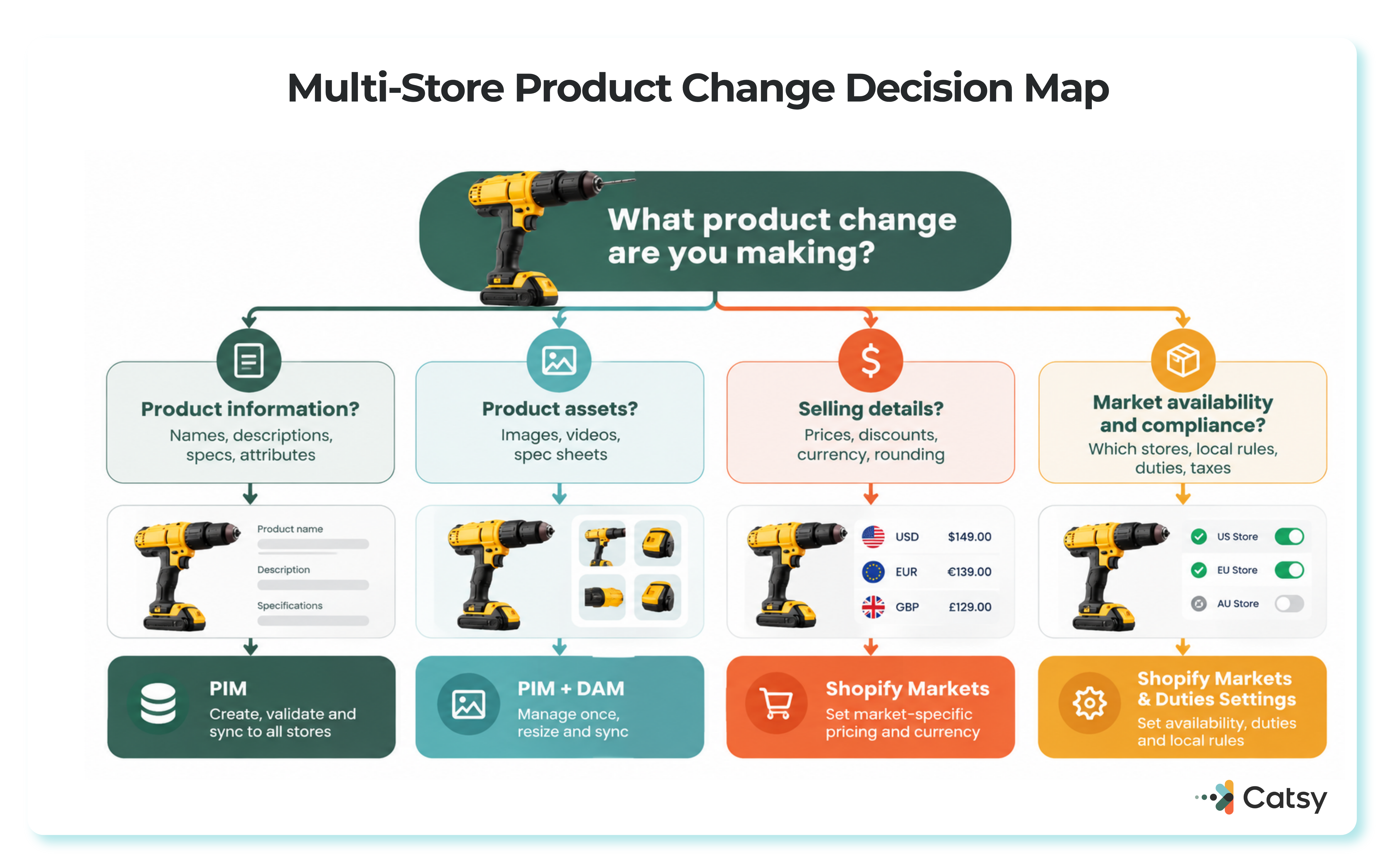
Markets and PIM split the work by the kind of change you’re making: content and specs go to the PIM, pricing and compliance stay with Shopify Markets.
Start With One Master Record
A PIM works like a hub with spokes: one central system feeds every storefront. The best PIM for Shopify builds this around a master record holding fixed facts like SKU, dimensions and materials, with market versions for price, description and compliance notes. A comprehensive PIM platform syncs videos and spec sheets too.
Rules decide where each product appears. A winter coat might sell in Canada and Northern Europe but not in Australia, and the PIM applies that automatically. The same kind of rules can assign categories and images.
Localization covers more than translation:
- Prices: take the GBP price, multiply by 1.5 for Australian dollars, account for local taxes and round to a familiar price point.
- Language: translations sit in one place, so products launch in every market the same day.
- Units: 8 ounces in the US becomes 227 grams in Europe automatically.
Shopify’s PIM guidance stresses keeping product information consistent across channels while adapting it for each market. A PIM enforces shared standards, lets local teams adjust marketing angles, and sends changes through multi-stage review processes before anything goes live.
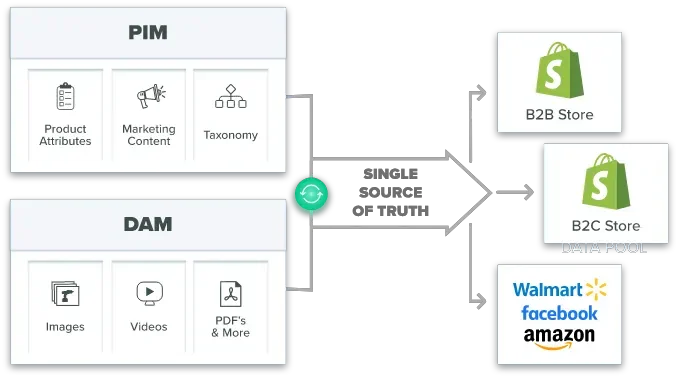
PIM and DAM feed one single source of truth, which publishes out to every B2B and B2C storefront and marketplace.
Features That Matter for Shopify Plus
A real Shopify connection. Look for API-based two-way sync (an API is the official way software talks to Shopify) and scheduled publishing, so a collection can go live at 9 AM local time in New York, London, Tokyo and Sydney. Metafield support is essential, since Shopify Catalog uses metafields to prepare products for AI channels. Confirm the connector uses current GraphQL product APIs, because Shopify notes that older apps may break on products with more than 100 variants.
Store-level control without duplicate records. One record should carry store-specific prices and availability and also feed Amazon, eBay and wholesale portals. That makes a consistent omnichannel strategy possible. Bulk editing turns days of updates into minutes.
Asset management. Photos and videos need a central digital asset management (DAM) library. Good tools also create appropriately sized images for different channels. Catsy’s asset transformation tools publish files to Shopify at the right size, with alt tags.
Quality checks. Accurate data removes barriers to conversion. Completeness scoring, validation rules and approval workflows catch errors before products go live.
Shopify Plus on Its Own vs. With Catsy
| Task | Native Shopify Plus | Shopify Plus + Catsy PIM |
|---|---|---|
| Where product data lives | Separately in each store’s admin | One central PIM + DAM record |
| Changing a product everywhere | Repeat per store, or CSV import/export | Edit once, sync by API |
| Error prevention | Few rules; tags are free text | Validation rules and completeness scoring |
| Images and files | Uploaded per product, per store | Central DAM, resized with alt tags |
| Approvals and ERP data | Staff permissions; ERP through apps | Workflows, role-based access, audit history, ERP feed |
| Other channels | A separate app per channel | Sent from the same record through Catsy channel syndication |
Catsy’s Multi-Store plan connects several Shopify stores and marketplaces by API, and its Enterprise plan adds managed onboarding for teams that need an enterprise PIM for multi-store Shopify Plus workflows.
Rolling It Out in Phases
Good rollouts move in stages, make data ownership clear and deliver improved data accuracy and faster launches.
Take stock. Map where product data lives and where errors start, then choose features. Shopify’s PIM evaluation guidance suggests weighing onboarding, integrations, real-time sync and vendor limits. Agree early that currency and rounding stay in Markets while product content moves to the PIM.
Clean and move the data. Fix errors first, start with one category, and test in a staging environment (a private copy of the store). Catsy’s guide on how to successfully implement a PIM in your Shopify store covers this in detail.
Set rules and train people. Decide who can edit and publish each type of data, using Catsy’s data governance roles. Training should explain why the system helps, not just which buttons to click.
Keep improving. Automate more tasks and track accuracy and time to publish. Catsy’s Shopify PIM best practices cover ongoing routines.
What the Investment Pays Back
Shopify has reported that companies using a PIM save 50% of the time they once spent updating product information. For a 10-store team spending 20 hours a week on updates, that frees 520 hours a year. [TO FILL: this 50% time-savings figure could not be independently confirmed against a current Shopify source during this pass — original text preserved]
In Catsy customer case studies, one manufacturer reported a 70% reduction in time-to-market. [TO FILL: a matching Catsy case study with this exact 70% figure for a manufacturer could not be located during this pass — the closest verified case study, Varaluz Lighting, reports a 77% reduction in collection-launch time; original text preserved] An 11th store takes little extra effort, which supports international expansion without operational chaos. Returns can drop as well: in 2025 research cited by Shopify, 59% of consumers said they had returned a product because the online description was misleading or inaccurate.
The best PIM for Shopify Plus also lets you react to market changes in every store at once and grow without adding staff at the same rate. Mordor Intelligence estimates the PIM market at $19.95 billion in 2026, reaching $37.39 billion by 2031. For the other side of the math, see the cost of not using a PIM for your Shopify store.
AI Shopping Assistants Now Read Your Catalog
In its Winter ’26 Edition announcement on December 10, 2025, Shopify introduced Agentic Storefronts, letting merchants sell in ChatGPT, Perplexity and Microsoft Copilot through Shopify Catalog. By March 24, 2026, Shopify said products were discoverable in ChatGPT by default, and select brands had started selling in Google AI Mode and the Gemini app.
AI agents ignore page design and compare titles, attributes, variants and availability field by field. A missing attribute in one store can keep products out of that market’s recommendations. Catsy applies validation rules and completeness scoring before products sync to Shopify. Read more in Catsy’s guide to Shopify MCP and agent-ready catalogs.
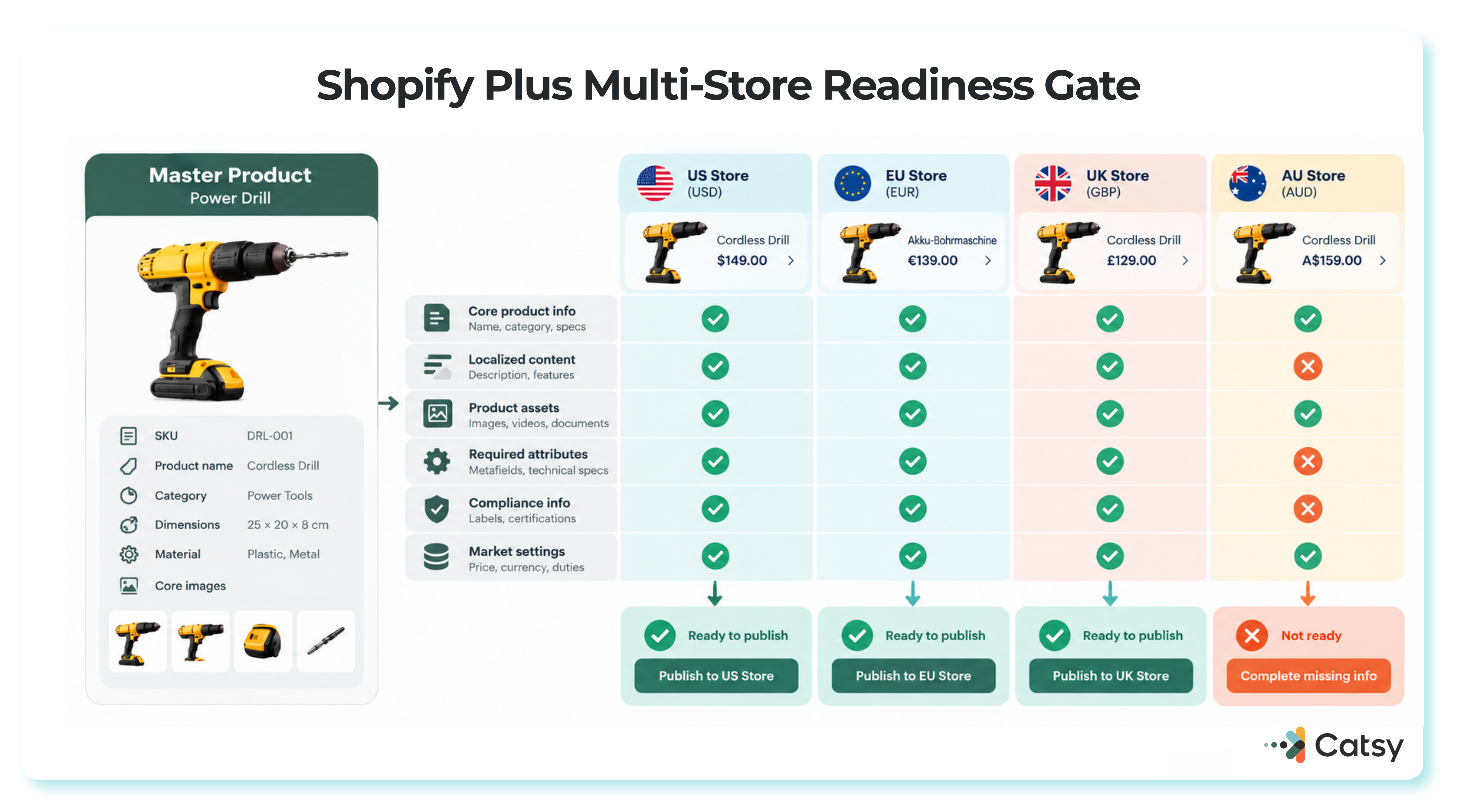
Every store gets its own completeness check before it’s marked ready to publish — one missing attribute and that storefront stays blocked.
Where to Go From Here
Product content is what breaks first as you add stores. A PIM fixes it by giving every channel the same checked record, but the rollout and clear data ownership decide whether it works. Catsy’s Shopify PIM combines PIM and DAM with multi-store API sync and full metafield support. Book a demo to see your own catalog mapped across your storefronts.
Key Takeaways
See your catalog mapped across every storefront
Catsy’s Shopify PIM connects multiple Plus stores and marketplaces by API, with a built-in DAM, completeness scoring and metafield mapping. Book a demo or browse Catsy’s Multi-Store and Enterprise plans.