
Product Information Management (PIM): The Complete Guide
Everything you need to know about centralizing, enriching, and distributing product data across every channel where customers buy — from definition to implementation.
- Ceejay S Teku
- March 29, 2026
- 8:19 pm
Table of Contents
📋 What You'll Learn
✓ What product information management is — as both a business discipline and a software category
✓ The seven types of product data a PIM system manages and why each matters
✓ How PIM works in practice: the four-stage workflow from ingestion to distribution
✓ Measurable benefits, including faster time to market, lower return rates, and reduced data errors
✓ A readiness checklist to determine if your organization needs PIM software
✓ How to evaluate, select, and implement the right PIM solution for your business
Product details live in several spreadsheets. Images and PDFs are scattered across shared drives, dropbox and desktops. Your Shopify listings could say one thing, while Amazon catalog could says another, and the print catalog could be a little different.
A lot of companies we help have problems along these lines that product information management solutions are built to solve.
Product information management (PIM) is the process of centralizing, completing, enriching, and distributing product data across the organization and every channel where customers buy. PIM software creates a single source of truth for product content — replacing scattered spreadsheets and siloed systems with automated workflows that keep every listing accurate, complete, and consistent.
This guide is the definitive resource on product information management — what it is, how it works, who needs it, and how to evaluate and implement it. Whether you’re an ecommerce manager drowning in spreadsheets, a marketing director trying to launch products faster, or an operations leader building the business case for a PIM system, everything you need is here.
We’ve structured this as a practical reference you can bookmark and return to. Each section answers a specific question. Skip to what matters most, or read end to end for the complete picture.

Challenge: Complex technical specifications, compatibility matrices, rapid product cycles, and frequent firmware/software updates that change product capabilities.
PIM value: Structured specification management, automated marketplace feeds, and version-controlled product data that keeps up with rapid product iteration.
What Is Product Information Management?
Product information management is two things at once. It’s a data discipline — the practice of governing product data across teams, systems, and sales channels. And it’s a technology category — the PIM software that makes that discipline possible at scale.
Think of it as the difference between “accounting” and “accounting software.” One is the practice, the other is the tool. You can do product data management with spreadsheets and email chains (many companies do), but eventually, the complexity breaks you.
The Big Picture: The core concept is simple: a centralized repository where all your product data lives, gets completed, enriched, and then distributed to every channel that needs it. One source of truth. No more conflicting specs. No more asking the question “which version is the right one?”
The need for dedicated PIM systems grew out of a very specific moment in commerce. For decades, product data lived inside ERP item masters — basic SKU records, cost fields, and inventory counts. That worked fine when brands sold through one or two channels.
Then ecommerce exploded. [McKinsey documented](https://www.mckinsey.com/capabilities/growth-marketing-and-sales/our-insights/accelerating-retail-transformation-to-win-digital-first-consumers) that ecommerce adoption compressed a decade’s worth of growth into just three months during 2020 — a phenomenon they called “the quickening.” Suddenly, brands needed rich product content for Shopify, Amazon, Wayfair, Walmart Marketplace, their own DTC site, print catalogs, and dealer portals. ERPs weren’t built for that. Spreadsheets couldn’t keep up. Product information management systems filled the gap.
Today, modern PIM platforms go well beyond basic data storage. They handle workflow automation, data validation, multi-channel syndication, and localization — everything required to manage product data across complex, multi-channel operations.
🔵 Some modern PIM platforms, like [Catsy](https://catsy.com/product-information-management-system), have taken this further by integrating PIM and DAM natively — managing structured product data and rich media assets in a single system rather than requiring separate tools. It’s a reflection of how the category has evolved from pure data management to full product content management.
What Data Does a PIM System Manage?
When people hear “product data,” they usually think SKU numbers and prices. In reality, a PIM system manages seven distinct categories of product information — and each one plays a critical role in how customers discover, evaluate, and buy your products.
Technical Data
Specs, SKUs, variant attributes, and compliance certifications. This is the factual backbone of every product record. Think about an industrial pump manufacturer listing 2,000 SKUs — each needs horsepower ratings, flow rates, pipe sizes, and material compatibility data. Get one spec wrong and you’re shipping a pump that doesn’t fit the application. Technical data is the foundation that every other data type builds on.
Marketing and Emotional Data
Product descriptions, brand storytelling, feature highlights, SEO-optimized content, and benefit-driven copy. This is the data that sells. A product’s technical specs tell the buyer what it is. Marketing data tells them why they need it. This includes everything from Amazon bullet points to lifestyle-driven product narratives for your DTC site.
Product Usage Data
How-to instructions, installation guides, care and maintenance information, application notes, and compatibility details. For products where the post-purchase experience matters — furniture assembly, electronics setup, industrial equipment installation — usage data directly impacts return rates and customer satisfaction.
Product Usage Data
How-to instructions, installation guides, care and maintenance information, application notes, and compatibility details. For products where the post-purchase experience matters — furniture assembly, electronics setup, industrial equipment installation — usage data directly impacts return rates and customer satisfaction.
Logistics Data
The data that is used in logistics and operations: dimensions, materials, weights, Unit of measures, MAP (minimum advertised price) rules, availability status, and lead times. When you sell through multiple channels with different pricing structures, managing this data in spreadsheets creates inevitable conflicts. A PIM system keeps pricing logic consistent across every distribution channel.
Categorization and Taxonomy
Product families, categories, tags, variant relationships, cross-sell and upsell associations, and collection groupings. Taxonomy is the skeleton of your product catalog — it determines how products relate to each other and how customers navigate your catalog. Strong taxonomy directly improves site search, filtering, and product discovery. For a deeper dive, see our guide to [catalog management software](https://catsy.com/blog/catalog-management-software/).
Localization Data
Translated product descriptions, regional compliance attributes, currency conversions, units of measure, and market-specific content. Brands expanding internationally need localization data that goes beyond simple translation — it includes adapting product content to local customer segments, regulatory requirements, and cultural expectations.
Digital Assets
Product images, lifestyle photography, videos, 3D renders, PDFs, spec sheets, and safety documentation. Digital assets are often the most operationally expensive product data to manage because they’re large, version-sensitive, and frequently updated. Many organizations manage product images and videos in entirely separate systems from their product data — which creates constant friction when assembling complete product listings.
🔵 This is where the PIM-DAM divide becomes operationally expensive. Platforms like [Catsy](https://catsy.com/product-information-management-system) address this by housing product data and digital assets as tabs within a single interface — so teams can view specs and lifestyle photography side by side without switching systems. For a deeper comparison, see our guide to [PIM vs. DAM](https://catsy.com/blog/pim-vs-dam/).
How Product Information Management Works
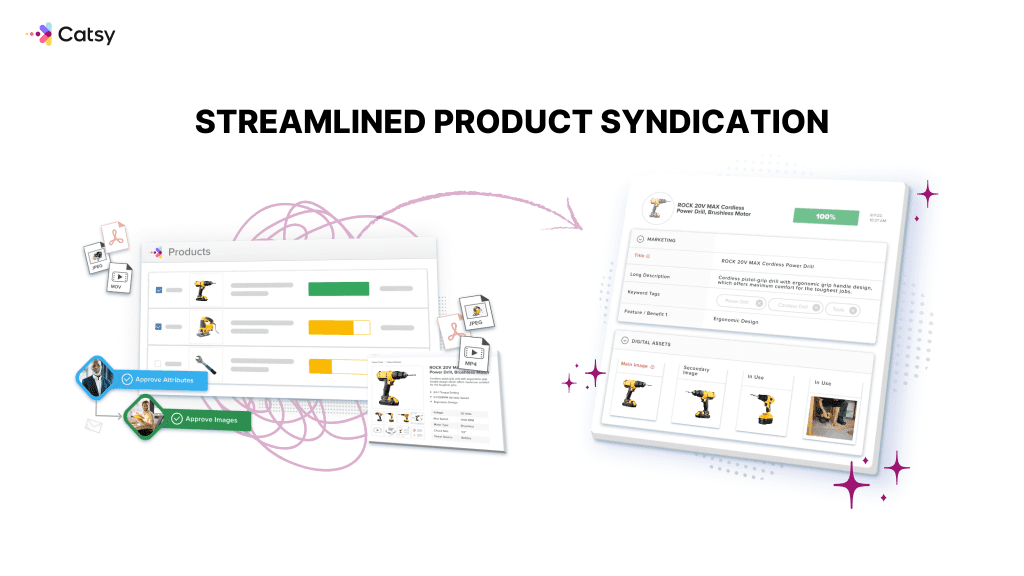
A PIM system works in four stages: collect and centralize, organize and govern, enrich and localize, then distribute and syndicate. Here’s what each stage looks like in practice.
1. Collect and Centralize
Data flows into the PIM from multiple sources — your ERP system, supplier spreadsheets, agency content, and manual entry. The PIM becomes the single repository where all your product data lives. Without this step, you’re working from five different “master” spreadsheets and hoping they agree with each other (they don’t).
2. Organize and Govern
Once data is centralized, the PIM applies your data model — validation rules, taxonomy structures, required attributes, role-based access, and approval workflows. This is where data governance happens. It’s the difference between a product record that’s “mostly filled out” and one that meets every channel’s requirements before it ever gets published.
3. Enrich and Localize
Teams add marketing descriptions, SEO content, translations, and associate digital assets with product records. Enrichment transforms raw product data into compelling product content that’s ready for commerce. This step is where marketing teams, copywriters, and content managers do their work inside the PIM rather than in disconnected documents.
4. Distribute and Syndicate
The enriched, validated product data pushes out to every sales channel — ecommerce platforms, marketplaces like Amazon and Wayfair, print catalogs, dealer portals, and mobile apps. Each channel gets the data in the format it requires, automatically. No more manual reformatting for every new marketplace listing.
What used to require manual data entry and reformatting across every channel now happens through integrations and automated workflows. Teams set up publish rules once, and the PIM handles distribution to multiple channels from a single action.
🔵 In practice, this workflow can move fast. Catsy customers like Leigh Country, an outdoor furniture retailer, reduced product launch timelines from 2–3 weeks to minutes once their PIM workflow was configured — with product data, images, and channel-specific formats all managed from a single publish action.

Benefits of Product Information Management
PIM benefits fall into six categories: better data accuracy, faster launches, fewer returns, stronger operational efficiency, revenue growth, and scalability. Here’s the detail behind each — with the data to back it up.
Data Accuracy and Consistency
A single source of truth eliminates conflicting product information across sales channels. When your Shopify store, Amazon listings, and distributor portal all pull from the same PIM record, inconsistencies disappear. This isn’t a minor operational improvement — [Gartner research](https://www.gartner.com/en/data-analytics/topics/data-quality) estimates that poor data quality costs organizations an average of $12.9 million per year. For product-driven businesses, a significant chunk of that cost comes from inaccurate product data creating downstream problems: wrong specs on marketplace listings, mismatched pricing between channels, and outdated product descriptions that confuse customers.
Accurate data also feeds every other system in your stack. When your PIM data is clean, the product feeds flowing to your ecommerce platforms, print catalogs, and dealer portals are clean too. Fix data accuracy at the source, and the ripple effect improves every channel downstream.
Faster Time to Market
Automated workflows cut product launch timelines from weeks to days. Instead of manually assembling product listings for each channel — finding the right images, writing channel-specific descriptions, reformatting spec sheets — teams publish across all channels simultaneously from the PIM. The result is dramatic compression of launch timelines, especially for brands managing seasonal collections or frequent new product introductions.
🔵 The gains can be dramatic. BAMA, an international manufacturer, achieved a 70% faster time-to-market after implementing [Catsy’s integrated PIM+DAM](https://catsy.com/product-information-management-system), largely by eliminating the data handoffs between separate product data and asset management systems.
Reduced Returns and Customer Complaints
Accurate product data means customers get what they expect. When product descriptions, images, dimensions, and specifications are correct and consistent across every channel, the “this isn’t what I ordered” returns drop significantly. For categories like furniture, apparel, and electronics — where return rates are already high — this is one of the fastest ROI drivers of PIM implementation.
Operational Efficiency
Teams stop wasting time on manual data entry and spreadsheet wrangling. [Research published in MIT Sloan Management Review](https://sloanreview.mit.edu/article/seizing-opportunity-in-data-quality/) puts the cost of bad data at 15% to 25% of revenue for most companies — driven largely by the labor of correcting errors, seeking confirmation in other sources, and dealing with downstream mistakes. A PIM system eliminates the repetitive tasks that consume your team’s bandwidth.
🔵 BrandJump, an agency managing 500,000+ SKUs across 35 manufacturers and 70+ retailers, saw a 70% faster product data turnaround after centralizing on Catsy — shifting their team from manual data wrangling to strategic work.
Revenue Growth
Better product content drives higher conversion rates. Complete, accurate, and compelling product listings outperform thin listings on every ecommerce platform. When customers can find detailed product details, high-quality images, and comprehensive specs — they buy. When product content is missing data or inconsistent, they bounce to a competitor who provides it.
The mechanism is straightforward: richer product content builds buyer confidence. A fully fleshed-out listing with multiple images, complete specs, lifestyle context, and clear descriptions reduces the perceived risk of an online purchase. For B2B buyers, where purchase decisions involve technical evaluation and multiple stakeholders, the quality of product data directly impacts whether your product makes the shortlist or gets filtered out.
Scalability
Add channels, SKUs, and markets without proportional headcount increases. This is the benefit that separates PIM from “just hiring more people.” When you expand from 500 SKUs to 5,000, or add three new marketplace channels, a PIM system handles the complexity through automation rather than additional staff. The same team that managed your Shopify catalog can now manage Shopify, Amazon, Wayfair, and Walmart simultaneously.
CTA: See PIM benefits in action. Explore how brands like Leigh Country and BrandJump transformed their product operations. [Read Catsy Customer Stories →](https://catsy.com/product-information-management-system)
Who Needs a PIM System?
PIM isn’t for every business. A company selling 15 products through a single Shopify store probably doesn’t need one. But once product data complexity crosses a certain threshold, PIM stops being optional. Here’s how to know if you’ve crossed it.
By Role
Ecommerce managers are managing product listings across platforms and dealing with constant data inconsistencies. Marketing teams are creating product content at scale and struggling to keep it consistent. Product managers are maintaining accurate specs and coordinating launch timelines across multiple channels. Operations and supply chain leaders are coordinating with suppliers and distributors who all send data in different formats. IT teams are trying to reduce integration complexity and eliminate data silos. C-suite executives are looking for revenue growth, operational efficiency, and a scalable data foundation for digital commerce.
The Readiness Checklist: Signs You've Outgrown Spreadsheets
If three or more of these apply to your organization, you’re ready for PIM software:
- You manage 500+ SKUs across 3+ sales channels
- Product launches take weeks of manual coordination
- Returns are increasing due to inaccurate product descriptions
- You’re expanding to new marketplaces (Amazon, Wayfair, Walmart)
- Multiple teams update product data in different systems
- You’re spending more time fixing data errors than creating content
- Your ERP handles product data, but it can’t manage rich content or digital assets
- Compliance requirements are increasing (GDSN, retailer-specific standards)
🔵 If three or more of these apply to your business, you’re likely ready for a PIM system. Mid-market platforms like [Catsy](https://catsy.com/product-information-management-system) are specifically designed for organizations managing 500–5,000 SKUs across 5–15 channels — the sweet spot where spreadsheets have become unsustainable but enterprise platforms feel like overkill.
By Industry
PIM serves a wide range of industries, each with distinct product data challenges. Retail and ecommerce brands need omnichannel consistency across DTC, marketplaces, and retail partners. Manufacturers manage complex technical specifications, certifications, and distributor portals. Fashion and apparel companies handle seasonal collections, size/color variant matrices, and heavy visual content. Home goods and furniture brands deal with lifestyle photography requirements and retailer-specific content standards. Consumer electronics companies navigate complex specs, compatibility matrices, and rapid product cycles. Distributors manage multi-brand product catalogs and dealer portals.
PIM vs. Other Systems: Key Differences
One of the most common questions in PIM evaluation is “how is this different from the systems we already have?” Here’s the short answer: PIM handles the product content layer — the rich, customer-facing data that drives commerce. Other systems handle different domains entirely. They complement each other; they don’t replace each other.
PIM vs. DAM (Digital Asset Management)
PIM manages structured product data — specs, descriptions, pricing, categorization. DAM manages unstructured digital assets — images, videos, PDFs, design files. Both are essential for complete product listings, which is why the integration question is one of the most important in PIM evaluation: do you buy two separate systems and integrate them, or find one platform that handles both? For the complete breakdown, see our [PIM vs. DAM comparison](https://catsy.com/blog/pim-vs-dam/).
🔵 The PIM vs. DAM question reveals a core architectural decision: buy two systems and integrate them, or find one platform that handles both? Organizations with heavy visual content needs — fashion brands launching seasonal collections, furniture retailers managing lifestyle photography — increasingly choose integrated PIM+DAM platforms like [Catsy](https://catsy.com/product-information-management-system) to eliminate integration overhead and reduce total cost of ownership.
PIM vs. ERP (Enterprise Resource Planning)
ERP systems are the operational backbone — finance, inventory, purchasing, orders. They handle transactional product data (cost, stock level, lead time). PIM handles experiential product data (descriptions, images, marketing content, channel-specific formatting). They work together: ERP feeds the PIM with base product records; PIM enriches them for commerce. For more detail, see our [PIM vs. ERP guide](https://catsy.com/blog/pim-vs-erp/).
PIM vs. MDM (Master Data Management)
MDM is an enterprise-wide data governance framework that spans all data domains — customer, product, supplier, location, financial. PIM is product-specific. If MDM is the governance strategy for all your organization’s systems, PIM is the deep-dive execution layer for the product domain within that strategy. Most mid-market companies need PIM first and adopt broader MDM later.
PIM vs. MDM (Master Data Management)
MDM is an enterprise-wide data governance framework that spans all data domains — customer, product, supplier, location, financial. PIM is product-specific. If MDM is the governance strategy for all your organization’s systems, PIM is the deep-dive execution layer for the product domain within that strategy. Most mid-market companies need PIM first and adopt broader MDM later.
PIM vs. CMS (Content Management System)
A CMS manages website content — blog posts, landing pages, site navigation. PIM manages product data for all channels, not just the website. Your CMS powers the storefront experience; your PIM feeds product data to that CMS and to Amazon, Wayfair, your print catalog, and every other distribution channel.
PIM vs. PLM (Product Lifecycle Management)
PLM manages the product development process — R&D, engineering, prototyping, and manufacturing. PIM takes over after development, managing product data for marketing and sales. PLM answers “how do we build this product?” PIM answers “how do we sell it across every channel?”
Quick Comparison Table
| System | Primary Focus | Data Types | Primary Users | Works With PIM? |
|---|---|---|---|---|
| PIM | Product content for commerce | Descriptions, specs, assets, pricing, taxonomy | Marketing, ecommerce, product teams | — |
| DAM | Digital asset storage & distribution | Images, videos, PDFs, design files | Creative, marketing teams | Yes — integrated or separate |
| ERP | Business operations | Inventory, orders, finance, cost data | Operations, finance, supply chain | Yes — feeds base product records to PIM |
| CMS | Website content | Pages, blog posts, navigation | Web, marketing teams | Yes — PIM feeds product data to CMS |
| MDM | Enterprise-wide data governance | All data domains (customer, product, supplier) | IT, data governance teams | Yes — PIM is product-specific MDM |
| PLM | Product development lifecycle | Engineering specs, prototypes, BOM | Engineering, R&D teams | Yes — PLM hands off to PIM post-launch |
How to Choose the Right PIM Solution
The PIM selection process comes down to four decision areas: core capabilities, integration requirements, total cost of ownership, and asking the right questions during demos. Here’s what to look for in each.
Core Capabilities to Evaluate
Data modeling flexibility — can the PIM tool handle your specific product data structure, including complex variant relationships and custom attribute types? Workflow automation — does it support approval chains, enrichment rules, and publishing triggers? Channel connectors — which ecommerce platforms and marketplaces are natively supported? Data quality tools — validation rules, completeness scoring, and error detection. Collaboration features — role-based access, commenting, and version history for marketing teams and sales teams working in the same system.
Integration Requirements
Your PIM platform doesn’t operate in isolation. Evaluate connectivity with your ERP systems (SAP, NetSuite, Dynamics), ecommerce platforms (Shopify, BigCommerce, Magento), marketplace support (Amazon, Walmart, Wayfair), and whether DAM is native or requires a third-party integration. API quality and documentation matter enormously — a PIM with poor API documentation will create headaches for every downstream integration with your organization’s systems.
Total Cost of Ownership
Licensing is just the starting line. Your real PIM cost includes implementation, data migration, training, ongoing support, and any add-on licenses. The most common hidden costs include: a separate DAM license (if your PIM vendor doesn’t include digital asset management), marketplace connector fees, and custom integration development.
🔵 One of the biggest hidden costs is the DAM question. If your PIM vendor doesn’t include digital asset management, you’re looking at a separate DAM license, integration costs, and ongoing sync maintenance. Platforms like [Catsy](https://catsy.com/product-information-management-system) include native PIM+DAM from $599/month — eliminating the dual-vendor overhead entirely.
Questions to Ask During a Demo
Walk into every PIM demo with these seven questions ready:
1. How does your platform handle our specific product data structure?
2. What’s the typical implementation timeline for our catalog size?
3. Is DAM included or a separate purchase?
4. How do you handle multi-channel syndication?
5. What does your data migration process look like?
6. What workflow automation is available out of the box?
7. What’s the pricing model, and how does it scale?
🔵 Question #3 is the sleeper. Most enterprise PIM vendors require separate DAM purchases. Mid-market platforms vary — Catsy includes DAM natively, while others require third-party DAM integrations. This single decision can swing your total cost of ownership by 30–50%.
PIM Implementation: What to Expect
PIM implementation follows a predictable four-phase structure. The biggest variable isn’t the software — it’s the state of your existing product data. Here’s what each phase looks like, and how long it actually takes.
Phase 1 — Planning and Data Audit
Audit your existing product data: where does it live, what’s the quality, what are the gaps? Define your data model and taxonomy structure. Identify integration requirements and set success metrics. This phase is where most teams underestimate the work. Your data is messier than you think. Accept that upfront and the rest goes smoother.
Common mistakes in this phase include skipping the data audit entirely, underestimating how much product data lives in people’s email inboxes and personal drives, and failing to document which systems are currently the “source of truth” for each data type. Invest time here and you’ll save weeks in Phase 2.
Phase 2 — Data Migration and Modeling
Clean and standardize your existing data. Map data fields from old systems to the new PIM structure. Migrate product data and digital assets. Validate data integrity after migration. Expect data migration to be the longest and most frustrating phase — every shortcut taken here creates problems downstream.
Phase 3 — Integration and Configuration
Connect to your ERP, ecommerce platforms, and marketplaces. Configure workflows, approval chains, and publishing rules. Set up user roles and permissions. Build channel-specific output templates. This is where the PIM starts connecting to the rest of your technology stack and your business applications.
Phase 4 — Training, Testing, and Launch
Train users by role (admin, contributor, reviewer). Run parallel testing with existing systems. Plan a phased rollout — start with one channel, prove the workflow, then expand. Post-launch optimization is ongoing, not a one-time event.
Timeline Expectations
By the Numbers:
Small catalog (under 1,000 SKUs): 4–8 weeks
Mid-market (1,000–5,000 SKUs): 10–16 weeks
Enterprise (5,000+ SKUs, complex integrations): 4–12 months
Note: Separate PIM + DAM implementations take longer than unified platforms.
🔵 Implementation timelines vary significantly by platform architecture. Integrated PIM+DAM platforms like [Catsy](https://catsy.com/product-information-management-system) typically complete mid-market implementations in 10–14 weeks because there’s no separate DAM integration phase. Compare that to organizations implementing separate PIM and DAM systems, which commonly report 4–12 months before both systems are fully synchronized. Catsy’s tiered onboarding — 30 days (Essential), 90 days (Multi-Store), custom (Enterprise) — is designed to deliver quick wins before expanding scope.
PIM for Different Industries
Every industry has a distinct product data challenge. Here’s how PIM solutions address the specific pain points across six major verticals.
Retail and Ecommerce
Challenge: Omnichannel consistency across DTC, marketplaces, and retail partners. Every channel has different content requirements, image specs, and taxonomy standards.
PIM value: Centralized product catalogs, automated syndication, and channel-specific formatting that lets teams publish everywhere from one system.
### Manufacturing and Industrial
Challenge: Complex technical specifications, certifications, compliance data, 3D files, and distributor content requirements.
PIM value: Structured attribute management, GDSN compliance, supplier portals, and the ability to manage thousands of technical data points across product families.
Fashion and Apparel
Challenge: Seasonal collections, size/color variant matrices, heavy lifestyle photography, and rapid product turnover.
PIM value: Variant management, integrated digital asset management, and fast collection launches across all marketing channels.
🔵 Italian luxury brand Baldinini uses Catsy to manage complex product content across international marketplaces while maintaining consistent branding. By centralizing product data and creative assets in a single platform, they eliminated manual errors and accelerated operations across global markets.
Home Goods and Furniture
Challenge: Lifestyle photography requirements, retailer-specific content standards (Wayfair, Amazon, Crate & Barrel all need different formats), and high return rates from inaccurate product details.
PIM value: Unified product data and asset management, multi-retailer syndication, and the ability to meet each retailer’s content standards from one system.
🔵 Catsy customer Leigh Country manages 4,500 outdoor furniture products syndicated to Shopify, Amazon, Wayfair, and 12 retail partners — all from a single publish action. Their product launches went from 2–3 weeks of manual coordination to minutes.
Consumer Electronics
Challenge: Complex technical specifications, compatibility matrices, rapid product cycles, and frequent firmware/software updates that change product capabilities.
PIM value: Structured specification management, automated marketplace feeds, and version-controlled product data that keeps up with rapid product iteration.
The Future of Product Information Management
PIM is evolving from a data management tool into a product experience platform. Here’s what’s driving that shift — and why it matters for organizations making PIM investments today.
AI-Powered Product Content
AI is entering PIM in practical, high-impact ways: automated image tagging and classification for digital assets, AI-generated first-draft product descriptions, content gap analysis that identifies missing data before it reaches customers, and automated data quality scoring that flags incomplete or inconsistent records. These aren’t speculative capabilities — they’re shipping in production PIM software today.
🔵 Platforms like Catsy already offer automated metadata tagging for digital assets and natural language search within their DAM — early applications of AI that reduce manual enrichment work. Content scoring dashboards monitor product data health, flagging gaps before they reach sales channels.
Product Experience Management (PXM)
PIM is evolving from managing product data to orchestrating product experiences. PXM means delivering contextual product content — different descriptions, images, and attributes for different digital channels, audiences, and devices. A B2B buyer looking at a pump spec sheet needs different product content than a consumer browsing that pump on Amazon. PXM-enabled PIM systems can serve both from the same data foundation.
The shift from PIM to PXM reflects changing customer expectations. Buyers don’t just want accurate product data anymore — they want product content tailored to their context, their channel, and their stage in the buying journey. PIM provides the data layer. PXM adds the intelligence layer that decides what to show, where, and to whom.
Composable and Headless Architecture
API-first PIM platforms are decoupling product data from presentation. This matters for brands building headless commerce stacks where the PIM feeds data to custom frontends, progressive web apps, and emerging channels without tight platform coupling. Composable architecture gives brands flexibility to swap out components without rearchitecting their entire tech stack.
Expanded Data Syndication
The next wave of distribution channels is already here: TikTok Shop, Instagram Shopping, Pinterest product pins, AI shopping assistants, and LLM-powered product discovery. Brands that treat their PIM as the foundation for digital commerce — not just traditional ecommerce — will be positioned to reach customers through channels that didn’t exist two years ago.
Why It Matters: The brands investing in PIM today aren’t just solving a 2026 problem. They’re building the data foundation for every commerce channel coming in 2027 and beyond — from AI-powered product recommendations to conversational commerce and voice search.
Frequently Asked Questions About Product Information Management
1. What is product information management (PIM)?
Product information management is the process of centralizing, enriching, and distributing product data across all the channels where you sell. It’s both a business discipline and a software category — the practice of managing product data at scale, and the PIM system that makes it operationally feasible.
2. What does a PIM system do?
A PIM system collects product data from multiple data sources (ERPs, suppliers, spreadsheets), organizes it with validation rules and taxonomy, enriches it with marketing content and digital assets, then distributes it to every sales channel in the format each requires. It’s the centralized platform that replaces spreadsheet-based product data management.
3. What is PIM software?
PIM software is the technology that enables product information management. It includes data modeling tools, workflow automation, channel connectors, enrichment interfaces, and reporting dashboards. Cloud PIM solutions are delivered as SaaS, meaning teams access them via browser without on-premise infrastructure.
4. What’s the difference between PIM and a product database?
A database stores data. A PIM system stores, validates, enriches, governs, and distributes data across channels. Think of it this way: a spreadsheet is a database. A PIM is the entire workflow from raw data to published listing — with automation, collaboration, and quality controls built in.
5. What is the difference between PIM and DAM?
PIM manages structured product data (specs, descriptions, pricing). DAM manages unstructured digital assets (images, videos, PDFs). Most ecommerce businesses need both. The key decision is whether to buy them separately or choose an integrated platform. Read our full [PIM vs. DAM comparison](https://catsy.com/blog/pim-vs-dam/).
6. What is the difference between PIM and ERP?
ERP handles operational data — inventory, orders, finance. PIM handles product content — descriptions, images, marketing attributes. They serve different functions and work together: ERP feeds base product records to PIM, and PIM enriches them for commerce. See our [PIM vs. ERP guide](https://catsy.com/blog/pim-vs-erp/).
7. What is the difference between PIM and MDM?
MDM (Master Data Management) governs all data domains across the enterprise — customer, product, supplier, financial. PIM is product-specific. Think of PIM as the product domain within a broader MDM strategy.
8. What is the difference between PIM and CMS?
A CMS manages website content. A PIM manages product data for every channel — not just your website, but marketplaces, print catalogs, dealer portals, and mobile apps. PIM feeds product data to a CMS; they’re complementary, not competitive.
9. What is the difference between PIM and PLM?
PLM manages product development (R&D, engineering, prototyping). PIM manages product data after launch for marketing and sales. PLM answers “how do we build it?” PIM answers “how do we sell it across every channel?”
10. Can PIM replace ERP?
No. PIM and ERP serve entirely different functions. ERP manages transactions, inventory, and finance. PIM manages product content for commerce. Attempting to use one as a substitute for the other will create gaps in both operational and customer-facing data.
11. How much does a PIM system cost?
PIM pricing varies significantly by vendor, catalog size, and deployment model. Mid-market platforms like Catsy start at $599/month for the Essentials tier, while enterprise platforms range from $45,000–$60,000+/year. Key cost variables include SKU count, user count, channel complexity, and whether DAM is included or licensed separately.
12. How long does PIM implementation take?
Small catalogs (under 1,000 SKUs): 4–8 weeks. Mid-market (1,000–5,000 SKUs): 10–16 weeks. Enterprise (5,000+ SKUs with complex integrations): 4–12 months. The biggest variable is the quality of your existing data — clean data migrates faster.
13. What is the best PIM software?
The “best” PIM depends on your catalog size, channel complexity, and budget. Our [Best PIM Software](https://catsy.com/blog/best-pim-software/) comparison evaluates the top platforms across these criteria to help you find the right fit.
14. Is PIM worth it for small businesses?
It depends on complexity, not company size. A small ecommerce business with 200 SKUs selling through one channel probably doesn’t need PIM. A small business with 800 SKUs across Shopify, Amazon, and Wayfair absolutely might. Catalog complexity and channel count matter more than revenue.
15. What features should I look for in a PIM?
Prioritize data modeling flexibility, workflow automation, channel connectors for your specific platforms, data quality tools (validation rules and completeness scoring), collaboration features, and API quality. If you manage digital assets heavily, native DAM integration is critical.
16. Do I need a PIM for Shopify?
If you’re selling fewer than 200 products exclusively through Shopify, probably not. If you’re selling 500+ products through Shopify and other channels, PIM becomes valuable fast. Shopify’s native product management works for simple catalogs but breaks down when you add complexity.
17. Do I need both PIM and DAM?
If your products rely on visual content (images, videos, lifestyle photography), yes. The question is whether you buy them as separate systems or choose an integrated PIM+DAM platform. Separate systems add integration complexity; integrated platforms streamline the workflow.
18. When should a company implement PIM?
When managing product data manually starts slowing down product launches, causing data errors across channels, or consuming more of your team’s time than creating content. Most companies cross this threshold around 500+ SKUs and 3+ channels.
19. What industries use PIM?
Retail, ecommerce, manufacturing, fashion and apparel, home goods, consumer electronics, food and beverage, automotive parts, medical devices, and distribution. Any industry where products are sold through multiple channels with rich content requirements benefits from PIM.
20. How does PIM improve SEO?
PIM improves SEO by ensuring every product listing has complete, unique, and keyword-optimized descriptions across all digital channels. Thin or duplicate product content hurts search rankings. PIM gives teams the tools to systematically enrich product content with engaging content that search engines reward.
Getting Started with Product Information Management
Product information management is the foundation for managing product data at scale across modern commerce. If you’re managing hundreds (or thousands) of SKUs across multiple channels, PIM isn’t a “nice to have” — it’s infrastructure.
Here’s what to do next:
Assess your readiness. Run through the readiness checklist above. If three or more items apply, you have a clear business case for PIM. Don’t wait until the pain becomes unbearable — the organizations that implement PIM proactively have faster rollouts and stronger adoption than those who wait until their data is in crisis.
Compare PIM solutions. Our Best PIM Software guide compares the leading platforms side by side. Focus on the decision criteria that matter most for your business — data model flexibility, channel connectors, and especially the DAM question.
Understand the trade-offs. Read the comparison guides PIM vs. DAM, PIM vs. ERP to understand how PIM fits into your existing technology stack.
🔵 If you’re evaluating PIM solutions and want to see how integrated PIM+DAM works in practice, Catsy offers a platform purpose-built for mid-market brands managing products across multiple channels. Explore Catsy’s PIM+DAM platform or request a demo to see it in action.
Ready to see what integrated PIM+DAM looks like in practice?
Explore Catsy’s PIM+DAM Platform → https://catsy.com/product-information-management-system
Related: What is PIM? | PIM vs DAM | PIM vs ERP | Best PIM Software
