
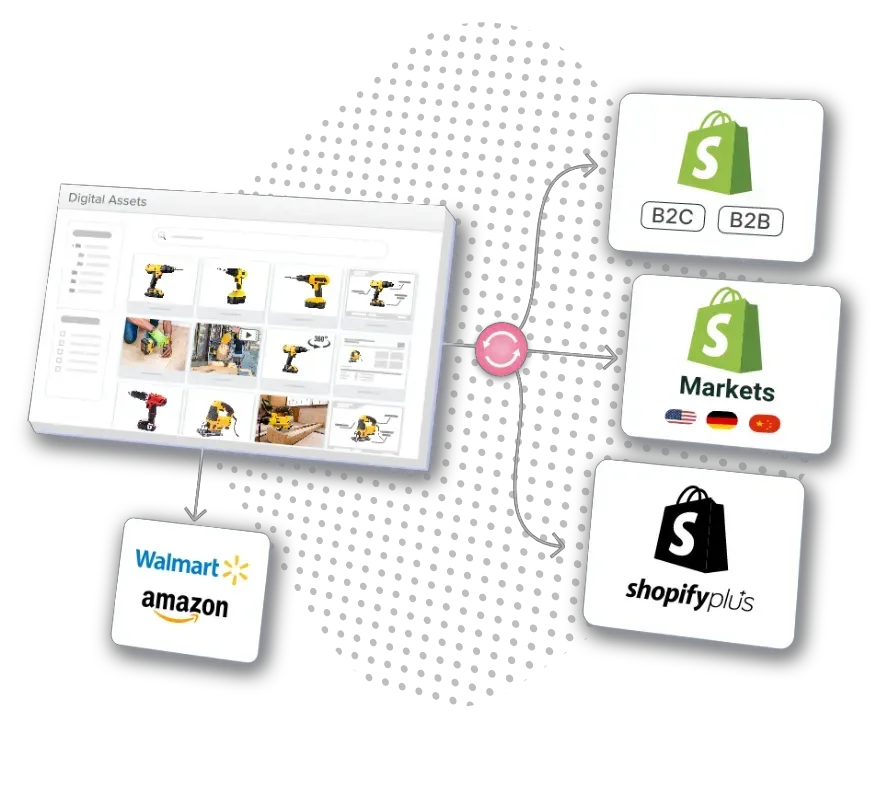
Managing Shopify POS Go across multiple stores requires coordinating hardware, payment processing, and inventory systems. Each location needs a complete POS terminal setup — from the barcode scanner to the cash drawer — while maintaining synchronized product data across your entire store network.
This guide covers everything from configuring your Socket Mobile charging dock to managing customer profiles across borders. Whether you’re setting up your second location or scaling to dozens of stores, proper hardware configuration and product synchronization are essential for multi-location success.
1. Understanding Multi-Location Inventory Management
The Multi-Location Reality
Shopify POS Go is an all-in-one mobile POS device built for reliable, fast, and simple on-the-floor selling. The handheld point-of-sale system integrates payments, POS software, and hardware into one device, featuring a built-in barcode scanner and card reader that eliminates the need for additional hardware.
Integrated mobile POS systems streamline the checkout process by combining payment processing and inventory management in one device. Mobile POS lets staff assist customers anywhere in the store, enhancing engagement throughout your entire network. POS Go accepts all payment types including cash, credit and debit cards, and digital wallets like Apple Pay, with 99.9% payments uptime.
Multi-Location Capabilities
Staff can check inventory availability across all store locations using POS Go. The device connects seamlessly to Shopify’s back office, centralizing store-level order, sales, inventory, and customer data. Staff can look up customer profiles and order history to enhance service whether selling at the counter or moving through the store.
2. Hardware Setup for Multiple Stores
Device Specifications
POS Go features an ultra-thin design with a durable 5.5-inch Gorilla Glass touchscreen. The device boots directly into Shopify and works right out of the box, making it easy to equip staff for mobile checkout. Battery life lasts up to 80 hours on a single charge, enabling all-day use. The built-in barcode scanner and integrated card reader handle all transaction types without additional hardware.
Additional Scanning Equipment
For counter-based operations at high-volume locations, many retailers add dedicated scanning equipment alongside the built-in scanner. The Socket Mobile 2D Bluetooth barcode scanner offers enhanced capabilities for locations processing hundreds of transactions daily. These wireless scanners work well for mobile selling throughout the store, and docking stations keep them charged between uses. Pair a scanner with a charging dock at each POS terminal to keep devices powered during busy periods.
Cash Drawer Integration
Every counter location needs reliable cash handling. The Star Micronics 16-inch cash drawer line offers multiple configurations compatible with Shopify POS Go, including standard and white-finish models for modern retail aesthetics, and regional variants for EU and UK markets. These drawers integrate with your POS cash management system, opening automatically during cash transactions while POS Go handles cards and digital wallets.
POS Terminal Dock Configuration
When paired with the POS Terminal Dock, Shopify POS Go functions as a fixed customer-facing display and payment terminal. This transforms the mobile device into a stationary counter solution when needed, combining the flexibility of mobile selling with the stability of a traditional POS terminal. Customers can view their cart and complete payment while staff manage order details.
Payment Processing Setup
Shopify Payments offers a flat rate for in-person debit and credit card payments starting at 2.7% + 0¢. POS Go accepts all payment types: Apple Pay and digital wallets, contactless tap, chip card transactions, swipe, and cash with integrated cash drawer. POS Go requires a Wi-Fi connection to process payments, check inventory, and update customer profiles in real-time.
Location Setup Protocol
Step 1 — Hardware installation: Position your POS terminal at the counter with a Socket Mobile charging dock nearby. Connect the Star Micronics cash drawer to your POS terminal. Verify Wi-Fi coverage throughout the store for mobile selling.
Step 2 — Device configuration: Charge your Bluetooth barcode scanner using the charging dock. Power on POS Go — it boots directly into Shopify. Verify the built-in barcode scanner functions by scanning test items. Test payment processing with Apple Pay and other payment types.
Step 3 — Staff training: Train team members on proper Bluetooth scanner usage. Demonstrate how to check customer profiles and inventory during transactions. Review end-of-day cash management procedures for your regional cash drawer model.
Navigate to Settings > Locations in Shopify admin to assign each POS terminal to its physical store location. Your store currency must match local currency for payment processing to function correctly at each location.
3. Syncing Products Across Countries and Currencies
POS Go connects seamlessly to Shopify’s back office, centralizing store-level order, sales, inventory, and customer data. This integration ensures that when staff check inventory across all store locations, they see real-time data regardless of where products are stocked. Customer profiles sync automatically — a customer who shops your Berlin location one day is recognized at your London store the next.
Multi-Currency Payment Processing
Operating POS terminals across countries means handling payment processing in multiple currencies. Your Berlin location accepts EUR, London accepts GBP, and New York accepts USD. Each POS terminal must process payments in local currency while maintaining pricing consistency.
Real-Time Inventory Sync
When staff scan items with the built-in barcode scanner or a Bluetooth scanner, they see stock levels at every location instantly. This enables smart fulfillment decisions — if one store is out of stock, staff can check other locations and arrange transfers or direct shipments. POS Go enables staff to manage store pickup and delivery orders directly from the device, verifying items and fulfilling same-day orders efficiently.
4. Overcoming Multi-Location Challenges
Real-Time Inventory Sync
Without real-time synchronization, your POS terminal shows inaccurate inventory. A customer scans a product in Berlin while your London store sells the last unit. Both transactions process, creating an overselling situation. According to Shopify’s research on multi-channel inventory management, without real-time visibility, stockouts and customer frustration become significantly more likely. POS Go’s seamless back office connection centralizes store-level data to prevent this.
Payment Processing Consistency
POS Go accepts all payment types with 99.9% payments uptime, ensuring reliable checkout at every location. Shopify Payments’ flat rate of 2.7% + 0¢ applies consistently whether customers use Apple Pay in Berlin or credit cards in New York. Display signage at each counter showing accepted payment types to speed up checkout and improve the customer experience.
Hardware Maintenance
Your Bluetooth scanner docking stations require daily attention. Dock scanners overnight so the battery is fully charged for each day of selling. Clean the built-in barcode scanner on POS Go weekly. Verify Wi-Fi connectivity throughout the store regularly, and test cash drawer operation to confirm it opens correctly during cash transactions.
Staff Training Consistency
Training must remain consistent whether staff work at the counter or practice mobile selling throughout the store. Every team member should know how to use the Bluetooth barcode scanner efficiently, process all payment types including Apple Pay, check customer profiles and order history during transactions, manage cash drawer procedures, look up inventory availability across all store locations, and handle store pickup and delivery orders from POS Go.
5. Scaling with PIM Software
While POS Go connects seamlessly to Shopify’s back office and centralizes store-level data, native tools aren’t built for complex multi-channel operations across dozens of international locations. When your barcode scanner processes transactions at the counter, the system should automatically sync inventory across your entire network. When customers pay with Apple Pay, pricing should reflect local currency while maintaining global consistency.
PIM Software Benefits
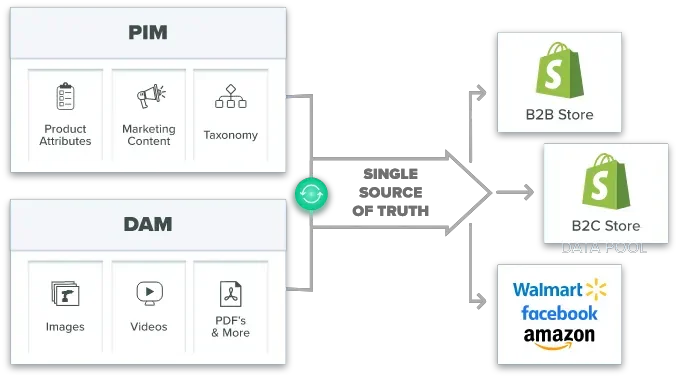
A best PIM for Shopify transforms multi-location operations by centralizing product data across all POS terminal locations while maintaining the seamless Shopify back office integration that POS Go provides. PIM extends that centralization to product content, translations, and cross-border operations.
Implementation Impact
Consider a fashion retailer with POS terminal locations in five countries. Without PIM, staff manually update products at each location, barcode scanners display inconsistent data, and payment processing errors occur due to incorrect pricing. Customer profiles don’t sync between stores, and outdated inventory data causes fulfillment failures.
With PIM, you update products once and sync to all POS terminal locations automatically. Your barcode scanner accesses real-time, localized data. Payment processing uses accurate pricing for all payment types including Apple Pay. Customer profiles sync across your entire store network. Staff can manage store pickup and delivery orders with confidence, and omnichannel fulfillment works seamlessly across borders.
ROI Measurement
A retailer with ten locations spending two hours daily on manual updates wastes 5,000 hours annually — time better spent on customer service and selling strategy than managing individual POS terminal configurations. PIM software can reduce product management time by 60 to 80 percent while eliminating payment processing errors from incorrect pricing, accelerating deployment of new locations, and improving inventory visibility from every barcode scanner. When the battery lasts up to 80 hours on a single charge, staff should be focused on customers — not data entry.
Companies using PIM systems experience 10–15% inventory reductions while maintaining better stock availability across their entire store network.

Key Takeaways

Frequently Asked Questions
POS Go has a built-in barcode scanner that handles checkout without additional hardware. For enhanced capabilities at busy counter locations, the Socket Mobile 2D Bluetooth scanner offers faster processing with wireless flexibility. Pair these with a charging dock at each POS station to keep devices powered throughout the day. For mobile selling across the floor, a Bluetooth scanner with a charging dock setup works well alongside POS Go’s built-in scanner. The 80-hour battery on POS Go means the device itself rarely needs mid-shift charging.
The Star Micronics 16-inch cash drawer line integrates seamlessly with Shopify POS Go. Choose the standard model, a white-finish version for contemporary retail environments, or region-specific variants for EU and UK markets. All configurations integrate with your POS cash management system and open automatically during cash transactions while POS Go handles cards and digital wallets.
Shopify POS Go accepts all payment types right out of the box — cash, credit and debit cards, and digital wallets like Apple Pay — with 99.9% payments uptime. Shopify Payments offers a flat rate starting at 2.7% + 0¢ for in-person transactions. Display payment signage at each counter to help customers understand accepted methods before they reach the register, speeding up checkout and improving the overall experience.
Yes. POS Go allows staff to look up customer profiles and order history across your entire store network. The device connects to Shopify’s back office, centralizing customer data so purchase history is available regardless of which location the customer originally visited. This works whether staff use a fixed POS terminal at the counter or carry POS Go for mobile selling throughout the store.
Shopify POS Go requires a Wi-Fi connection to process payments, check inventory, and update customer profiles in real-time. While the device can handle some transactions offline, synchronization with your store network depends on connectivity. A Wi-Fi outage at one location means inventory changes won’t propagate to other stores until connectivity returns, creating potential overselling risk. Invest in reliable Wi-Fi infrastructure and consider backup connectivity options at every location.
Standardize equipment configurations across all stores. POS Go boots directly into Shopify out of the box, making setup consistent. Use identical Bluetooth scanner and dock configurations at every location. Choose consistent cash drawer models, including regional variants where required. Train staff on identical procedures for scanner usage, payment processing, customer profile management, and end-of-day cash reconciliation. Consistency at the hardware level translates directly to consistency in the customer experience.
Consider PIM when managing more than three to five POS terminal locations, expanding internationally, or when your team spends significant time daily updating products across locations. PIM becomes essential when payment processing errors occur due to incorrect pricing, or when staff checking inventory across locations need more sophisticated data management than Shopify’s native tools provide. PIM extends the centralized capabilities of your POS setup, ensuring every device accesses consistent, localized data whether staff work at the counter or move throughout the store.
Where to Next?
Multi-location retail is a complex operation to navigate, but the right data infrastructure keeps every storefront on course. When product information flows cleanly from a single source to every POS terminal, your staff spend their time on customers — not spreadsheets.
Centralize Your Multi-Location Product Data with Catsy
Catsy’s PIM connects directly to your Shopify stores and syncs product data, pricing, and inventory across every location automatically — so your team can focus on selling, not data management.
Book a Demo