
ERP and PIM manage completely different layers of your product data. ERP runs your business operations. PIM makes your products sellable. Here’s how to tell them apart, how they work together, and how to know if you need one, the other, or both.
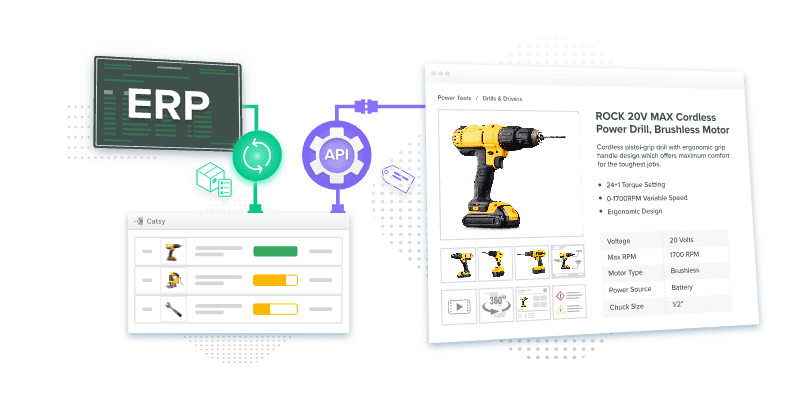
If you're searching "pim vs erp," there's a good chance you already have an ERP and you're wondering whether you also need a Product Information Management (PIM) system. Your ERP has a product master. It has fields for product names, SKUs, categories, and attributes. So the question is reasonable: why would you need another system?
The short answer is that ERP and PIM don't compete. They manage fundamentally different kinds of data, serve different teams, and solve different problems. Gartner research estimates that poor data quality costs organizations between $12.9 million and $15 million per year on average.1 Most of that cost doesn't come from bad ERP data. It comes from the gap between operational product data, which ERPs handle well, and the commercial content layer that determines whether a buyer can find, understand, and purchase a product, which ERPs were never built to manage.
Most organizations selling products across multiple channels eventually need both systems. But they also need to understand where the line between them is, because blurring it creates real operational problems. This guide gives you a clear, practical breakdown.
An ERP (Enterprise Resource Planning system) is the operational backbone of a business. It manages the core transactional data and business processes that keep the organization running: inventory, purchasing, manufacturing, finance, accounting, HR, and supply chain logistics. When a purchase order arrives, the ERP tracks the inventory against it, generates the invoice, triggers fulfillment, and records the financial transaction in the right ledger. That's the job it was built for, and it does it well.
Every ERP includes a product master: a record for each product containing the operational facts the business needs to process transactions. SKU number, cost, unit of measure, weight for freight, inventory levels by location, and the supplier it comes from. This product master is indispensable for operations. But it's designed for transactional efficiency, not commercial richness. The ERP product master tells your warehouse what to pick and your finance team what to invoice. That is a fundamentally different task from convincing a buyer to purchase. It's worth holding that distinction clearly before we go further.
Six vendors account for most mid-market and enterprise ERP deployments: SAP, Oracle NetSuite, Microsoft Dynamics 365, Infor, Epicor, and Sage. According to Fortune Business Insights, the global ERP market is projected to grow from $106 billion in 2026 to $282 billion by 2034, a 13% compound annual growth rate driven largely by cloud adoption.2 What differs across vendors is industry depth, deployment model, and how cleanly each integrates with the commercial product-content layer that sits in front of them.
Market leader for large enterprises globally. SAP S/4HANA is the cloud-native successor to SAP ECC, with deep functionality across manufacturing, utilities, and financial services. High implementation complexity at scale.
The leading cloud ERP for mid-market companies and scaling businesses. Popular with eCommerce brands, software companies, and multi-entity organizations needing multi-currency capability without enterprise-level implementation cost.
Integrates deeply with Azure, Power BI, Teams, and Office 365. Popular with manufacturers and distributors already invested in the Microsoft ecosystem. Dynamics 365 Finance and Supply Chain are the primary ERP modules.
Specializes in industry-specific ERP for manufacturing and distribution. CloudSuite Industrial has strong out-of-the-box functionality for industrial and process manufacturing use cases.
Serves mid-market manufacturers and distributors, particularly in discrete and job-shop manufacturing. Epicor Kinetic is widely used in metal fabrication, electronics manufacturing, and industrial distribution.
Sage Intacct is a cloud financial management platform for mid-market companies. Sage X3 is Sage's full ERP for manufacturing and distribution companies that need operational management beyond core accounting.
A Product Information Management (PIM) system manages the commercial product content that buyers encounter and that channel systems require. Where an ERP manages operational product data (inventory, cost, supplier), a PIM manages the rich commercial layer: marketing descriptions, technical attributes, certifications, product images, videos, and the channel-specific content that Amazon, Grainger, Google Shopping, and your own website all need in different formats.
The distinction matters because buyers and operations teams are asking completely different questions. Your warehouse needs to know the unit of measure, weight, and storage location. A buyer needs to know what the product does, whether it fits their technical requirements, and why it's the right choice over the alternative on the next listing. ERP answers the first set of questions. PIM answers the second, and those answers are what generate revenue.
Research from McKinsey shows that companies leading on customer experience grew revenue at more than twice the rate of customer-experience laggards between 2016 and 2021, and product content is a core driver of that customer experience advantage.3 The product descriptions, images, specs, and channel-specific content that PIM manages are not an operational nicety. They're a direct revenue lever.
PIM is also where Digital Asset Management (DAM) becomes part of the picture. A combined PIM and DAM platform manages both structured product attributes and the associated digital assets (images, spec sheets, installation guides, videos) in one governed place. Catsy's integrated PIM and DAM ensures that the right asset reaches the right channel in the right format, automatically, rather than through manual export and reformatting.
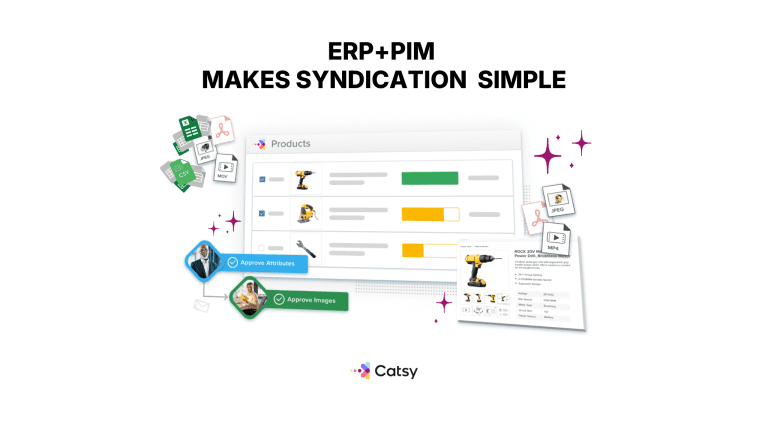
The confusion starts with the ERP product master. Both systems have product records. Both have fields for product name, SKU, and category. So why doesn't the ERP product master do what PIM does? Three concrete reasons, each representing a real operational problem for teams that have tried to make it work.
ERP product masters are built for transactional efficiency, not content richness. They store the minimum product data required to process orders and manage inventory. Managing the volume and variety of commercial product content through an ERP (long-form descriptions, multiple image variants, channel-specific content templates, localized versions for different markets) requires workarounds that fight against the system's operational design. Teams end up with custom fields, unsanctioned spreadsheet exports, and content that lives partly in the ERP and partly outside it.
ERP systems have no channel syndication layer. An ERP knows what you have and what it costs. It can't automatically format your product content to Amazon's title character limits, Walmart's content quality scoring requirements, or Grainger's industrial specification templates, and then push that formatted content to each channel and update it when data changes. That distribution layer simply isn't part of the ERP's architecture.
ERP governance is designed for finance and operations, not for marketing content workflows. The teams who manage ERP data are finance, supply chain, and IT. The teams who manage commercial product content are marketing, eCommerce, and product management. Giving marketing teams edit access to ERP product records creates governance problems. Building commercial content workflows inside an ERP creates operational bottlenecks. The two governance models are not compatible at scale.
| Dimension | PIM (e.g., Catsy) | ERP (e.g., SAP, NetSuite) |
|---|---|---|
| Primary Purpose | Make product content sellable across every channel | Run the business — finance, supply chain, operations |
| Data It Owns | Marketing attributes, descriptions, images, video, localized content, channel-specific variants | SKUs, costs, inventory levels, purchase orders, financial postings |
| Primary Users | Marketing, eCommerce, product managers, content ops | Finance, operations, HR, supply chain, IT |
| Where the Data Goes | Outward — eCommerce sites, marketplaces, retailers, distributor portals, catalogs | Inward — across internal departments and operational systems |
| Updates Measured In | Hours (a new image, an enriched spec, a localized description) | Months (a new GL account, a workflow change, a chart of accounts restructure) |
| Success Metric | Time-to-market, content completeness, channel coverage | Operational accuracy, audit compliance, cost control |
Most product-led companies need both. The following sections explain how they fit together — and where Catsy fits in.
In a well-designed tech stack, PIM and ERP are complementary. The ERP is the source of operational truth: it knows what products exist, what they cost, and what's in stock. The PIM is the source of commercial content truth: it knows how those products are described, what they look like, and how they should appear on every channel. They share data through integration, with each system contributing what it owns.
The standard integration pattern works like this. When a new product is set up in the ERP (SKU created, cost loaded, inventory location assigned), that event triggers the creation of a corresponding record in the PIM. The product content team then enriches that PIM record with descriptions, images, technical specifications, certifications, and channel-specific copy. Once complete, the PIM syndicates the enriched content to the relevant channels. When the ERP updates pricing or inventory status, those changes flow to the PIM and from there to channels automatically, keeping what buyers see current without manual intervention.
The decision usually isn't complicated once you know what each system is actually for.
You sell through one or two channels, your catalog is small (under 200 SKUs), your products don't require rich marketing content, and your team can manage product data in spreadsheets without significant rework. This situation becomes rarer as selling moves online and distributors increasingly require structured, channel-specific content from suppliers.
You're selling through three or more channels, your team spends meaningful time manually reformatting product data for each one, you've had listing suppressions or content quality issues on marketplaces, or product launches consistently slip because content is the last thing ready. If you have an ERP and are managing the commercial content gap with spreadsheets, PIM replaces that gap with a governed system.
You're a manufacturer or distributor with 500-plus SKUs selling through multiple channels: your own site, marketplaces, distributors, and retailers. ERP handles your operations. PIM handles your commercial content. They work together, not instead of each other, and this describes most mid-market and enterprise organizations in product-heavy industries.
When evaluating PIM systems, the integration with your existing ERP is a selection criterion from day one, not an afterthought. Four capabilities matter most.
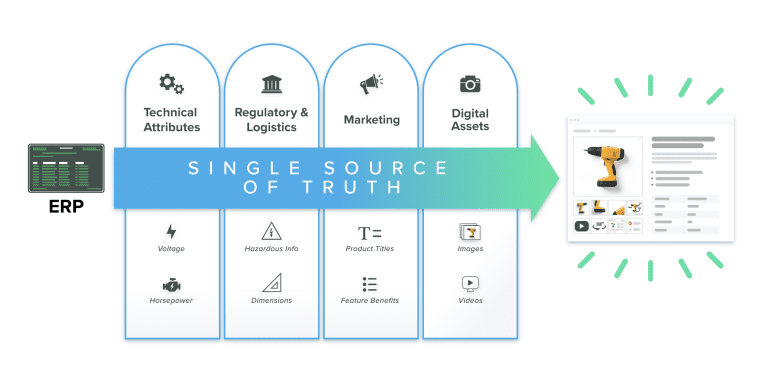
ERP (Enterprise Resource Planning) manages operational business data: inventory levels, pricing, purchasing, manufacturing, finance, and supply chain. PIM (Product Information Management) manages commercial product content: descriptions, technical attributes, product images, certifications, and the channel-specific content that buyers encounter on websites, marketplaces, and distributor platforms. ERP tells your operations team what you have and what it costs. PIM tells buyers what your products are and why they should purchase them. Most organizations need both systems, connected via integration, with each managing the data layer it was built for.
No. PIM is a separate system category from ERP. Some ERP vendors offer PIM-adjacent modules or have partner integrations with PIM vendors, but the two systems serve fundamentally different purposes and are built for different teams. ERP product masters store operational data for transactional processing. PIM manages rich commercial content for channel publishing. Organizations that rely solely on their ERP product master for channel content typically encounter listing suppressions on marketplaces, inconsistent product data across channels, and slow new product introduction timelines. A dedicated PIM solves problems that ERP isn't architected to address.
Not for organizations selling through multiple channels with substantial product content requirements. ERP product masters store the minimum operational data required to process transactions: SKU, cost, inventory, supplier. They're not designed to manage marketing descriptions, product imagery, channel-specific content templates, or the syndication workflows required to push formatted content to Amazon, Grainger, your website, and distributor portals simultaneously. Some ERP vendors are adding content management features, but these remain transactional systems at their core, not commercial content management platforms built for the workflow marketing and eCommerce teams actually need.
Most product-led companies that sell through three or more channels and manage catalogs of 500-plus SKUs need both. ERP handles operations: inventory, finance, purchasing, manufacturing. PIM handles commercial content: the descriptions, attributes, and images that buyers encounter and that channel systems require. They're complementary systems that integrate: the ERP pushes core product data to the PIM, and the PIM enriches it with commercial content and distributes it to channels. If you're currently managing product content in spreadsheets and shared drives alongside an ERP, you almost certainly need a PIM to replace that manual process.
Three systems, three distinct layers. PLM (Product Lifecycle Management) manages the engineering and development lifecycle: design files, bills of materials, engineering change orders, and regulatory compliance data. ERP manages operational and transactional data: inventory, pricing, purchasing, finance, and supply chain. PIM manages commercial product content: descriptions, images, technical attributes, and channel-specific content that buyers encounter when deciding what to purchase. The typical data flow in a manufacturer's stack is PLM to ERP to PIM to channels. Most manufacturers with complex products and multi-channel distribution need all three.
For most businesses, ERP comes first. It manages the operational foundation the business needs to function: accounting, inventory, order management, and purchasing. PIM typically becomes urgent when you reach channel scale: when you're managing three or more sales channels, your catalog has grown past 500 SKUs, or your team is spending significant time manually reformatting product data for each channel. If you already have an ERP and are evaluating PIM, the integration between the two systems should be a top selection criterion from the start. The data flow ERP to PIM to channels is what eliminates manual re-entry and maintains accuracy across your digital shelf.
Not exactly, but the distinction is smaller than some vendors suggest. PIM (Product Information Management) is the underlying system of record for product content. PXM (Product Experience Management) is a category label that some vendors use to describe PIM plus the channel-formatting, optimization, and analytics layers that can sit on top of it. In practice, modern PIM platforms — Catsy included — handle most of what's marketed as PXM out of the box. The category label matters less than confirming the platform can enrich product content and syndicate it to every channel your buyers use, with the governance and completeness tracking your team needs.
The three systems serve three different phases of a product's life. PLM handles engineering data: the design files, bills of materials, and revision history that product engineers and compliance teams care about. ERP handles the transactional and operational side: costs, inventory levels, finance, and supply chain. PIM handles the commercial side: the descriptions, images, attributes, and channel-specific content that buyers actually see when they're deciding what to purchase. Most companies that manufacture or distribute products across multiple channels need all three. For a detailed look at how PIM and PLM divide responsibilities, read the full PIM vs PLM comparison.
Catsy integrates with SAP, Oracle NetSuite, Microsoft Dynamics 365, Infor, Epicor, and Sage, adding the commercial content management layer your channels require. Enrich your ERP product data, syndicate it to every channel, and keep it consistent automatically.
Book a Demo