PIM ERP Integration

A Complete Implementation Guide

Table of Contents

What You’ll Learn

→  What data flows between PIM and ERP – and which system owns it

→  Three integration patterns: one-way, two-way, and event-driven

→  A 5-step implementation guide you won’t find on any competitor’s page

→  Common pitfalls and how to avoid them before they cost you

→  How to know when PIM-ERP integration is actually worth the investment

This guide is for ecommerce managers, IT leads, and operations teams who are either planning a Product Information Management (PIM) integration or trying to figure out why the one they have isn’t working the way it should.

Why PIM-ERP Integration Matters

The Data Ownership Problem

Here’s the underlying issue: your ERP and your PIM systems each own different types of data. They weren’t built to share.

The ERP system owns the operational side, like your supplier information, logistics data, human resources records, and supply chain processes. It’s the backbone of your business operations.

On the flip side, PIM solutions own the commercial side of things, like product images and tech specs. The PIM handles what your customers actually encounter.

Without a PIM integration, there’s someone one your team bridging the gap between those two systems. They’re they one exporting data from the ERP, cleaning it up, and manually entering it into whichever platform is calling for it. Every. Single. Time. That’s a liability.

The Cost of Disconnected Systems

The costs of disconnected systems are real, and they’re compounding. You’ll find that duplicated work is created for your teams, and that your inconsistent product listings are eroding the trust your customers have in your brand. Product launches are slipping just because your content’s not ready.

Research from Gartner consistently puts the cost of poor data quality at roughly $15 million per year for large enterprises, and mid-market companies aren’t immune to the same dynamics at smaller scale.

Key Benefits of PIM-ERP Integration

When the two systems are properly connected, the difference is immediate:

•       Single source of truth – a centralized database for each data type, with clear ownership rules

•       Faster time to market – new products flow from ERP to PIM to sales channels without the need for manual handoffs

•       Fewer errors – there’s no more meed for copying and pasting between systems, and there’s no more manual data to introduce inconsistencies

•       Data consistency – the same product information reaches every sales channel, every time

•       Better customer experience – accurate information on listings means fewer returns and fewer abandoned carts

•       Reduced operational costs – the hours your team spends cleaning up data errors go back to work that actually moves the needle

If your team spends more time fixing product data than enriching it, PIM ERP integration is overdue.

Most mid-market companies discover that product data ends up living in three places at once: the ERP, a separate PIM system, and yet another DAM for digital assets. Platforms like Catsy collapse the PIM-DAM layer into one, so your ERP integration delivers a complete product data pipeline — operational data, marketing content, and digital assets — without a separate DAM integration to manage on top of it.

What Data Flows Between PIM and ERP

Before you start configuring anything, you need a mental model for which system owns what. Here’s one that actually sticks.

The Hot Data / Cold Data Framework

Hot data changes constantly. Every transaction and restock triggers a change. Cold data only changes when your product team decides it should be changed, like a localization update or a content refresh.

A rule of thumb to follow is that if the data changes with transactions, the ERP owns it. If it changes with content updates, it’s owned by your PIM. This makes data it easy to make intuitive ownership decisions before you’re neck-deep in field mapping.

ERP System Data (Hot Data - Operational)

•       SKUs and product IDs

•       Base pricing and cost data

•       Inventory levels and warehouse locations

•       Supplier information and lead times

•       Weight, dimensions, and shipping classification (logistics data)

•       Order and fulfillment data

•       Customer relationship management records

Why This Data Stays Hot

Supply chain processes drive constant updates to your ERP data. Every order, restock, or supplier negotiation touches it. The ERP system is built to handle that velocity. PIM is not, nor should it be.

PIM System Data (Cold Data - Commercial)

•       Product descriptions, both short form and detailed descriptions

•       Digital assets: product images, videos, documents

•       Technical specifications and feature attributes

•       Channel-specific content for each sales channel

•       Translations and localized content

•       Taxonomy, categories, and product relationships

•       Compliance and regulatory product-related data

How the PIM System Enriches Raw Data

The PIM system takes bare product data from the ERP like a SKU or a weight, and changes it into rich product data that’s ready for customers. That means you’ll have descriptions that convert and images that show the product clearly. Your specs will be formatted for the specific requirements of each channel.

The Source-of-Truth Matrix: Who Owns What

This is how data governance becomes operational instead of theoretical. Every product attribute in your catalog has a clearly defined owner, and that ownership lives in a specific system. That system becomes the single source of truth for that field.

In practice, enforcement is straightforward. Fields that are imported from ERP remain read-only in your PIM. Fields that are managed in your PIM are read-only in your ERP. There’s no overlap and no ambiguity: if a price is wrong, you’ll correct it in ERP and if a description is off, it’s updated in PIM. Easy peasy.

Rule of thumb: if the data changes with every transaction, the ERP owns it. If it changes with every content update, the PIM owns it. The Source-of-Truth Matrix turns that rule into field-level permissions.

PIM-ERP Integration Patterns

What’s the correct PIM-ERP integration pattern? There’s no single right answer here. The pattern that fits your business depends on your catalog complexity, how your teams work, and how much technical overhead you can actually support. Most PIM ERP integrations follow one of three patterns. Let’s take a peek.

One-Way: ERP → PIM

This is the most common starting point. As a matter of fact, it’s all most companies ever need. The ERP system creates product records and the PIM imports master data. Product teams enrich that data for each channel, and it only flows in one direction: ERP to PIM to customer.

This pattern is best for companies where the ERP system is definitely the origin of product records, and where enrichment status doesn’t have to feed back into the other systems. There’s a limitation though: completeness scores, approval status, and channel readiness won’t flow back to your ERP. If that doesn’t impact your operations, it’s not a problem for you.

When One-Way Is Enough

If your product team doesn’t need to push anything back to the ERP, and the ERP doesn’t need to know when content is approved, one-way keeps complexity low. Ship it, watch it, and only add complexity when your business actually requires it.

Two-Way: ERP ↔ PIM

This refers to bidirectional sync where selected fields flow between the two systems in both directions. The ERP sends operational data down to PIM, and selected enriched data like localized product names or translated product descriptions returns to the ERP.

This makes the most sense for companies running B2B and B2C operations simultaneously, where the ERP needs enriched product data for customer-facing portals or distributor catalogs. It’s more complex to implement and requires airtight ownership rules per field, because ambiguity in a two-way sync creates conflicts quickly.

Event-Driven: Webhooks and Publish Triggers

Instead of syncing on a schedule, systems respond to events in real time. A product goes live in PIM, and that triggers record creation in the ERP. When stock drops below a certain threshold in your ERP, it’ll trigger an attribute update in your PIM.

This is the modern approach, and it’s the most technically demanding. It’s the right choice for you if your data accuracy on product pages is genuinely time-sensitive. It also reduces batch processing overhead significantly once it’s working.

Combining Patterns

Most companies eventually land on a hybrid system. One way for daily bulk sync, event-driven for the fields that need it like pricing and inventory. Start with one way, and you can add event-driven triggers as your product lifecycle demands grow.  

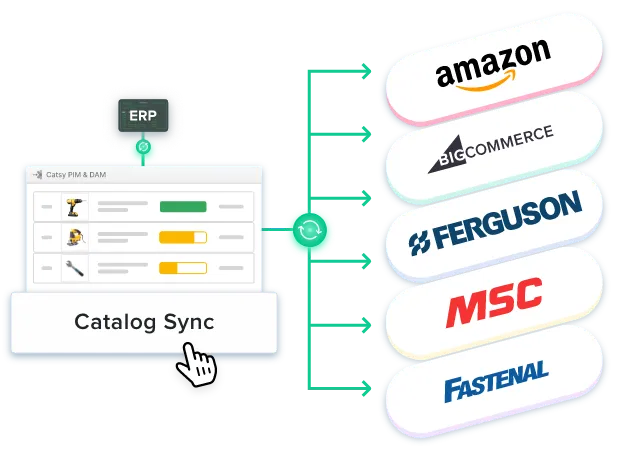
The integration pattern also depends on how many systems are involved. Catsy connects with ERP systems like SAP, NetSuite, and Microsoft Dynamics through API and supports downstream syndication to Shopify, BigCommerce, Amazon, and Walmart. Because PIM and DAM are already unified in a single platform, the architecture stays flatter… that’s one fewer integration to build and maintain.


Integration Methods: How to Actually Connect Your PIM and ERP

Once you’ve chosen a pattern, you need to choose a method. These aren’t the same thing. Pattern is the data flow logic, and method is the technical plumbing.

API-Based Integration (REST API)

This is the preferred method for modern PIM software and ERP solutions. It grants real-time or near-real-time data exchange, granular control over exactly what syncs and when, and the most flexibility for future changes. Most modern ERP software and PIM platforms support REST APIs out of the box.

The trade-off: it requires development resources to build and maintain. If your team has the capacity, this is where to start. If not, you should probably look at middleware.

Middleware and iPaaS Platforms

When API integration is too complex or if you’re connecting more than just a PIM and ERP, middleware can act as a translation later. Tools like MuleSoft and Boomi sit between your systems, handling the data exchange without requiring custom code for each connection.

This is a good option for non-technical users who are managing the integration, or for teams that need to connect systems without a developer. The ongoing cost is a platform subscription rather than dev time, which often works out in favor of the business.

File-Based Integration (CSV, Excel, XML)

This is viable for smaller catalogs or for existing ERP software that predates modern API standards. The ERP exports files on a schedule, and PIM imports them. This system is simple to set up and has the lowest technical barrier; it’s often already familiar to the team managing it.

This comes with limitations, though. You won’t get real-time sync, you’ll have a higher risk of error, and manual oversight will be needed to catch any failures that occur. But, with that having been said, many ERP systems simply weren’t built with APIs and this is the most practical bridge for some setups.

Choosing the Right Method

In practice, many companies run a hybrid: API-based for critical data exchange like stock levels and pricing, file-based for bulk operations like new product onboarding. Check what your PIM vendors and ERP vendor actually support before you end up committing to anything.

Factor

API-Based

Middleware / iPaaS

File-Based

Speed

Real-time / near-real-time

Near-real-time

Scheduled (hourly/daily)

Setup Complexity

High (dev resources)

Medium (config-driven)

Low (export/import)

Best For

Modern stacks, control

Multi-system envs

Legacy ERPs, small catalogs

Ongoing Cost

Dev maintenance

Platform subscription

Manual oversight

Scalability

High

High

Limited

Step-by-Step PIM-ERP Integration Guide

No competitor has published a clear step-by-step here. This is the part you bookmark.

Step 1: Audit Your Data Landscape

Begin by mapping every system that currently touches your product data. Your ERP software, spreadsheets, shared drives, e-commerce admin panels, and someone’s local folder – they all count! All of it. The goal is to see the whole picture before you begin to connect things.

•       Where does product data live today, and where does it live unofficially?

•       What’s duplicated or contradictory across my systems?

•       How does a new product actually get from creation to live on my sales channels right now?

•       As you ask these questions, please be sure to involve key stakeholders from IT, marketing, sales, and operations early. These teams definitely know where the bodies are buried!

Best Practice: Clean Before You Connect

Run a data quality audit before you integrate. Dirty data in your ERP system doesn’t get cleaned by PIM integration, it gets amplified. Every field with duplicate values or formatting inconsistencies becomes a source of downstream errors in every channel you syndicate to.

Step 2: Define Data Ownership and Governance

For every product attribute your catalog touches, decide which system is the source of truth for that field? Use the Source-of-Truth Matrix from Section 2. Build the list. Then enforce it technically.

•       ERP-sourced fields (such as price, stock, and dimensions) should be read-only in the PIM system

•       PIM-sourced fields (such as descriptions, media, or channel content) should be read-only in the ERP

•       Document these integration requirements before you write a single line of configuration

Best Practice: Lock It Down Before Go-Live

Establish data sovereignty rules before anything goes live. Your teams are going to default to editing whatever feels most familiar, and an integrated PIM system with undefined ownership is worse than no integration at all.

Step 3: Choose Your Integration Pattern and Method

Reference Section 3 for patterns and Section 4 for methods. The decision factors: catalog size, how frequently different data types change, what technical resources you actually have available, and your budget for ongoing maintenance.

Best Practice: Start Small, Scale Later

A working PIM integration covering 10 critical data fields beats a broken integration that covers 200. Pick the data that matters most to your sales channels, get that flowing correctly, and expand from there. Scope creep in phase one is one of the most reliable ways to tank a timeline.

Step 4: Map Fields and Configure Sync Rules

ERP attributes and PIM attributes rarely have matching names or formats; field mapping is where the technical work lives. You’re building the translation layer between how the ERP system stores data and how your PIM system needs to receive it.

•       Map each ERP attribute to its PIM equivalent; don’t assume field names match

•       Define transformation rules: for instance, the ERP stores dimensions in inches, but your EU channels need centimeters

•       Set sync frequency per data type: stock levels need real-time, product descriptions can run daily

•       Configure conflict resolution, like what happens when both systems have a value for the same field?

Step 5: Test, Monitor, and Iterate

It’s time to test, test, and test again. Run the PIM ERP integration in a sandbox or a staging environment before you go live with it, if you can. Validate your field mapping with a representative sample. Don’t just use your cleanest products – the messiest ones are where you need the help.

•       Set up error monitoring and alerts; sync failures need to notify someone immediately, not sit in a log

•       Validate data consistency across a sample of products on actual sales channels

•       Plan for iteration: first integrations are almost never perfect… and that’s perfectly fine!

Best Practice: Automate Validation

High data quality standards need to be enforced by the system, not by people checking spreadsheets before every launch. Platforms like Catsy include built-in data validation rules and product readiness checks that flag incomplete or non-compliant product data before it reaches any channel.

Mid-market companies typically move faster with a unified PIM+DAM platform. Catsy customers managing 1,000–3,000 SKUs reach first channel syndication in 10 to 14 weeks, partly because there’s no separate DAM integration to configure. Phased rollouts deliver quick wins before full-scale deployment, which keeps stakeholder confidence high throughout the process.

Common PIM-ERP Integration Challenges (And How to Avoid Them)

Most PIM ERP integration projects fail because of the problems that were already present before anyone started connecting systems.

Dirty Data Derails Everything

If your ERP data has inconsistencies like missing required fields or formatting that varies based on whoever created the record, PIM integration won’t fix that. It’ll amplify it. You need to clean your data before you connect, so that the same errors don’t get pushed to every channel you syndicate to – at speed.

Data quality is a prerequisite for a successful integration, not something you clean up afterward. Risk management starts with the data itself.

Scope Creep in Phase One

The impulse to sync everything between every system in the first phase is one of the most common integration challenges. It feels thorough, but it inevitably leads to 9-month timelines and broken launches.

Start with critical data like SKUs, product names, pricing, or stock levels. A PIM solution handles enrichment, so let it do that job without overloading the initial integration with 200 fields that can wait.

Legacy ERP Limitations

Many ERP systems were built before modern APIs existed, so they store only a single product image. They have rigid data models that limit PIM functionality and make direct API integration impractical. Unfortunately, this is a real constraint, not an outlier. There are oodles of ERP systems active today that fall under this category.

File-based integration is a legitimate bridge. An existing ERP that can’t support a REST API gives you a reason to choose the right integration method. Manual processes are more expensive long-term than the workaround.

Organizational Resistance

Teams that have been managing product data in spreadsheets for years have a workflow they understand. A new system that changes that workflow will meet resistance, especially if it’s not clearly better from day one.

Involve people early and show them a few quick wins. Provide your teams with real training. The technical integration is often easier than the people side of it, especially for your veteran performers who have been using the same workflows for what seems like centuries.

The Hidden Challenge: Undefined Ownership

When nobody agrees on which system is the source of truth for a given field, teams edit the same data in both systems. The integration produces conflicting values. Nobody knows which one is right, and the whole thing falls apart.

The Source-of-Truth Matrix from Section 2 exists specifically to prevent this. Define ownership per field before your go-live, enforce it technically, and document it so it survives staff turnover.

When to Invest in PIM-ERP Integration

Not every business needs this right now. Do you? Here’s how to read the signals.

Signs You Need Integration Now

•       You sell across multiple channels and manually update product data in each one

•       Your team spends more time fixing data errors than enriching product catalogs

•       New product launches take weeks because content isn’t ready across channels

•       Customer experience is suffering from incorrect or inconsistent product information

•       Your ERP system has become a bottleneck for marketing and ecommerce business growth

•       You’re expanding into new markets, additional sales channels, or new languages

When It's Not Worth It (Yet)

If your catalog is under 100 SKUs and you sell on one channel, a full PIM system may not be necessary just yet. As your catalog complexity and channel count grow, the cost of manual data management rises faster than you might expect, and customer engagement drops when listings aren’t accurate or complete.

The business growth threshold varies, but most teams feel the pain clearly by the time they’re managing 300-500 SKUs across three or more channels. That’s usually when the conversation shifts from “do we need this” to “why didn’t we do this sooner.”

For mid-market teams managing 500–5,000 SKUs, Catsy offers integrated PIM+DAM starting at $599/month with ERP connectivity to SAP, NetSuite, and Microsoft Dynamics.

That’s a fraction of enterprise PIM software pricing — with the pim integration capabilities that growing businesses actually need.

Cost savings start from day one, partly because you’re replacing multiple systems and the manual processes connecting them.

Frequently Asked Questions About PIM-ERP Integration

What is PIM-ERP integration?

PIM ERP integration connects your product information management system with your enterprise resource planning system so product data flows automatically between them. It eliminates manual data entry, keeps operational and commercial product data in sync, and ensures consistent information across all business operations and customer-facing channels.

Is PIM an ERP system?

No. PIM stands for product information management. It handles customer-facing product data like product descriptions, product images, and technical specifications. ERP handles internal operations: inventory, finance, procurement, supply chain management. The two systems are complementary. Neither replaces the other.

Does SAP have a PIM?

SAP includes core product master data capabilities, but most organizations extend it with a dedicated PIM solution to handle content enrichment, digital asset management, and multichannel syndication. While SAP effectively manages operational data, the enrichment layer that supports sales channels is typically handled within a specialized PIM platform.

How long does PIM-ERP integration take?

Simple, one-way PIM integrations can typically go live in 4 to 8 weeks. More complex, two-way PIM–ERP integrations usually take 3 to 6 months, depending on data complexity and system requirements. API-first PIM platforms with pre-built connectors for your ERP can accelerate timelines significantly, especially when PIM and DAM are already unified, removing an entire integration from the project scope.

Can PIM replace ERP?

No, and it’s not trying to. The PIM system handles product content for sales channels. The ERP system handles internal operations like inventory, procurement, and finance. Both are necessary for a complete product data pipeline. They’re designed to work together, not to compete.

What data should sync between PIM and ERP?

From ERP to PIM: SKUs, base pricing, stock levels, product dimensions, supplier data. From PIM to ERP (if two-way): enriched product descriptions, translations, channel-specific content. Define clear data management ownership rules per field before you configure anything… that’s what makes the sync sustainable.

Do I need middleware for PIM-ERP integration?

Not always. Direct API integration works well for many ERP solutions and PIM platforms with modern APIs. Middleware helps when you’re connecting multiple systems, when an existing ERP lacks API support, or when the data exchange requires complex transformation logic that would be expensive to build from scratch.

The Bottom Line

PIM ERP integration turns fragmented product data into a competitive advantage. But the technical connection is only half the work. The other half is data governance, like defining ownership, locking down fields, and making sure everyone agrees on which system is the source of truth before any of it goes live.

If you’re evaluating a PIM solution that integrates with your existing ERP, our guides to the PIM vs. ERP comparison and what PIM is are good starting points. And when you’re ready to compare platforms, our best PIM software guide breaks down options by catalog size, channel complexity, and whether integrated DAM is a priority for your business.


Related: What is PIM?  |  PIM vs DAM  |  PIM vs ERP  |  Best PIM Software