
Run every Magento store — Open Source or Adobe Commerce — from a single, validated product catalog. Catsy's integrated PIM and digital asset management (DAM) platform centralizes your product data, grades it against channel requirements, and publishes complete, accurate listings to every storefront you operate.
Get a Free Demo Watch Video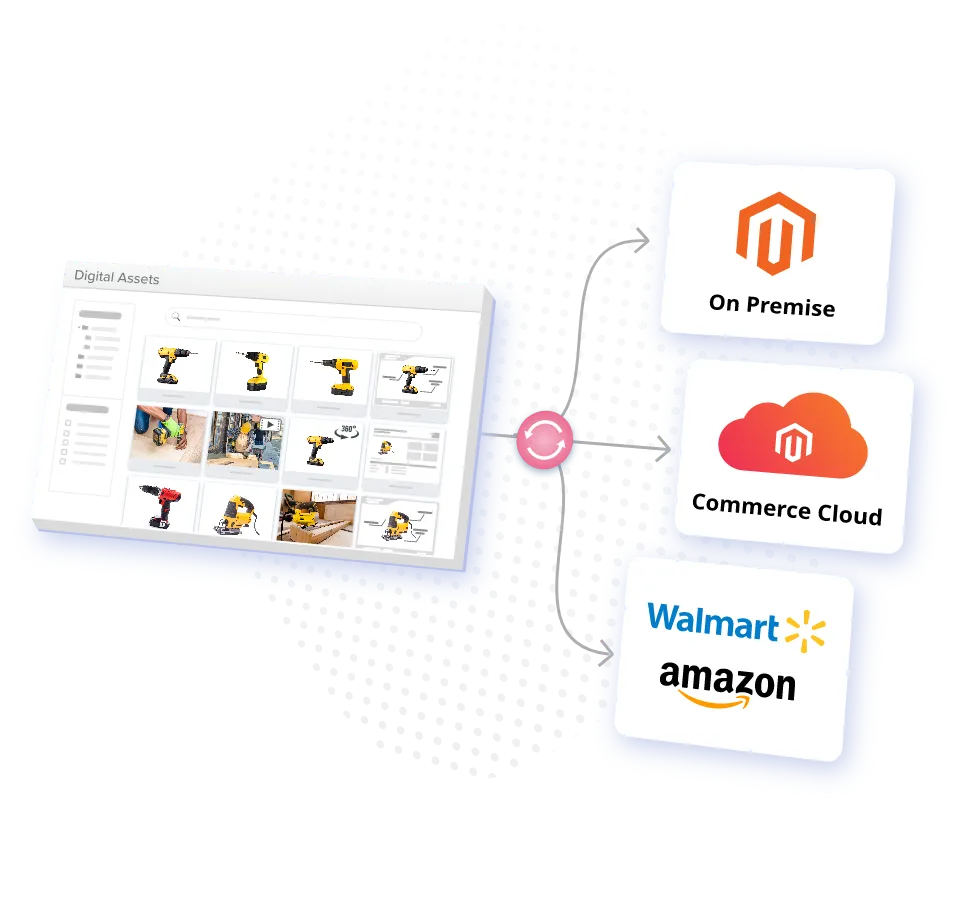
Magento earned its reputation by giving merchants control. Open Source or Commerce edition, single store or twelve, it's an e-commerce platform that bends to your business needs in ways hosted platforms can't. But that control is developer-shaped: the catalog lives in admin panels, attribute sets, and store views — and the people responsible for product content usually aren't the people with deploy access.
That's the gap a PIM system fills. Product information management (PIM) software gives your merchandising and product teams one governed workspace for product data — every attribute, description, asset, and translation, organized per SKU and validated before it goes anywhere. A PIM doesn't replace Magento; it feeds Magento, the way your ERP feeds your warehouse.
Without one, every update means export, merge, re-enter — once per Magento store — and every handoff invites drift that surfaces as suppressed listings, returns, and lost sales. With one, you enrich and validate once and publish everywhere. Your Magento instance stays lean, too: developers build storefront experience instead of doing catalog housekeeping.
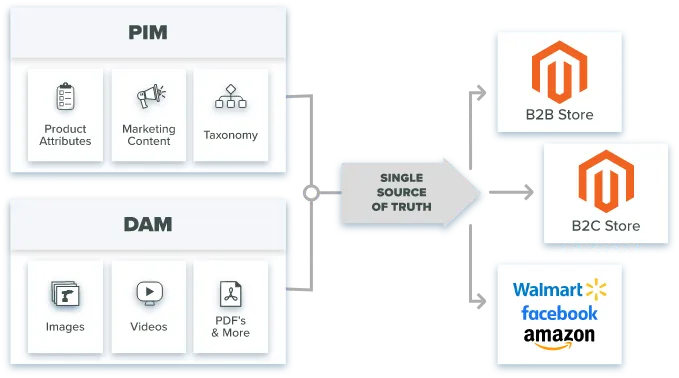
Whether you're on Magento Open Source or Adobe Commerce, Catsy gives your team one place to enrich, validate, and approve every item before it publishes. Instead of managing product data store by store, you manage it once — and every storefront inherits the corrected record. That's what a product information management system is for: ending the copy-paste economy between spreadsheets, shared drives, and admin panels.
Tired of balancing folders filled with master files, duplicates, and everything in between? Catsy's DAM library stores a single master version of every PDF, video, image, and 360° spin, linked directly to its SKU. When a product photo changes, every Magento store serves the new version — no hunting, no stale imagery, no watermarked files reaching customers.
Your ERP owns inventory, pricing, and the item master. Catsy picks up where it stops. SKU data flows from your ERP into Catsy on a scheduled sync, gets enriched with the marketing content, descriptions, and specifications your ERP was never designed to hold, and publishes to your Magento stores automatically. Update the record once in Catsy PIM and let the automation carry it everywhere. Read how PIM ERP integration works end to end — it's the foundation every Magento PIM integration builds on.
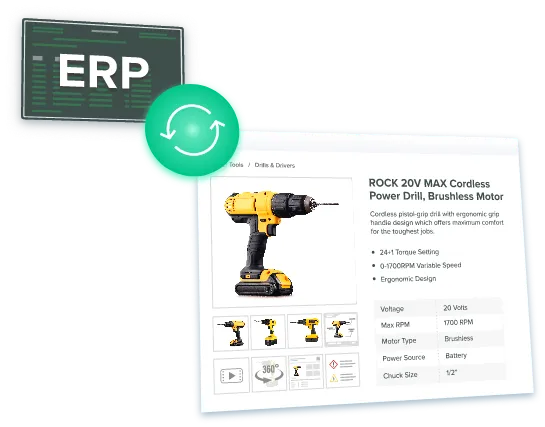
Import and export your largest product catalog without error. Catsy's high-limit API lets SKUs flow from your ERP all the way to your Magento instance — tens of thousands of items at a time — with catalog management guardrails that catch bad records before they land on a storefront. One honest note: Catsy delivers the data through its high-limit API, and your team (or your agency) builds the Magento-side connector that receives it. The Integration section below covers exactly what that means.
Magento is rarely your only destination. The same validated product data that feeds your stores also feeds Amazon, distributor spec sheets, print catalogs, and the rest of your sales channels. Add a new channel without rebuilding your data: pick the channel template, map once, publish. Your Magento stores and your marketplaces finally tell the same story about every product.
Most Magento PIM integration pages promise "seamless sync" and stop there. Here's how a Catsy PIM integration actually works, at the level an ecommerce or IT lead needs to evaluate it — what connects, what maps where, what triggers a sync, and who owns which piece of the work.
Catsy connects to Magento over an API-based PIM integration that works with Magento Open Source and Adobe Commerce, including multi-store and multi-website instances. Catsy's high-limit API pushes catalog data out; a Magento connector on your instance receives it and writes to your stores. Because Magento is an open-source, developer-driven platform, that receiving connector is built on the Magento side — by your developers or your agency, with Catsy's team specifying the payload and mapping. This is deliberate: Magento deployments are heavily customized, and a connector built against your instance beats a generic plugin fighting your extensions.
Sync runs on a scheduled cadence — typically nightly for full catalog refreshes, with on-demand pushes when your team approves updated content. Direction of truth is set per field, not per system: the ERP stays authoritative for inventory, cost, and the item master; Catsy is authoritative for enriched content — descriptions, attributes, assets, SEO fields, category assignments. Magento receives; it doesn't overwrite upstream. That per-field contract is what prevents the classic failure mode where a storefront edit silently diverges from the catalog and resurfaces as lost sales three months later — and it's the part of a PIM integration most vendors gloss over.
Catsy supports Magento 2 across both editions — Open Source and Adobe Commerce — including multi-website and multi-store-view configurations. The connector pattern is the same in every case: Catsy's API delivers the validated payload, and a connector on your instance consumes it. Because every Magento 2 deployment carries its own extensions, custom attributes, and theme logic, the connector is built against your instance rather than shipped as a one-size-fits-all plugin — that's what keeps the sync stable when your stack changes. Running multiple platforms (say, Magento 2 for B2B and another storefront for B2C)? The same pattern extends to each: one catalog, several receiving endpoints, no duplicate data entry.
Catsy's typical deployment runs 10–14 weeks from integration kickoff to first channel publication. Catsy's onboarding team owns the data model and the attribute mapping — you're not left alone with a spreadsheet of field codes. Your team owns three things: access to your ERP export, decisions about which fields matter per store, and the Magento-side connector build. The integration process is staged: ERP-to-Catsy flow first, then enrichment and validation rules, then the Magento connector and first publish. For developer-level detail on Magento's APIs and attribute architecture, hand your team Adobe's Commerce developer documentation — this page stays at the operational level on purpose.
Two things a well-run PIM integration should never require: re-keying product data that already exists in your ERP, and pausing your storefronts during cutover. If a vendor's integration process demands either, keep evaluating.
Your PIM system should catch errors before your customers do. Optimize in Catsy before publishing to Magento — maximize conversion, minimize returns.
The validation tool double-checks item specs for consistency and data accuracy, alerting your team to errors before you publish to a Magento store. Bad data gets caught at the source, not in a customer service ticket.
Catsy's Recommended Actions tool tells you what to fix next, continuously — a running checklist that turns catalog cleanup from a quarterly project into a daily habit.
Set customized grading standards using Catsy's templates for channels such as Magento, Home Depot, Amazon, and more. Every item earns a score against the channel it's headed to, so "ready to publish" is a measurement, not a feeling.
Export images and files in distributor and retailer spec formats for catalog creation and multiple sales channels — as well as your Magento stores.
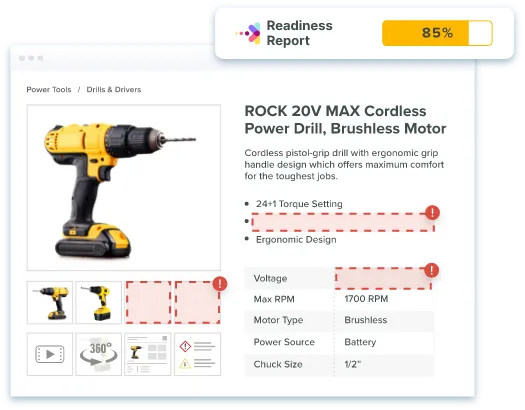
Completeness scoring identifies specific gaps in content the moment items are imported, so you resolve missing elements in minutes. PIM ensures every product published to Magento is complete — because a PDP missing its dimensions isn't a small bug, it's a return waiting to happen.

Publish product pages with six to eight of your highest-quality photos, 360° spins, and videos in a matter of clicks. Only the most current, approved assets are ever in circulation, and every store pulls from the same library — so customer experience stays consistent across storefronts.
Apply a broad range of product attributes to your products so shoppers filter their way to the right item instead of hitting "product not found." Strong product data is what makes Magento's layered navigation work; managing product data in Catsy is how it gets strong.
Give customers more reasons to add to cart. Catsy PIM creates product kits and accessory recommendations before publishing to your ecommerce platforms and distributor channels — cross-sells built into the catalog, not bolted onto the theme.
Centralize product information in one PIM system while keeping persona content separate and organized. One SKU, many faces:
Use different images, videos, and 360° photos for the same item across B2B, B2C, or regional buyer personas.
Link multiple titles and descriptions to the same SKU based on customer personas — the industrial buyer sees specs first, the consumer sees benefits.
Create separate tag sets for the same SKU for easy multi-store publishing through the PIM connector.
Attach different measurement systems to the same item and publish to your US and Canadian stores from one record.
Create, access, and link all translated versions of a product to the same SKU — supporting the markets you're in and the ones you're entering.
Selling in the US and Europe? Link the dollar and the euro as separate currencies to the same item for Magento multi-store sync.
Manage every Magento store from one PIM system and single source of truth, whatever your business needs look like today or next year.
Take accurate, consistent products to market faster with a workflow review and approval process built for speed, not just accuracy.
Publish to all channels from one asset library, so products stay consistent across every storefront.
One validated product data record per SKU across your entire catalog, before anything reaches Magento.
See every component of a product together in one view before it publishes to a product page.
Spot missing content inside the single product view and fix it on the spot.
Fuel your Magento stores with accurate translations and multiple currencies from one place.
Let SKUs flow between ERP and your PIM system so product information is current at all times.
Persona-specific marketing content linked to a single product, managed in one PIM and DAM.
Shortlisting the best PIM systems for a Magento build comes down to four questions. Does the PIM solution handle your full product catalog through its API limits? Does it include DAM, or will assets live in a second tool? Does the PIM ensure content meets each channel's requirements before publishing? And does the vendor's onboarding team own the mapping, or do you?
Catsy's answers: high-limit APIs sized for enterprise catalogs, DAM built in, per-channel content grading, and white-glove onboarding that owns your data model. The best PIM systems also differ by architecture — open source versus SaaS, standalone PIM software versus integrated suites — and the right choice depends on your business needs, catalog complexity, and how much data management your team wants to own. If you're earlier in your evaluation, compare PIM platform types or review our guide to the best PIM software before you shortlist.
Three evaluation details that separate a workable PIM for Magento from a great one:
A beautiful data model with a brittle Magento sync still fails. Ask every vendor to walk you through their integration process for your instance — what maps where, what triggers a sync, who wins conflicts.
Demos run on clean catalogs. Bring your worst supplier feed and watch how each PIM system handles import data validation, duplicate SKUs, and half-filled product attributes.
A PIM solution is a data management investment that outlives any single storefront. Whether you stay all-in on Magento or expand across multiple platforms, product data management done once — in one PIM system — should serve every channel you add. The platform that lets you launch a new marketplace without a re-implementation is the one that pays for itself.
No. Magento — in both Open Source and Commerce editions — manages catalog data for the storefront, but it isn't a PIM system. There's no completeness scoring, cross-channel validation, or single source of truth for product data across stores and channels. Most multi-store merchants pair Magento with dedicated PIM software once manual updates stop scaling.
It depends on your catalog size, channel count, and team. Look for a PIM solution with high-limit API support, integrated DAM, per-channel content grading, and Magento 2 multi-store mapping. Catsy is purpose-built for brands and distributors running large catalogs across Magento 2 and other sales channels.
An Adobe Commerce PIM integration works over APIs: the PIM pushes validated product data — attributes, assets, categories, store-view content — and a connector on the Magento side writes it to your stores. Catsy specifies the mapping and payload; your developers build the receiving connector against your instance.
Yes — multi-store is the core Magento PIM use case. Catsy manages every Magento store and store view from one catalog: shared products, store-specific titles, descriptions, tags, languages, and currencies, all linked to a single SKU. Merchants update once and publish everywhere, instead of repeating every change across each Magento store admin.
A typical Catsy PIM integration runs 10–14 weeks from kickoff to first channel publication. Catsy's onboarding team handles the data model and attribute mapping; your team provides ERP access, field decisions per store, and the Magento-side connector build. Multi-store complexity affects the timeline less than data cleanliness does.
See how Catsy PIM + DAM feeds complete, validated product data to every storefront you operate.
Get a Free DemoCatsy is not affiliated with Adobe Inc., the Magento Association, Adobe Experience Cloud, or the broader Adobe open source community. Magento, Adobe, and Adobe Commerce are trademarks of their respective owners.