PIM vs CMS: Key Differences (And When Do You Need Both?)
PIM manages what a product is. CMS manages how content is presented. See the differences, the 100 to 500 SKU threshold, and when you need both.
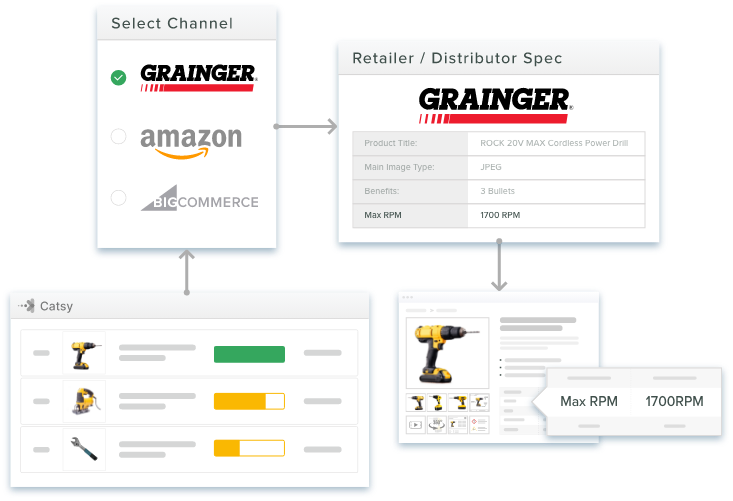
Table of Contents
Key Terms to Know
Both PIM and CMS systems touch your product pages, but only one was built to know what a product actually is.
Most companies start with a website and a content management system (CMS). It handles product pages fine until the catalog grows. Then a product goes live on Amazon with the wrong dimensions, or a distributor rejects a spreadsheet with missing fields.
That is usually when the question comes up: do we need a PIM?
The two systems do different jobs. A CMS controls how content looks on your website. A product information management (PIM) system controls what your products are, keeping specs, prices, and variants accurate everywhere you sell.
PIM vs CMS at a Glance
| PIM | CMS | |
|---|---|---|
| Main job | Structured product data | Website and digital content |
| Holds | SKUs, specs, pricing, variants, digital assets | Pages, blog posts, media |
| Data model | Attributes, parent-child variants, category fields | Pages and posts with custom fields |
| Sends data to | Marketplaces, retailers, distributor portals, print | Mostly your own website |
| Built-in checks | Validation, completeness, approvals | Editing and version history |
| B2B channels | Distributor templates, Shopify B2B catalogs | Not designed for distributor feeds |
| AI shopping tools | Clean, machine-readable product feeds | Page copy a machine must interpret |
The CMS Is Built for Publishing
A content management system lets people create and publish web content without writing code. WordPress, first released in 2003, is still the leader. As of October 2026, W3Techs data shows WordPress runs on 40.1% of all websites and 58.6% of sites whose CMS is known.
A CMS is strong at blogs, campaign pages, on-page SEO, and basic product pages. A home furnishings brand can update its Shopify pages without code. But it is a publishing tool, not a data management tool.
A headless CMS, such as Contentful, Hygraph, or Strapi, sends content to any front end through an API (a way for two programs to exchange data). Shopify works the same way: its Storefront API is a GraphQL API for building custom storefronts. But an API only moves data. A headless CMS has no product-level validation or marketplace syndication built in.
The PIM Is Built to Know the Product
A Product Information Management (PIM) system collects, improves, checks, and distributes structured product data. It pulls information from suppliers, your ERP (the system that runs inventory and finance), and internal teams into one controlled source of truth.
Data comes in, the team adds descriptions and specs, the PIM checks completeness, and the data goes to every channel at once. The home furnishings brand, with 2,000 SKUs in size, material, and finish variants, can update Shopify, Amazon, Wayfair, and 12 retail partners from one change.
That depends on a real data model. Most PIMs use parent-child variants: one parent record holds shared details, and each child holds its own size, SKU, and price. Commerce systems often store these fields with an Entity-Attribute-Value (EAV) model, and Adobe Commerce uses EAV attributes in its Catalog and Customer modules. PIM also sits next to digital asset management (DAM), which handles product images and files. For more depth, see our guide to what is PIM.
Where the Two Systems Part Ways
PIM manages what a product is. CMS manages how content is presented. A CMS stores pages, which works for 50 products but buckles under 5,000 with specs and variants. It publishes to your website, while a PIM formats data for Amazon, Walmart, retailers, and print, each with its own rules. A PIM checks data before it goes live, which is the heart of product data governance, while a CMS publishes whatever it is given. And scale is different: a CMS strains around 200 products, while a PIM is built for 500 to more than 50,000 SKUs.
Selling Through Distributors and B2B Portals
For manufacturers, the hardest channels are often B2B. In its FY2025 Form 10-K, Grainger says Grainger.com provides detailed product information and that its High-Touch Solutions businesses offer approximately 2 million products. Zoro, in Grainger’s Endless Assortment segment, offers approximately 13 million. Suppliers must deliver data in each distributor’s format.
Shopify B2B uses catalogs to control which products and prices each company location sees, so those catalogs are only as good as the data feeding them. Catsy includes distributor spec templates and a secure brand portal to turn one master record into each partner’s format.
Sharing the Work Between PIM and CMS
These systems are partners, so a typical launch runs like this:
The PIM owns product facts, and the CMS owns the presentation. Change a price once in the PIM, and it flows everywhere. Catsy includes built-in connectors and channel exports for Shopify, Amazon, and BigCommerce, so data reaches those channels without custom middleware.
CMS Alone, PIM, or Both?
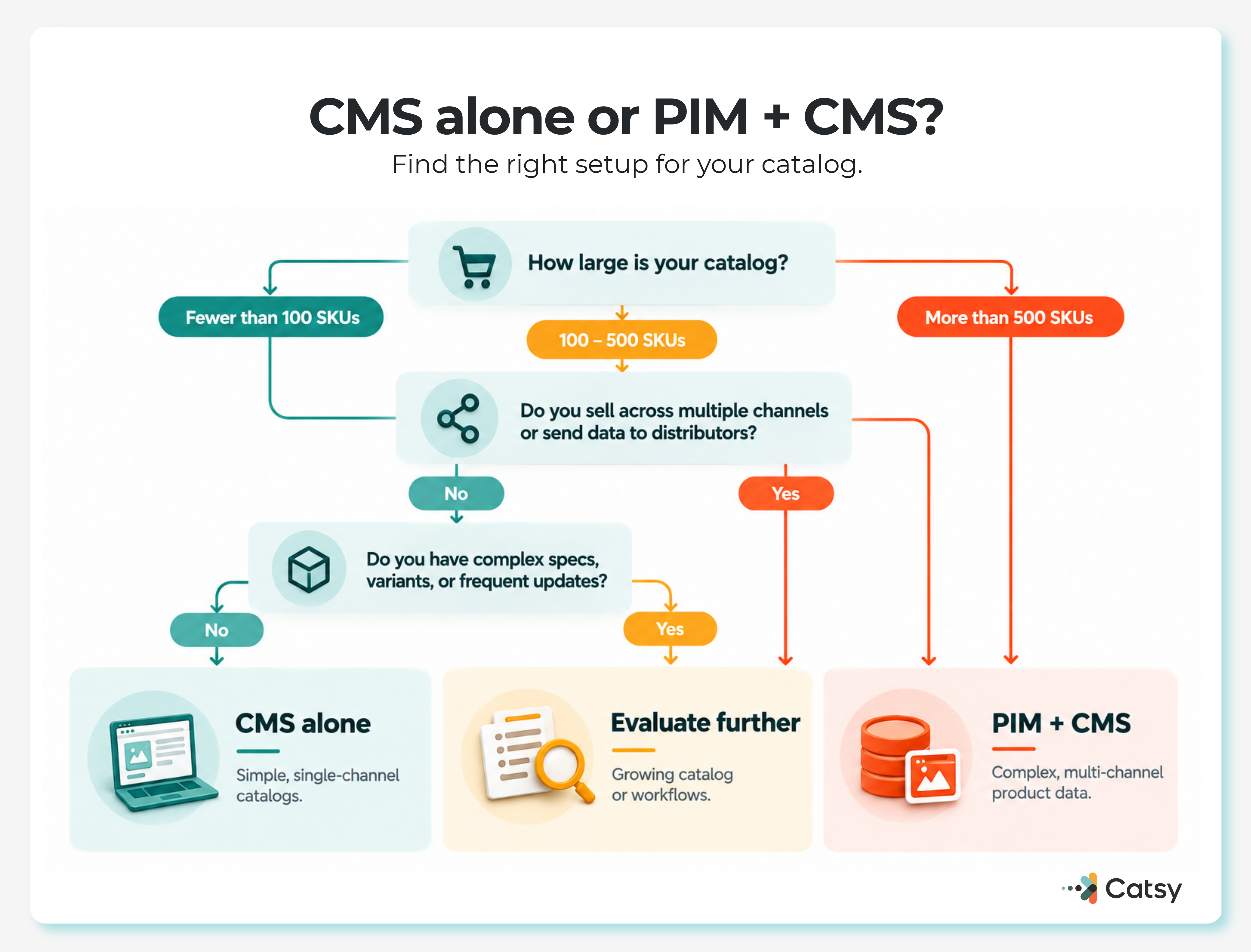
A CMS alone usually works if you have fewer than 100 SKUs, sell only on your website, and rarely change product data. A brand selling 30 products through one Shopify store does not need a PIM.
But you need a PIM when you manage hundreds or thousands of SKUs, sell through three or more channels, update data often, or supply distributors with their own templates. In Catsy’s experience, the switch usually happens between 100 and 500 SKUs across three or more channels.
Most growing businesses end up using both. The home furnishings brand, with 2,000 SKUs across 15 channels, needs the PIM as its data backbone and the CMS as its storefront. For visual-first categories like fashion, a combined PIM and DAM platform means connecting one system to the CMS instead of wiring three together.
Signs Your CMS Has Hit Its Limit
Watch for custom-field workarounds nobody wants to touch, custom development for every new channel, and wrong specs going live unchecked.
Bigger platform limits do not solve this. In October 2025, Shopify raised its variant limit from 100 to 2,048 per product, but more storage does not add completeness scoring or distributor-specific formatting.
The cost is real. Baymard Institute’s usability testing found that shoppers often abandon a product, and sometimes the whole site, when key details are missing. Gartner reports that poor data quality costs organizations at least $12.9 million a year on average, based on its 2020 research. In February 2025, Gartner also predicted that through 2026, organizations will abandon 60% of AI projects unsupported by AI-ready data.
A PIM catches those problems first. Industrial manufacturer Dynabrade reported moving from 61% to 99% data completeness across 58,000 SKUs after centralizing in Catsy PIM + DAM. Distributor feed errors fell from 25 to 35 per quarter to zero, and data preparation time dropped by more than 50%. (Catsy customer-reported results.)
Before You Buy
Avoid using CMS custom fields as a stand-in PIM, buying a PIM too early, or buying PIM and DAM separately. Check ERP connections early too. Our PIM and ERP integration guide explains what data flows each way.
Then run a quick audit: where your product data lives, which channels need which formats, how many SKUs and variants you manage, and what is coming next year. If the answers show real complexity, compare options in our guide to the best PIM software.
In Catsy’s experience, enterprise PIM rollouts can take 6 to 12 months, while mid-market platforms like Catsy usually reach first channel syndication in 10 to 14 weeks. Dynabrade finished its full rollout in 11 weeks.
Adding DAM to the Picture
PIM covers what a product is, DAM covers how it looks, and the CMS covers how content is experienced. Running all three separately means three vendors, three approval flows, and three integrations. Our guide to PIM vs DAM explains the first two in depth, and Catsy keeps product data and digital assets in one platform under one approval workflow.
New Pressure on Product Data
More systems now read product data without ever loading your website. In September 2025, OpenAI introduced Instant Checkout in ChatGPT, powered by its Agentic Commerce Protocol. Merchants share a structured product feed with identifiers, pricing, inventory, and media, and checkout is currently limited to approved partners. B2B buying has also spread out: McKinsey’s 2024 research found B2B customers use an average of ten channels, up from five in 2016.
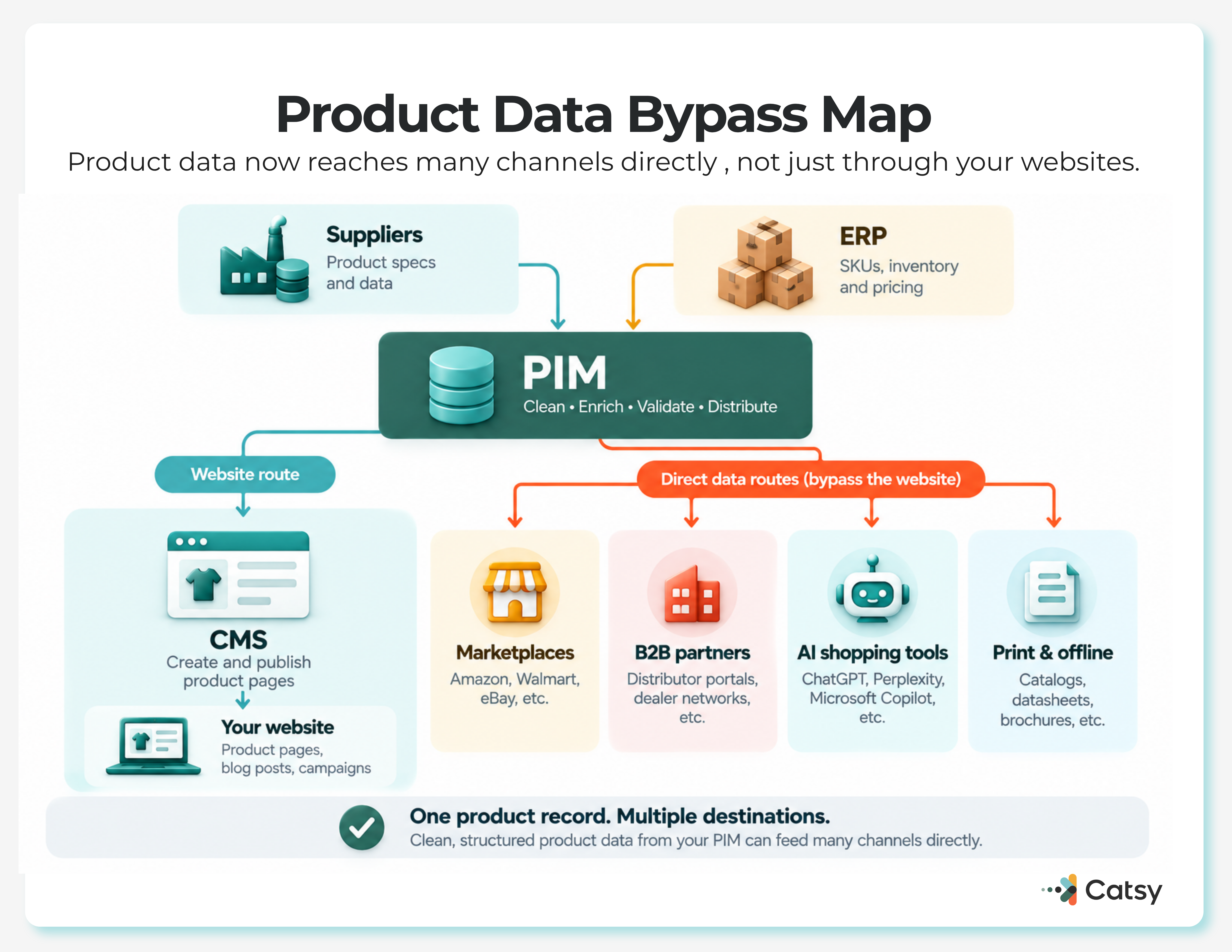
More revenue now depends on product data that never passes through the CMS, which makes the PIM more central to the stack than it used to be.
Where This Leaves You
A small catalog on one channel can live in a CMS. Past that, most businesses need both. If you are comparing options, look closely at integrated PIM + DAM solutions, or book a Catsy demo using your own catalog.
Ready to see your own catalog in a PIM? Request a Catsy demo and bring your messiest spreadsheet.
Key Takeaways