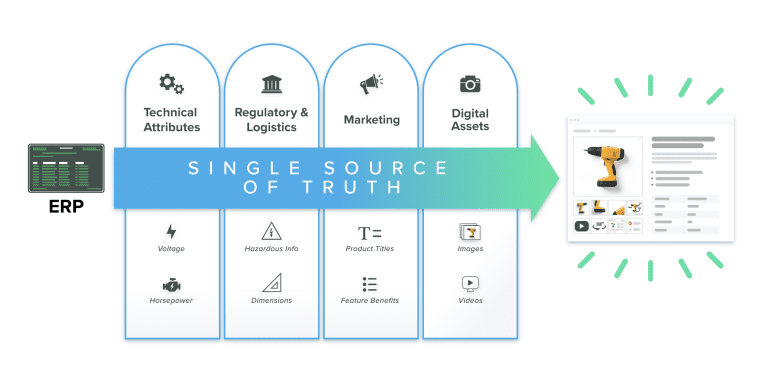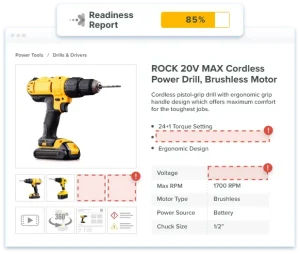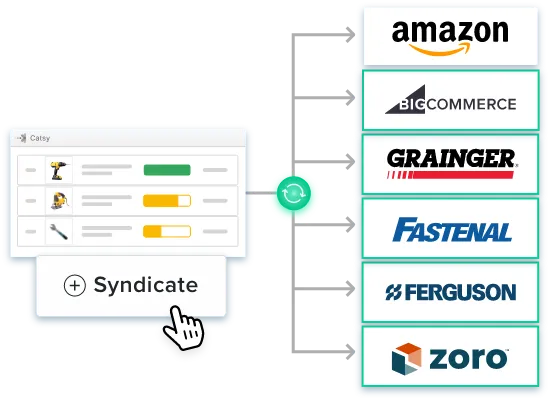
Think of product content syndication as the plumbing behind your digital shelf presence. It’s the automated process of pushing product data — titles, images, specs, pricing, availability — from one central source out to every sales channel simultaneously, with no manual uploads and no channel-by-channel re-entry.
This has nothing to do with blog posts, social media, or editorial content. Product content syndication is specifically about product data feeds and the systems that move them accurately to channels at scale. The digital shelf is where purchase decisions happen. A title that’s too long, a missing GTIN, or an image with a colored background instead of white can pull a product from results entirely. A data error that removes a product from search results isn’t recoverable until the next feed validation cycle.
What Is Product Content Syndication?
Product content syndication is the automated distribution of product data from a single governed source to multiple sales channels simultaneously. The mechanics come down to two formats: product feed files and product feed URLs.
A product feed file is a structured data export — typically XML, CSV, or JSON — containing all the attributes a specific channel requires. A product feed URL is a hosted endpoint the channel pulls from on a schedule, so data updates automatically without anyone uploading a file manually. Both move product data from your product information management system to the channel that needs it.
Different channels use different delivery methods. Amazon vendors typically submit via flat files through Vendor Central; third-party sellers can connect via the Selling Partner API. Google Shopping pulls from a feed URL through Merchant Center. GDSN retailers require certified data pool submissions. A solid product content syndication strategy covers all three, built on product data management practices that keep the source of record clean.
The digital shelf is the collective presence your products have across every channel where buyers can find and evaluate them. Product content syndication is the operational system that keeps that presence accurate, complete, and channel-compliant at scale.
Why Product Content Syndication Matters
The $3.8 trillion figure is the competitive arena your product data enters. The 60% Amazon figure shows its density: millions of third-party sellers competing for the same search placements, the same Buy Box positions, the same product detail page real estate. In that field, what separates a listing that surfaces from one that doesn’t is whether the product data meets each channel’s specifications precisely enough to avoid suppression and remain eligible for placement.
The 98% failure rate is where the opportunity sits — and where the risk is concrete. Poor data quality produces four specific, measurable outcomes in a product content syndication context:
Channel-by-Channel Requirements for Product Content Syndication
Every channel maintains its own specification sheet — compliance is not negotiable. Here’s what each of the major channels actually requires.
| Channel | Key Requirements | Without Them |
|---|---|---|
| Amazon | Titles 80–200 chars · 5 bullet points · GTIN required · Pure white background images (RGB 255,255,255, min 1,000px) · A+ Content for brand-registered sellers | Wrong browse node = wrong attribute template = listing suppression. Missing GTIN = listing ineligible. |
| Walmart | Walmart taxonomy codes (Amazon browse nodes don’t transfer) · Content Quality Score governs ranking and Buy Box · Titles 50–75 chars · 360-degree imagery for qualifying categories | Low Content Quality Score suppresses listings regardless of price. Mismatched taxonomy causes feed rejection. |
| Home Depot | Structured spec sheets · Installation guides · 360-degree imagery · Compliance certification docs (UL, ETL) | Missing certification docs block listing approval in regulated product categories. |
| Grainger | Industrial specs in standardized attribute format · CAD files for engineered products · SDS compliance docs · Cross-reference numbers · UNSPSC codes | Products without valid UNSPSC codes or cross-reference numbers are rejected from data intake. |
| Google Shopping | GTIN required · Google Product Taxonomy code · Price & availability updates daily minimum · Schema markup on product landing pages | Stale data drops feed health scores and wastes paid search spend. Missing GTIN limits Shopping ad eligibility. |
| Shopify | Metafields for extended attributes · Collections structure aligned to navigation · Storefront API for headless implementations · 3D model support for qualifying products | Attributes beyond standard fields get dropped without metafields. Headless implementations break without Storefront API. |
Image and asset specs are as varied as data specs. Keeping digital asset management connected to your product data — rather than running it in a separate system — is the only practical way to get the right asset version to each channel automatically.
What Is GDSN and When Do You Need It?
GDSN (the Global Data Synchronization Network) gets left out of most product content syndication guides. The omission matters most for manufacturers selling through grocery and large retail trading partners.
A worldwide network of interoperable data pools built on GS1 standards. Rather than exchanging spreadsheets or one-off data files with each retailer, suppliers and retailers both connect to certified data pools that synchronize product data automatically using a shared GS1 attribute structure.
Grocery, CPG, and large retail chains. Walmart, Target, Kroger, and Costco require GDSN-compliant data exchange from most of their suppliers. If you’re selling to any of them, GDSN is the default prerequisite for getting your data into their systems — exceptions exist by category, but they’re the exception, not the rule.
A supplier publishes product data to a GS1-certified data pool. The retailer subscribes and receives synchronized data automatically. GTINs are the mandatory linking key. The shared GS1 attribute structure means no custom mapping is needed for each individual retailer relationship.
GDSN covers the B2B layer: direct retailer-to-supplier data exchange. It’s not a substitute for marketplace feed syndication — it’s a parallel track. Manufacturers selling through both retail trading partners and digital marketplaces need both running simultaneously.

8 Questions to Ask Before Choosing Syndication Software
The right evaluation moves past feature lists to operational questions — how a platform performs when specs change, feeds break, or a channel flags errors. These eight questions reveal that.
Certified connections are vendor-maintained API integrations — when Amazon updates its feed specification, the vendor pushes the update. Template-based connections give you a file format to work from, but when specs change, your team manages the updates. If you can’t dedicate resources to monitoring channel spec changes constantly, certified connections are worth prioritizing.
Look for native XML, CSV, and JSON output, plus GDSN-compatible exports for retail trading partners. If a platform only generates one format, every channel that needs something different becomes a custom integration project — adding cost and maintenance burden every time channel specs change.
Three things matter: feed scheduling (how frequently updates go out), trigger-based publishing (does a price change in PIM automatically push to all channels, or does someone have to initiate it?), and approval workflows for high-stakes categories. Anywhere manual publishing is required, you’ve created a chokepoint that undercuts the whole point of product content syndication.
Pre-flight validation catches missing GTINs, title length violations, image spec failures, and missing required attributes before the feed leaves your system. Ask vendors to walk through their validation rule set per channel specifically. “We validate content” is a marketing statement, not a specification.
Stale pricing on marketplace channels causes Buy Box loss and order cancellations. Google Shopping needs daily updates at minimum. Anything less and feed health scores start to slide. Get the actual sync cadence in writing for your priority channels — not just a reassurance that it’s “real-time.”
Syndication isn’t just structured data. It’s images, videos, PDFs, CAD files, and everything else channels require alongside product specs. A platform with integrated digital asset management means the right asset version (white background for Amazon, 360-degree for Walmart, CAD for Grainger) is automatically paired with the right product record. Without that integration, asset versioning becomes a separate, manual, error-prone process running in parallel.
Amazon, Walmart, and Google run certification programs for syndication partners. Certified vendors get earlier notice of spec changes, have dedicated escalation paths when feeds break, and appear in channel partner directories. Ask which specific channels the vendor is certified with — not just whether certifications exist generally.
The real test is what happens after the feed goes out. Does it surface channel feedback — rejections, content score drops, suppressed listings, image compliance warnings — back into your workflow? Without that feedback loop, you find out about problems when revenue drops, not when the issue first appears. By then, the revenue impact is already measurable.
These questions apply whether you’re evaluating a standalone syndication tool or a PIM for manufacturers platform with syndication built in.
How to Choose the Right Product Content Syndication Software
The right platform depends on who you are and what channels you need to reach. Three buyer profiles, three different priority sets.
Prioritize PIM + DAM + Syndication in One Platform
Syndicating from a governed product information management source — not spreadsheets or ERP exports — ensures every channel feed draws from validated, complete data. Catsy combines PIM, DAM, and syndication in one platform purpose-built for mid-market manufacturers and distributors: pre-loaded channel templates, built-in validation, and automated distribution from a single source of truth to every channel simultaneously.
Lead with GDSN Certification
Check whether the platform is itself a certified GS1 data pool or integrates directly with a GS1-certified data pool provider. There’s no workaround for selling to Walmart, Target, Kroger, or Costco. GDSN compliance is mandatory for most product categories, and a syndication platform without it isn’t a complete solution for this buyer profile.
Focus on Channel Breadth and Sync Speed
Prioritize the number and quality of direct channel connections, near-real-time price and inventory sync, and content score visibility. GDSN typically isn’t in scope here. Certified API connections to Amazon, Walmart, and Google Shopping are what drive digital shelf performance.
How to Implement Product Content Syndication in 5 Steps
Done well, product content syndication is an ongoing operation, not a launch-and-forget project. Here’s the sequence that actually holds up.
What’s Next?
Product content syndication is no longer a nice-to-have for manufacturers and distributors. It is already reshaping how brands reach channels, govern data quality, and scale across marketplaces and distributor networks without adding headcount. But technology alone does not close the gap. The real advantage comes from pairing a capable syndication platform with a clear data strategy — knowing who owns what, which system holds the source of truth, and how validated content flows from your PIM into every downstream channel automatically.
When you scale well, you don’t just connect more channels — you syndicate from a clean, governed source. That’s what separates digital shelf management that compounds over time from syndication that requires constant firefighting. A product information management system is what makes that foundation possible.

Key Takeaways

Frequently Asked Questions
Product content syndication is the automated process of distributing product data — titles, images, specs, pricing, availability — from a single governed source to multiple sales channels simultaneously. It’s not content marketing. It’s the operational infrastructure that keeps product information accurate and channel-compliant wherever your products appear online.
A product feed — whether a feed file in XML, CSV, or JSON, or a product feed URL — is the delivery format. Product content syndication is the system around it: the governance, validation, and workflow that ensures what’s in the feed is correct before it goes out. A feed without that infrastructure is just a data export. What makes it product content syndication is the process that makes feeds reliable at scale.
It depends on where you sell. If your channels include Walmart, Target, Kroger, or Costco, GDSN is mandatory for most product categories — those retailers require GS1-certified data exchange from most suppliers. For marketplace and direct digital channels like Amazon, Google Shopping, and Shopify, you don’t need GDSN; direct API feeds handle those. Many manufacturers need both tracks running at the same time.
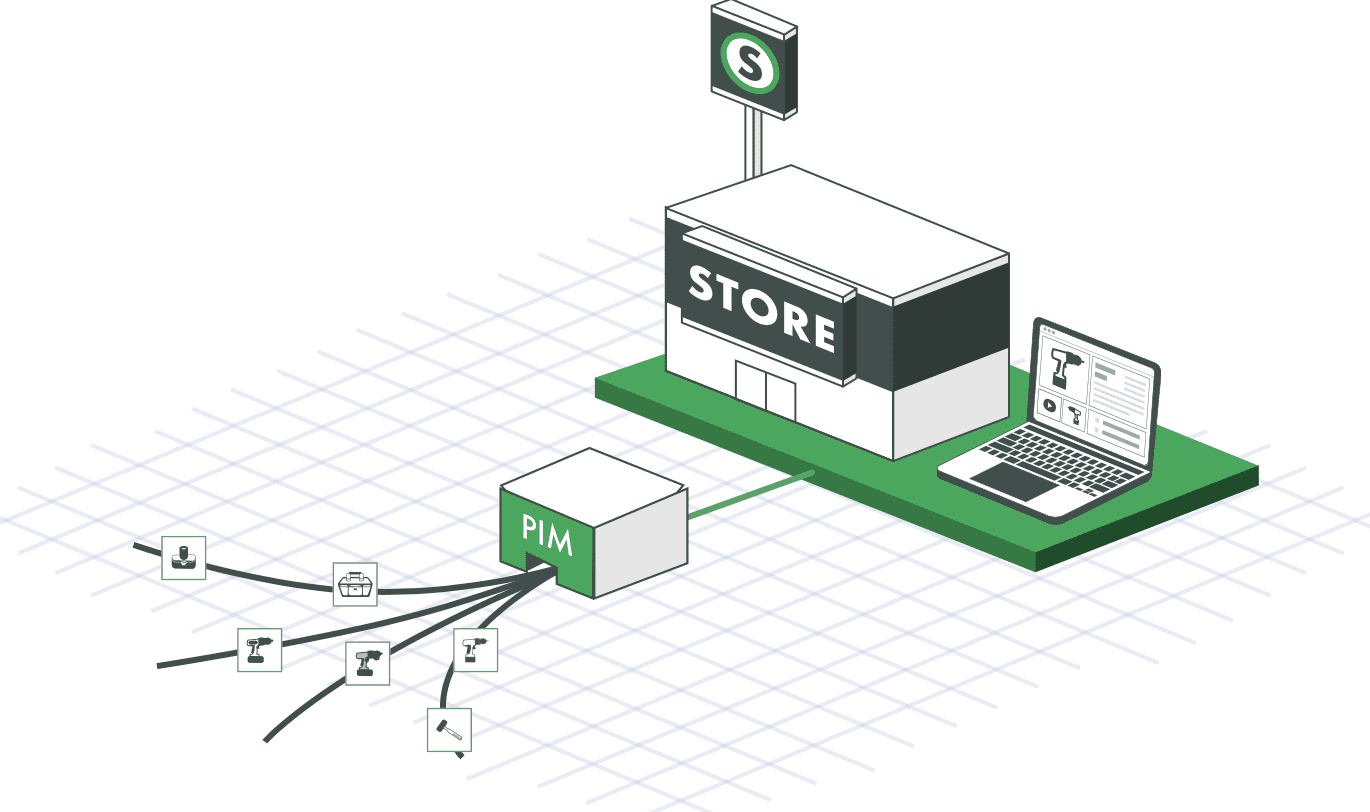
A product information management system is where product data lives, gets enriched, and gets validated. Product content syndication is how that data gets pushed out to channels. PIM is the source; syndication is the distribution layer. The quality of your syndicated data is only as good as what’s in your PIM, which is why syndicating from spreadsheets or raw ERP exports tends to produce inconsistent, error-prone feeds over time.
The consequences are specific and measurable: listings get suppressed when products don’t meet content thresholds, sellers lose Buy Box eligibility when pricing or inventory data goes stale, entire feed files get rejected when required attributes are missing, and organic placement drops when content scores fall below channel thresholds. These are channel-reported outcomes that show up directly in revenue — not abstract risks.
Start with one or two priority channels, get clean feeds with no rejections, then expand. Going wide before validating makes problems harder to diagnose. Channel feedback from a single integration often surfaces data gaps you didn’t know existed. Fix those first, then scale. Connecting everything at once means the first month is typically spent on cleanup that a careful test batch would have caught.
Where to Next?
Product content syndication is no longer a nice-to-have for manufacturers and distributors. The real advantage comes from pairing a capable syndication platform with a clear data strategy — knowing who owns what, which system holds the source of truth, and how validated content flows from your PIM into every downstream channel automatically.
Ready to Syndicate Product Data Across Every Channel?
Catsy combines PIM, DAM, and syndication in one platform — pre-loaded channel templates, built-in validation, and automated distribution from a single source of truth. One governed record. Every channel served.
Book a Demo