If you’re researching PIM for Amazon, you probably didn’t get here from a strategy deck. You got here from a suppression email at 4:55 PM on a Friday — a listing pulled from search because one required attribute in one category was blank, and nobody noticed until sales flatlined.
That’s the part of Amazon operations nobody warns you about. Every category has its own style guide, its own required attributes, its own image specs, its own parent-child variation rules. And the enforcement isn’t a quality nag from a merchandiser — it’s automated. A missing attribute isn’t a to-do item. It’s a suppressed listing, zero visibility, and lost revenue until someone finds it and fixes it.
Amazon rewards sellers who treat listings as an operation. The rest firefight. For how Catsy approaches this specifically, see our PIM and DAM for Amazon platform page.
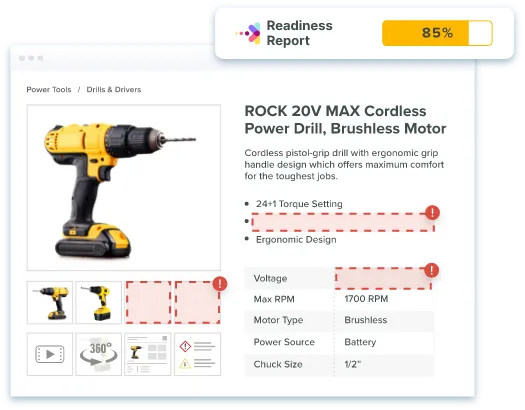
Most Amazon product data problems aren’t random. Across manufacturer catalogs, the same five failures show up again and again — and each one maps to a specific PIM mechanism that prevents it.
Amazon requires different attributes by category — and it suppresses listings that don’t comply. Miss a required field, exceed a category’s title limit (around 200 characters in most categories, far less in some like apparel), or leave an invalid value in a flat file, and the listing quietly drops out of search. The cost isn’t just lost sales; it’s the detection lag. Suppressions don’t announce themselves to the person who can fix them.
Amazon’s main-image requirements are strict and enforced automatically: pure white background (RGB 255,255,255 — not off-white), the product filling at least 85% of the frame, at least 1,000 pixels on the longest side so zoom works, and no text, logos, or watermarks. Compare that to what’s actually in your shared drive: a mix of hero shots, lifestyle renders, and whatever the agency sent in 2023. Upload the wrong one and the listing goes live without images — or doesn’t go live at all.
A digital asset management (DAM) layer stores channel-specific renditions with the specs attached, so the Amazon-ready image — right background, right resolution, right crop — is the only one that can flow to Amazon.
Parent-child relationships are how Amazon understands that your 40 SKUs are one product in 8 colors and 5 sizes. When variation families are built by hand in flat files, they drift: a new colorway gets listed as a standalone orphan, a child ends up under the wrong parent, review history fragments across duplicate listings, and customers can’t find the size they want from the page they landed on.
You refreshed the comparison charts and feature imagery on your own site in March. Amazon’s A+ content still shows the 2024 versions — because the assets live in two places and nobody owns the sync. Shoppers now see two different stories about the same product, and the older one is on the channel with the most traffic. When an asset is updated once in the DAM, every channel that references it — including Amazon A+ modules — pulls from the current version, and stale copies stop circulating.

Backend search terms are the field nobody owns. Content that goes in at launch tends to stay there untouched for years: old brand names, discontinued use cases, terms pasted past the limit. Because the field is invisible on the listing, the decay is invisible too.
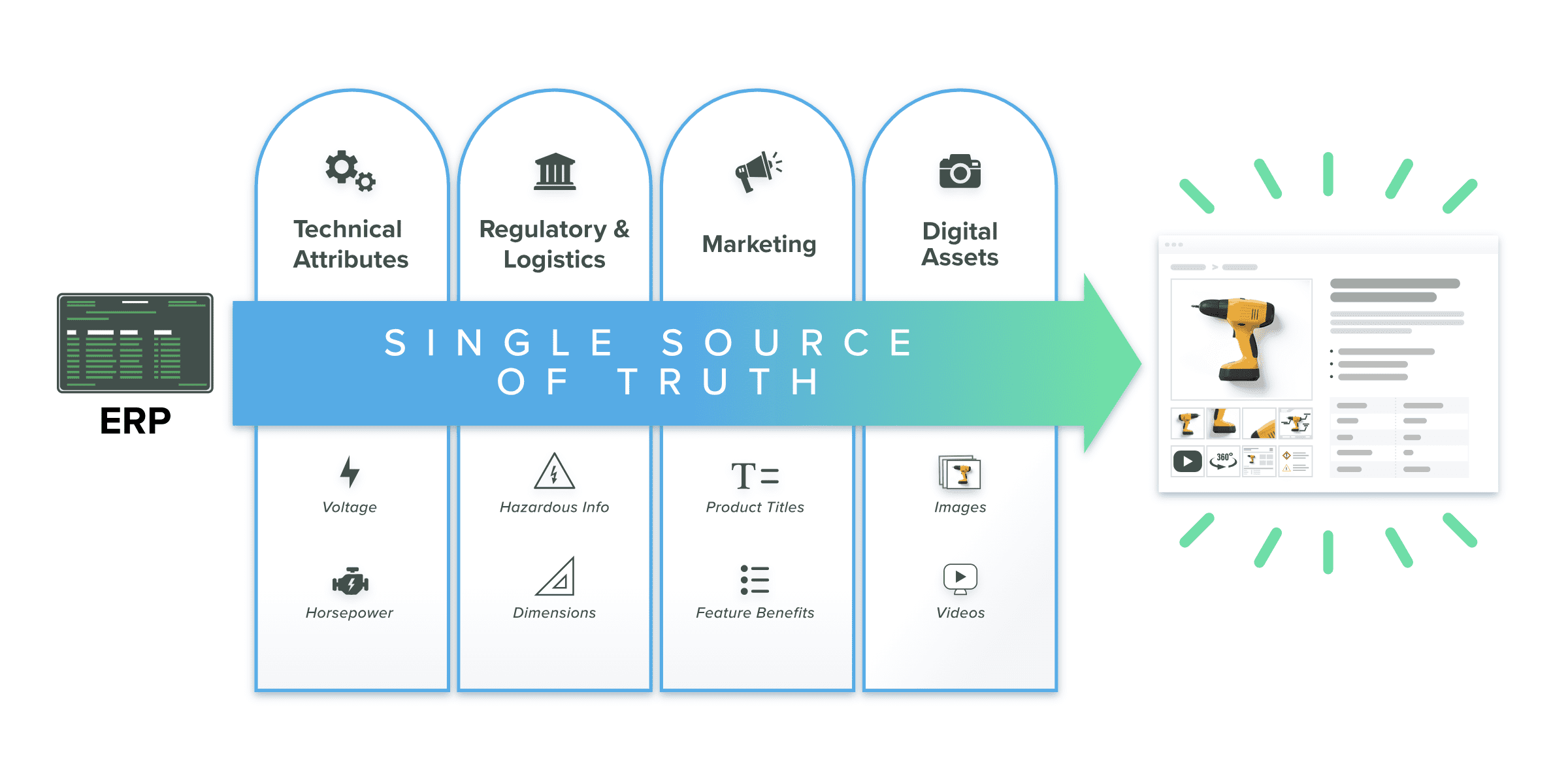
Here’s the operational flow, stripped of vendor abstraction.
Catsy’s channel templates hold an Amazon-ready version of every SKU alongside the dealer, distributor, and DTC versions — one catalog, channel-specific outputs, exported in Amazon Seller Central format. No parallel “Amazon spreadsheet” that drifts from the master.
Every guide on this topic treats Amazon as the whole world. If you’re a manufacturer, it isn’t — and that’s precisely why your product data problem is harder than a marketplace seller’s.
The same SKU that feeds Amazon also feeds your DTC site, distributor portals (each with its own spec format), dealer catalogs, retail partners, and print collateral like spec sheets and price books. Six destinations, one product — and six chances for the story to diverge.
Divergence isn’t cosmetic. When your Amazon listing shows a different spec than your own site, customers notice, dealers field confused calls, and returns climb because the product page over- or under-promised. On Amazon, that fallout is measurable: content that doesn’t match the product feeds directly into the complaints, returns, and listing-quality flags that Seller Central surfaces on its own dashboards.
The operating model that works is single source of truth with channel-specific enrichment: one catalog record per SKU, enriched once, then shaped per channel through templates. Amazon gets its 200-character title and backend search terms; the distributor gets its required spec columns; the dealer catalog gets print-ready copy — all generated from the same underlying record, so a correction made once propagates everywhere. This is product content syndication in practice, and it’s the model our product information management system is built around.
One caveat on scope: if you sell 1P (first-party) through Vendor Central, item setup and day-to-day mechanics work differently. The single-catalog operating model applies either way, but the 1P mechanics are their own discussion.
If your Amazon catalog has crossed roughly 500 SKUs, run this quarterly. It’s the difference between running operations and doing archaeology.
If you’d rather walk this list with people who’ve run it across B2B product catalogs many times, that’s exactly what a demo is for — bring one messy category and we’ll show you how it flows through Catsy’s Amazon integration. Book a demo of Catsy’s Amazon integration.
Amazon doesn’t reward the brands with the best products. It rewards the brands whose product data holds up under automated scrutiny — complete attributes, compliant images, coherent variations, current content. That’s operational discipline, and past a few hundred SKUs, a PIM is how a mid-size team affords it. If you’d rather spend next quarter optimizing listings than repairing them, book a demo and see how Catsy runs Amazon from one source of truth.


Not at small scale — under roughly 50 SKUs, Seller Central plus disciplined spreadsheets works. A PIM earns its keep when product data becomes a coordination problem: hundreds of SKUs, multiple contributors, and Amazon running alongside other channels. At that point, validation, completeness scoring, and channel templates replace manual checking that no longer scales.
Bulk management runs on structured data: maintain one catalog with complete, validated attributes, then push updates via flat files or an API-based integration into Seller Central. A PIM automates the mapping — titles, bullets, backend search terms, category attributes — so a change made once in the catalog updates every affected listing.
The most common causes are missing or invalid required attributes for the category, titles exceeding category length limits, and non-compliant images — especially main images without a pure white background or below the 1,000-pixel minimum. Because enforcement is automated, prevention beats detection: validate data against Amazon’s requirements before publishing, not after the suppression email arrives.
No. Seller Central remains where your account, orders, advertising, and performance monitoring live. A PIM sits upstream as the system of record for product content, feeding Seller Central complete, validated listing data — and feeding the same data to every other channel you sell through.
Quarterly for catalogs past roughly 500 SKUs — covering attribute requirements, image specs, variation maps, A+ asset currency, search-term ownership, suppression sweep cadence, title limits, identifier integrity, content diff against your own site, and your feed-error triage log. Amazon’s category requirements change; a quarterly audit is how your catalog keeps up.
Seller Central is the 3P (third-party) seller environment where you control pricing, inventory, and listing content directly. Vendor Central is the 1P (first-party) environment where Amazon buys from you wholesale and controls the listing. Item setup mechanics differ between the two, but the single-catalog operating model — one source of truth, channel-specific templates, corrections that propagate everywhere — applies in both cases.
Amazon is where listing discipline is enforced automatically and the penalty for data problems is immediate. The guides below cover the platform decisions and data infrastructure that matter most when you’re building the system behind the listings.
Catsy’s PIM and DAM give your team completeness scoring, Amazon-ready channel templates, and one source of truth behind every channel you sell on — so suppressions get caught in your workflow, not in Seller Central.
Book a Demo