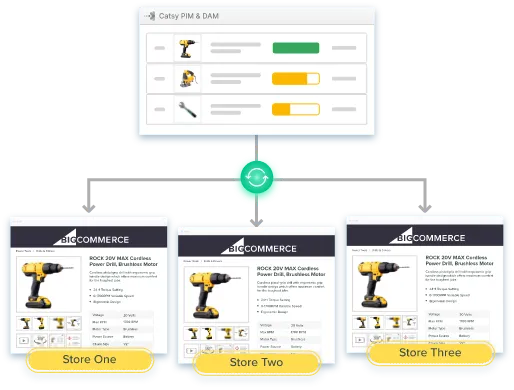
Here’s the honest answer most BigCommerce PIM content dances around: BigCommerce is a strong storefront and a weak system of record. It’s an ecommerce platform built to sell — fast pages, flexible checkout, solid APIs. It was never built to be the central hub where thousands of SKUs get enriched, validated, and prepared for every channel your business sells on.
You feel that gap at four predictable breakpoints:
Two or more of those describe most merchants who end up here. This playbook walks through the full BigCommerce PIM integration, step by step — and what it fixes first is the slow leak: incomplete pages, stale specs, and the customer dissatisfaction that follows them.
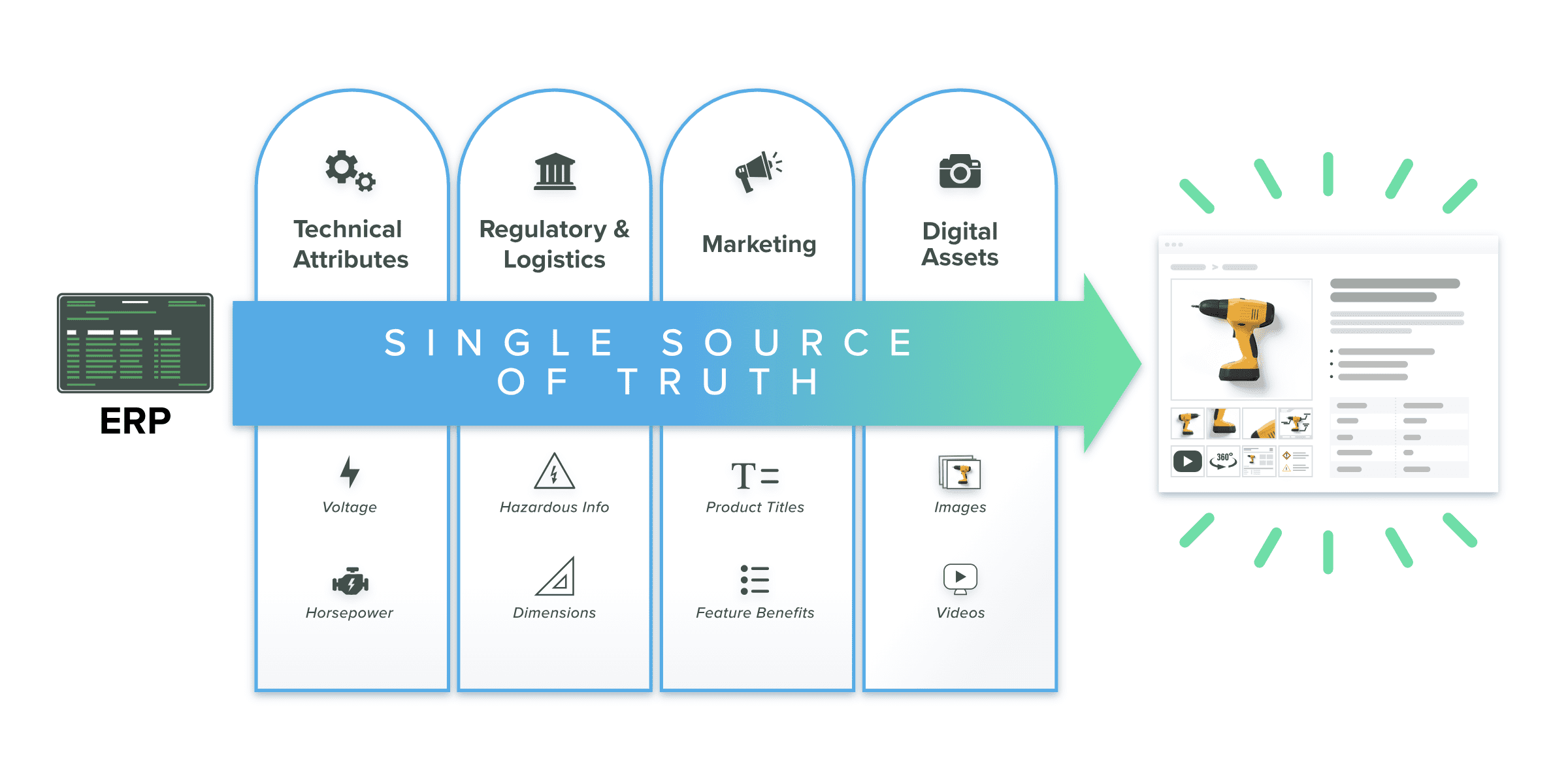
Skip the generic benefits list. PIM solutions earn their keep on four concrete jobs, each of which changes how your team runs BigCommerce day to day. Here’s what a product information management system does for BigCommerce merchants:
Product data management happens once, in the PIM system. Every BigCommerce storefront — and every other channel — pulls from that central hub. BigCommerce stays your sales layer; the PIM becomes your data layer.
A PIM system grades every product against your own required-field rules, so incomplete product listings never reach customers. That’s data quality enforced by workflow, not by heroics — accurate information on every page, consistent as the catalog grows.
A built-in digital asset management (DAM) system ties every image, video, and spec sheet to its SKU, so digital assets publish with products automatically — correctly sized, in the right order.
The same enriched record feeds distributor spreadsheets, Amazon, and print catalogs. Prepare product data once, publish it to every sales channel.
Catsy’s BigCommerce PIM software syncs your catalog every hour on the hour across multiple storefronts, with high-limit API support for large product catalogs, and exports distributor-ready content for partners like Grainger, Fastenal, Zoro, and MSC alongside your BigCommerce integration.
Six steps, in order, with honest time expectations. A full PIM integration typically runs a matter of weeks — not the “live in 48 hours” a connector brochure might promise. The audit and data model steps usually run in parallel; everything else moves in sequence. Done in this order, an integration with BigCommerce is a controlled rollout instead of a leap of faith.
Inventory everything — attributes, variants, digital assets, categories, and every channel each product touches. The goal is to find dirty product data before migration: duplicate SKUs, inconsistent units, missing images, conflicting product descriptions.
Your ecommerce or product management lead, with input from whoever owns the ERP.
1–2 weeks. Teams that skip this step pay it back with interest at step 5. If your data quality baseline is rough, budget more.
Define attribute groups, required fields, and completeness rules in the PIM. This is where your business decides what “done” means for a product — which fields must be populated, in what format, before anything publishes to your BigCommerce store.
You, working with your PIM vendor’s implementation team. This is a business decision dressed as a technical one.
1–2 weeks, running in parallel with the audit.
SKUs and structural product data flow from your ERP into the PIM system, which becomes the enrichment layer on top of your operational backbone. The ERP keeps inventory, cost, and transactions; the PIM owns everything a buyer reads.
PIM vendor + your IT/ERP admin.
2–4 weeks depending on the ERP and how clean step 1 left the data.
Every PIM attribute gets mapped to its BigCommerce destination — products, variant options, modifiers, custom fields, categories. This is where most integrations stall: HTML formatting inside descriptions, image sort order, and BigCommerce’s per-product limits on variants and custom fields all deserve scrutiny before a single SKU publishes.
This is the step that stalls DIY projects. Catsy’s onboarding team does the field mapping with you — a working session, not a documentation link and good luck.
1–2 weeks.
Sync one category — not the whole catalog. Validate rendering, variant behavior, image order, and category placement on the BigCommerce store. Fix mapping issues while they’re cheap.
Your team validates against real business scenarios; the vendor adjusts mappings.
About a week, including review.
Cutover is when the BigCommerce integration goes live: full catalog sync, then scheduled updates take over. Document the source of truth per field before this step — which system wins for price, for product descriptions, for inventory.
Everyone signs off; ops owns the cadence going forward.
Most businesses reach steady state within 1–2 weeks of cutover.
| PIM attribute | BigCommerce field | Watch out for |
|---|---|---|
| Product name | Product Name | Character limits; channel-specific naming rules |
| Long description | Description | HTML rendering — strip inline styles from legacy content |
| Size / Color / Finish | Variant Options | Per-product variant caps; option display order |
| Add-on services | Modifiers | Modifiers don’t create SKUs — see next section |
| Technical specs | Custom Fields | Field count and length limits |
| Product taxonomy | Categories | One-to-one mapping table; watch orphaned categories |
| Images / documents | Product Images / assets | Sort order, alt text, resolution |
Most integration guides skip this section entirely. Four places where a BigCommerce PIM integration actually fails:
In BigCommerce, variant options generate real SKUs (a red, size-10 boot is its own sellable unit); modifiers customize a product without creating SKUs (engraving, a warranty add-on). Your PIM data model has to mirror that distinction before mapping, or you’ll generate thousands of phantom SKUs — or collapse real ones. Units of measure need the same rigor: if the ERP sells by the case and the BigCommerce store sells by the each, model the conversion explicitly.
Customer-group price lists and contract pricing belong in your ERP and BigCommerce’s price list engine. The PIM system’s job is the content around them: correct units, minimum order quantities, spec sheets. A PIM that tries to become your pricing engine creates a second source of truth — the exact problem your PIM integration exists to eliminate.
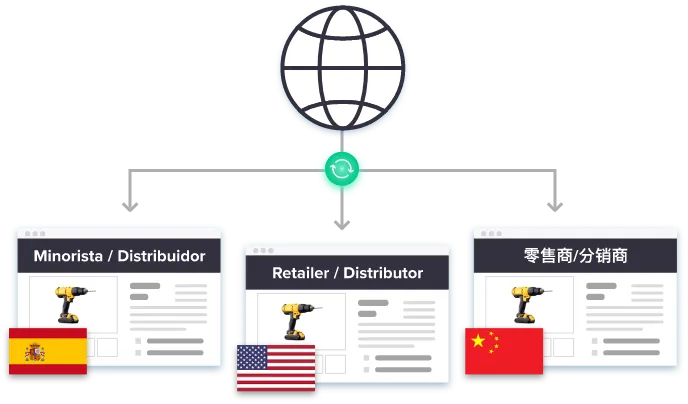
BigCommerce merchants run multiple storefronts for real business reasons: a B2C store leading with lifestyle imagery next to a wholesale store leading with net pricing and specs; a premium brand beside an outlet; US, UK, and EU stores with localized measurements and compliance documents. Without a PIM, that means duplicated records and drifting attributes — “red” on one store, “crimson” on another — and, eventually, customer dissatisfaction on whichever storefront gets updated last.
With one, a single product record carries storefront-level overrides: same SKU, different title, assets, or language per store, updated once and published everywhere.
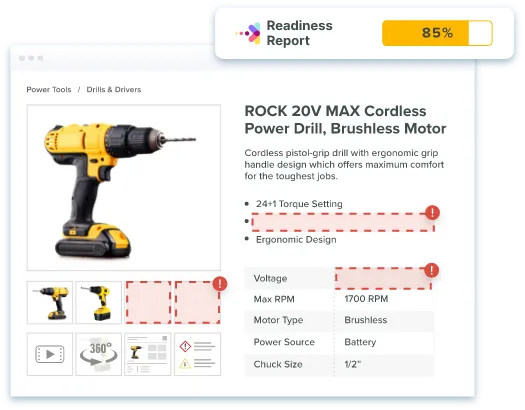
A swatch image, a lifestyle shot, and a spec sheet are three different jobs for the same SKU. Your DAM should store all three against the product and publish the right one per context. This is where completeness scoring earns its keep: Catsy grades every variant against your rules and flags the gaps — the missing swatch image, the empty spec field on one size — before they publish, not after a customer or distributor finds them.
A BigCommerce connector raises two questions your business must answer before cutover. Both are deceptively simple to write down and genuinely important to get right.
Scheduled hourly sync is the workhorse — edits made in the PIM system land on the storefront within the hour, which keeps product data fresh without hammering API limits. On-demand pushes handle the exceptions: product launches, corrections, seasonal changeovers. Define what triggers an update (any field change? only published-state products?) so nobody’s job includes remembering to click sync.
This is the “source of truth” question made concrete. Write it down per field before cutover:
Teams that codify these rules avoid the most common post-launch complaint — “my edit disappeared” — because nothing about the pipeline is ambiguous. A PIM with change history and audit trails makes any dispute diagnosable: you can see who changed what, when, and roll back if needed. Data accuracy stops being a hope and becomes a policy.
Before your business cuts over for good, run this list. It catches the five most common PIM integration failures — and five more that hurt almost as much.
If you’d rather walk this list with people who’ve run it across B2B product catalogs many times, that’s exactly what a demo is for — bring one messy category and we’ll show you how it flows through Catsy’s integration with BigCommerce. Book a demo of Catsy’s BigCommerce integration.
The playbook in five words: audit, model, map, pilot, cutover. Not sure which PIM to build on? The best PIM software guide covers platform options before you commit to a stack. BigCommerce stays your sales engine; the PIM system becomes the central hub where product data gets enriched, validated, and published — one workflow for accurate information everywhere your business sells, from BigCommerce storefronts to distributor feeds to online marketplaces. Follow the sequence, write down your conflict rules, and run the checklist. That’s how a BigCommerce PIM integration ships without breaking the catalog.


No. BigCommerce’s native product management features — categories, custom fields, and metafields — are storage, not product information management. There’s no completeness scoring, attribute governance, channel-specific content, or asset-to-SKU management. BigCommerce merchants with large or multi-store catalogs pair the ecommerce platform with a dedicated PIM system as the data layer behind the storefront.
Use a PIM system with a native BigCommerce connector built on the Catalog API. The integration sequence that works: audit your catalog, design the data model, import ERP data into the PIM, map fields to BigCommerce, pilot one category, then cut over to scheduled sync — hourly for routine updates, on-demand for product launches.
It depends on your specific business — catalog size, channel count, and whether you need distributor-format exports alongside your storefront sync. Prioritize a native BigCommerce integration with multi-storefront support, completeness scoring, an integrated DAM, ERP connectivity, and exports for your other sales channels. B2B sellers should insist on distributor-format exports. To weigh PIM solutions systematically, review the guide to the best PIM software.
Weeks, not days — and be wary of anyone promising otherwise. Timelines vary with catalog size, data quality, and ERP complexity; the audit and field-mapping steps are what keep the schedule honest. Typical full implementations, from kickoff to first channel publication, land in the 10–14 week range.
Variant options generate real SKUs — a red, size-10 boot is its own sellable unit with its own inventory. Modifiers customize a product without creating SKUs: engraving, a warranty add-on, a gift message. Your PIM data model has to mirror that distinction before mapping, or you’ll either generate thousands of phantom SKUs or collapse real ones into a single product record.
Neither — pricing belongs in your ERP and BigCommerce’s native price list engine. The PIM system’s job is the content around pricing: correct units, minimum order quantities, spec sheets. A PIM that tries to manage B2B contract pricing or customer-group rates creates a second source of truth, which is the exact problem the integration exists to eliminate.
A well-run BigCommerce PIM integration is as much a data governance project as a technical one. The guides below cover the platform decisions and architecture questions that matter most before you choose a vendor and start mapping fields.
Bring one messy category — we’ll show you how it flows from your ERP through Catsy into your BigCommerce storefronts.
Book a Demo